

$449.00

The strongest setup is two RayNeo frames with one job each: RayNeo iO for live captions in conversation, and RayNeo GT or RayNeo GT Max as the private game screen with up to 120Hz refresh. iO is built to listen and show text over the real world; GT and GT Max are built to show a large, sharp picture from a console, handheld or PC.
For a single frame, RayNeo X3 Pro puts translation subtitles in 14 languages, meeting transcription and selected Android apps on one full-color see-through display.
A caption display has to stay out of the way. It sits on a clear lens so you keep eye contact, listens through microphones, and is worn all day on its own battery. A gaming display does the reverse: it puts a large, high-contrast picture in front of your eyes and takes its video signal over a cable.
| Live captions | Private gaming screen | |
|---|---|---|
| RayNeo model | iO | GT / GT Max |
| Display | Monochrome green MicroLED on a waveguide, 97% transparency, 23.5° field of view | 1920×1080 Micro-OLED, 46° (GT) or 59° (GT Max) field of view |
| Audio hardware | 4-mic array plus a bone conduction sensor | Quad speakers tuned with Bang & Olufsen, with Whisper Mode 2.0 |
| How it connects | Bluetooth 5.4 to your phone | USB-C DisplayPort video from the source, or HDMI through an adapter |
| Power | Built-in 240mAh battery, up to 2 days of everyday use | No battery to charge; powered through the USB-C cable |
| What it shows | AI replies, notifications, captions, translations, teleprompter text | Video from the connected device at 2D 120Hz or 3D 60Hz |
iO carries the microphones and the AI assistant that turn speech into text. GT and GT Max carry the big picture and the Bang & Olufsen-tuned sound. Each frame is built around its own job, which is why the two-frame setup covers both.
Live Captions turns speech into text in your field of view. It helps you catch important information in noisy rooms, in conversations with strong accents and in fast-paced exchanges. The microphone array tells your voice apart from other speakers, and the captions show the other person's speech while filtering out your own.
iO pairs with a phone over Bluetooth through the RayNeo App, and captions and translation cover 55 languages and 109 accents. A session starts from the App List on the glasses or from the RayNeo App. Before starting, you select the language the other person is speaking and make sure the paired phone has an available network connection.
For a conversation across two languages, turning on Translation in the Live Captions settings and setting both speakers' languages puts the other person's translated speech on the glasses and your translated speech on the phone, where a tap plays it aloud. Live Calibration sets the pace of that text: on, the translation updates word by word as the person speaks; off, it appears once each sentence is recognized, for a steadier display.
Two details help in a lively conversation. Rotating the Smart Crown scrolls back through earlier captions, and the view returns to the live conversation after a short pause. When the conversation ends, the full transcript lands in Sessions, where you can review it, generate a summary or share it.
At 33 grams and without a camera, iO is easy to wear all day and switch captions on when a conversation starts. For long sessions, iO is rated for 6.2 hours of continuous translation, and up to two days of everyday mixed use. Focus Mode mutes proactively pushed notifications, RayNeo Suggestions and reminders, so a long dinner conversation stays on the captions. For deaf and hard-of-hearing users, iO is a consumer device rather than a hearing aid, and it works alongside existing hearing support.
The caption controls, from review to saved transcripts, are covered step by step in our guide to live captions for conversations.
GT and GT Max are wired display glasses. They plug into the device running the game and show its picture as a large virtual screen: 201 inches on GT and 267 inches on GT Max. The size is adjustable on both, with 136, 201 and 231 inches on GT and 227, 267 and 307 inches on GT Max.
Connecting your games. Compatible USB-C handheld consoles, laptops and phones with DisplayPort video output connect directly with one cable (on iPhone, the 15, 16 and 17 series, excluding iPhone 16e, 17e and Air). Consoles and computers with HDMI output, including PlayStation, Xbox, Nintendo Switch and desktop PCs, connect through the RayNeo HDMI Adapter: plug the adapter into the source's HDMI output, then run the USB-C cable included with the glasses from the adapter to GT or GT Max. Device-by-device details are in our GT and GT Max compatibility guide.
One cable, nothing to charge. GT and GT Max have no built-in battery and do not require charging. The USB-C cable carries power, video and audio from the source, and the glasses turn on automatically when a compatible power supply and video signal are detected. For long sessions on a USB-C device, the RayNeo USB-C Charging Adapter keeps the source device charging (USB-C PD) while you use the glasses.
Motion and screen position. The panels refresh at up to 120Hz, and native 3DoF from the Zone 360 3DoF Chip keeps the virtual screen steady as you move your head, reducing unwanted visual movement. A short press of the Spatial Mode button switches between Steady, Pinned and Follow. Steady gives stable viewing with subtle natural movement, ideal for travel and commuting; Pinned keeps the screen fixed in one position for focused, cinema-like viewing; Follow keeps it centered as you move your head; and in Pinned Mode a press and hold recenters the screen in front of you.
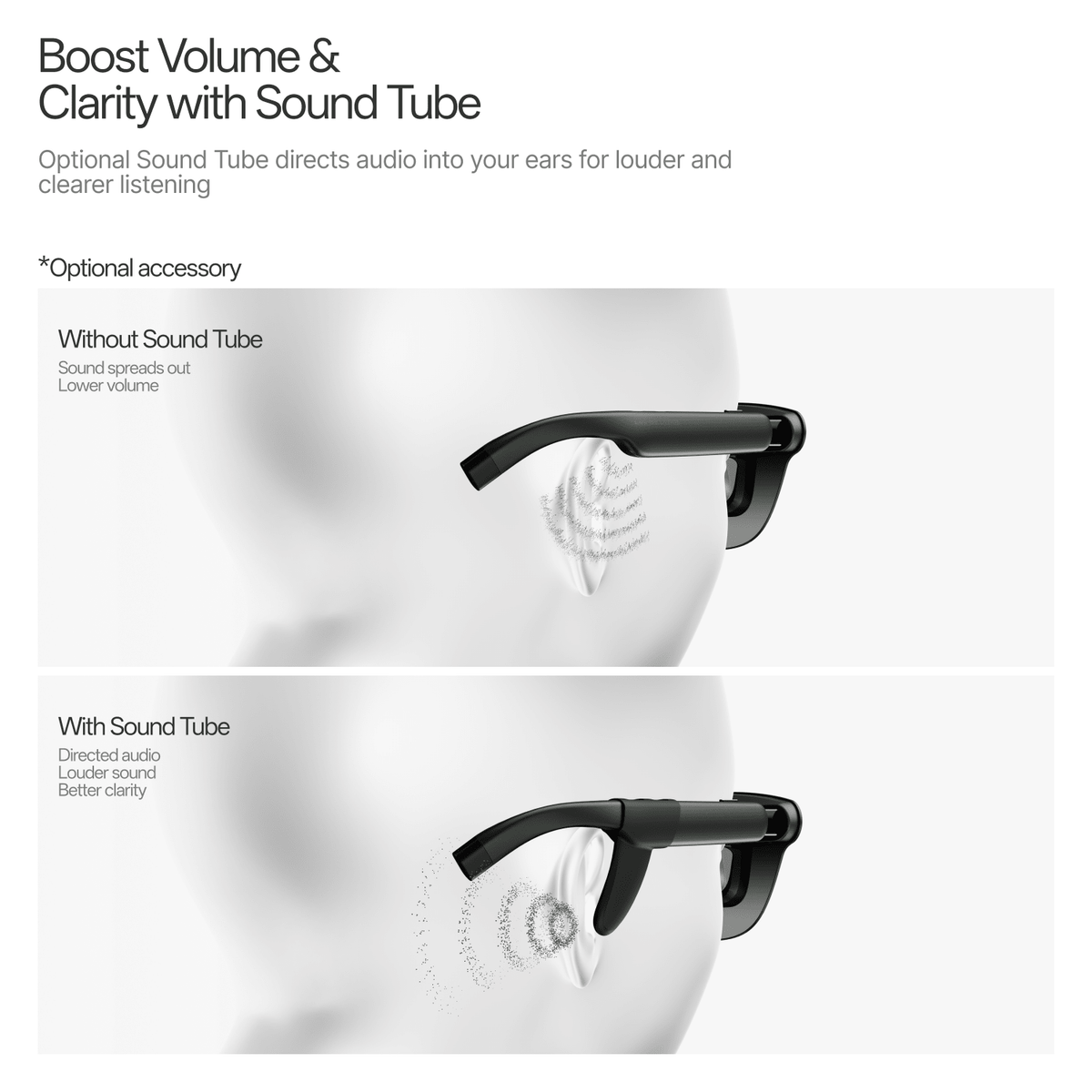
Privacy. The picture forms inside the glasses, so there is no physical screen for the person in the next seat to read. The open-ear speakers direct sound toward your ears, making audio difficult to hear clearly from about 1.5 meters away, and Whisper Mode reduces leakage in quiet or public places. Pressing and holding the volume rocker switches between Standard, Whisper and Spatial Surround audio modes. The optional Sound Tube directs audio toward your ears with a boost of up to 15 dB for fuller bass, clearer sound and reduced audio leakage. An optional Lens Shade blocks surrounding light for a more private, cinema-like view.

Captions inside the game. Because GT shows whatever the source sends, subtitles switched on in a game or video appear in the picture like any other on-screen text.
GT or GT Max. The two share the same panel, refresh rate and audio, and they differ in fit and scale:
IPD (interpupillary distance) is the distance between the centers of your pupils, and ipd.rayneo.com measures it in a smartphone browser. On GT Max, the result maps straight to a size: S under 64mm, M from 64 to 67mm, and L over 67mm. GT is built around a fixed 64mm IPD with adjustable nose pads, so there is no size to pick at checkout.

X3 Pro is a standalone AI+AR frame with its own Snapdragon AR1 Gen 1 processor, storage, Wi-Fi 6 and battery. Its full-color MicroLED display sits on a binocular waveguide at 640×480 with a 30° field of view, roughly a 43-inch screen at two meters, so you see text and apps over the real world rather than in place of it. The display reaches 3,500 nits average and 6,000 nits peak brightness.
For text, X3 Pro shows real-time translation across 14 languages as on-screen text or synchronized audio, delivering the translation in 2.1 seconds, and it records and summarizes meetings with voice-to-text transcription and key-point extraction. A 3-mic beamforming array handles voice pickup. For the screen, a built-in Android environment runs selected everyday apps such as TikTok, Instagram and WhatsApp, alongside RayNeo's own music player, camera, teleprompter and navigation tools.
X3 Pro suits a reader who wants one frame for translation, meeting notes and apps, answered by voice with "Hey RayNeo."
| How you spend most of your time | Setup | Combined price |
|---|---|---|
| Conversations every day, gaming in the evenings or on trips | iO + GT | $828 |
| Conversations every day, long gaming sessions on a 267-inch screen | iO + GT Max | $928 |
| Translation, meeting notes and everyday apps in one frame | X3 Pro | $1,299 |
Combined prices cover the glasses only (iO $499, GT $329, GT Max 429).ConsolesthatconnectoverHDMIalsousetheRayNeoHDMIAdapter(64), and the optional Lens Shade and Sound Tube for GT or GT Max are $19 each.

Do GT and GT Max need an app to show a game?
How does iO handle captions in a group?
Can both frames use prescription lenses?
Pair RayNeo iO for everyday conversation captions with RayNeo GT for lighter travel gaming, or with RayNeo GT Max for a 267-inch screen in long sessions.







Share:
How Do You Use a Smart-Glasses Teleprompter at a Trade Show?
HUD Smart Glasses vs. Virtual-Screen AR Glasses: Key Differences