

$429.00

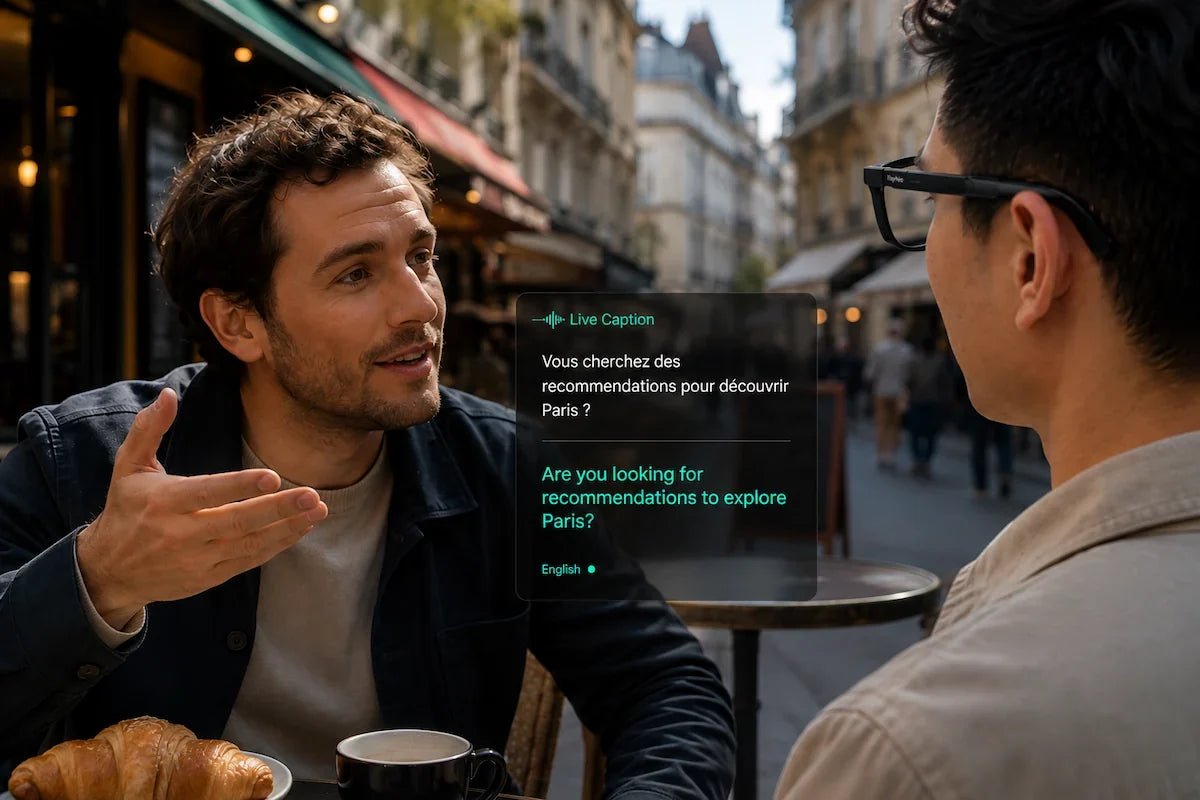
RayNeo iO is currently RayNeo’s model built for this. A 4-microphone array picks up what the person across from you is saying, while a bone conduction sensor reads the wearer’s own voice to help isolate it from background noise, and iO displays that speech as live text within your field of view on a binocular MicroLED display. RayNeo calls the feature Live Captions & Translation, and its product page lists coverage across 55 languages and 109 accents, at $449 (Standard) or $499 (Charging Case Bundle) at the time of writing.
That kind of on-lens captioning is useful to more than one kind of reader. Deaf and hard-of-hearing users can read a conversation instead of straining to catch every word. Someone standing at a loud gate announcement or a crowded restaurant table can get a second channel for speech that’s hard to hear over background noise, though how well that holds up in a genuinely loud room is something RayNeo hasn’t published numbers on (more on that below). A traveler or a business contact speaking a different language gets a translation without pulling out a phone. And anyone sitting in a meeting gets a record of what was said, since iO can also record the conversation and generate notes afterward.
The rest of this guide covers how the hardware actually captures and displays that text, what RayNeo has and hasn’t published about accuracy, and where the feature’s real limits are.

RayNeo names the feature Live Captions & Translation. RayNeo’s product materials list a technology partnership with Timekettle. On iO’s product page, the feature is described in terms of translating between two different languages: someone speaks, and the words appear on your lens in the language you’ve set.
That framing matters if your main reason for wanting captions is hearing accessibility rather than a language barrier. If you’re Deaf or hard of hearing and the person talking to you speaks the same language you do, what you actually want is a live transcript, not a translation. RayNeo’s public materials don’t spell out a distinct “same-language captioning” mode separate from translation between two languages, and the product page doesn’t detail language settings for that specific scenario. Anyone relying on iO specifically for same-language hearing accessibility should confirm how it behaves in a real conversation, and check the language options available at setup, before counting on it for that use.
iO combines a 4-microphone array with a bone conduction sensor built into the frame. RayNeo describes the pairing on iO’s product page: “Advanced array and bone-conduction microphones isolate your voice with precision.” The product page doesn’t break down exactly how the array and the bone conduction sensor divide that work.
That combination is built to separate what the wearer is saying from what everyone else in the room is saying. RayNeo has not published a word-error-rate or accuracy figure for the array’s performance in loud environments, such as a crowded restaurant or a train platform, so treat noisy-room performance as a designed capability rather than a measured, guaranteed outcome.
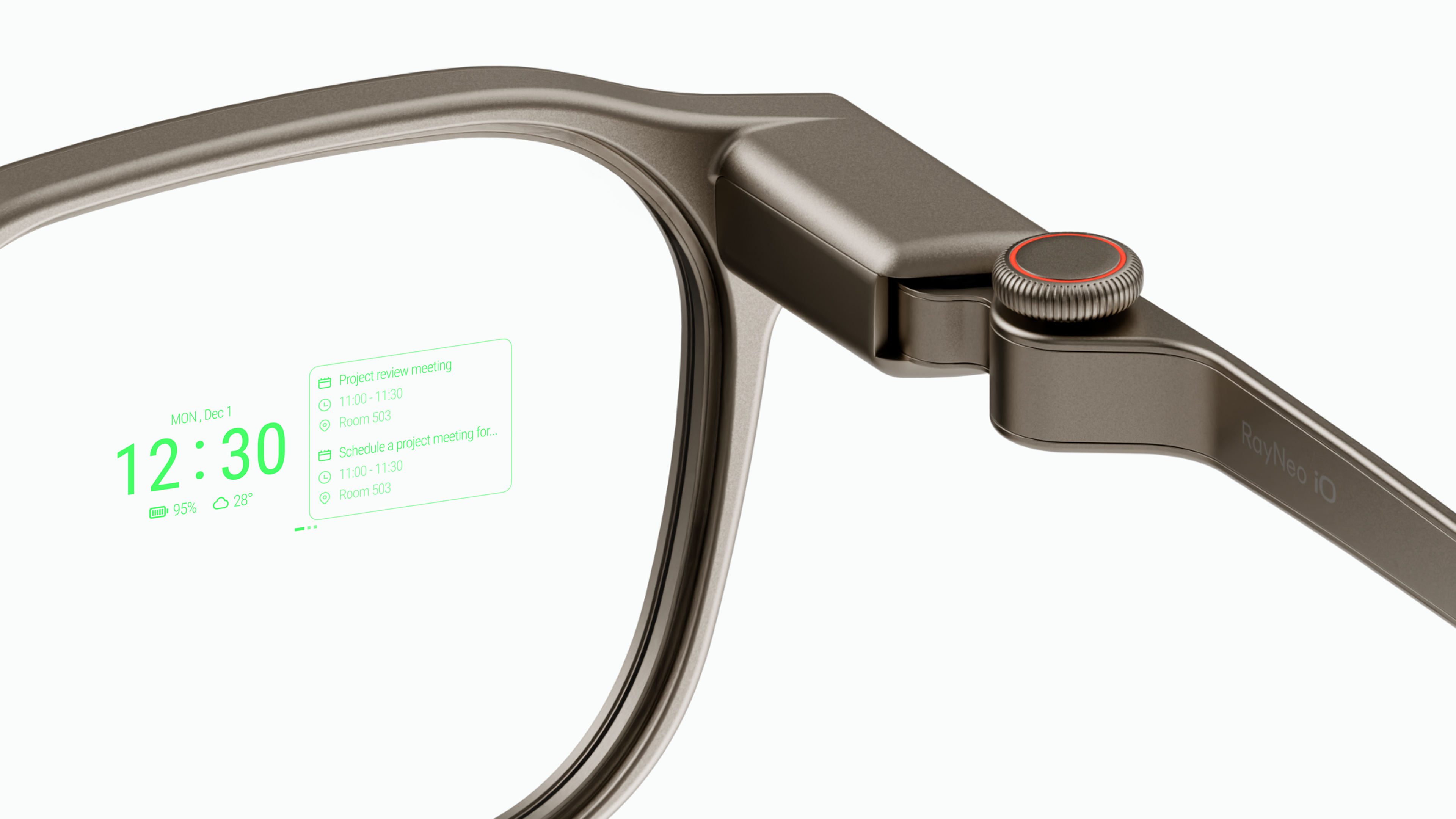
Captions show up on iO’s binocular MicroLED display, a monochrome green heads-up display layered over the lens rather than a full-color screen. RayNeo lists the display’s active area at 97% transparency, a 23.5 degree field of view, and an equivalent size of a 33-inch screen viewed from about 2 meters away. RayNeo also lists eye-level brightness at 1,300 nits, though the product page doesn’t make specific claims about how readable that stays in direct outdoor sunlight.
In practice, that transparency is what makes on-lens captions usable for a face-to-face conversation. The text sits within your field of view, and because the display area is up to 97% transparent, you can still see the other person’s face through it, rather than glancing down at a phone screen and losing eye contact mid-sentence.
RayNeo’s product page describes iO’s translation as running on “fast on-device processing,” though it doesn’t detail exactly how the glasses, the paired phone, and any cloud component divide that work, or what happens without an internet connection. RayNeo’s product materials also list about 1.2 seconds of translation latency and a claimed 75% improvement in response speed, figures that appear in RayNeo’s product imagery rather than the page’s text, so treat them as company-reported figures rather than independently verified benchmarks. If accurate, a delay that short would feel more like back-and-forth conversation than a stalled exchange.
iO’s product page includes a section titled “Making Everyday Communication More Accessible,” credited to Michael Allen Nesmith, a Deaf creative director and founder of Non-Breaking Space. That’s RayNeo’s own accessibility-focused material for the product, and it’s worth watching directly on the product page if this is your primary reason for considering iO.
What’s confirmed by RayNeo: the 4-mic and bone-conduction hardware, the 55-language and 109-accent coverage, the on-lens caption display, and the camera-free design, meaning the person you’re talking to doesn’t need to worry about being recorded on video while a conversation is being captioned.
What RayNeo hasn’t published: an accuracy figure for noisy environments and a same-language captioning mode separate from translation, both covered above, plus anything about how iO fits alongside a hearing aid or cochlear implant, whether that’s physical fit around the ear or interference with those devices. Those gaps are worth testing in person or confirming directly, especially if accurate captioning in everyday noisy settings, or wearing iO alongside a hearing device, is the main reason you’d consider the glasses.

Beyond live captions, iO’s One-tap Record feature captures a conversation on demand and generates an AI summary afterward. The Smart Crown, a physical dial built into the temple, lets you press it to flag a specific moment as important while recording is still running, so a decision or action item doesn’t get buried in a longer transcript. Recording someone else’s side of the conversation is worth a quick heads-up to that person first, the same courtesy as recording any conversation with a phone.
That makes iO useful for more than a single exchange. A doctor’s appointment, a job interview, or a work meeting all benefit from having a record to go back to later, not just a caption you read once and lose.
RayNeo lists continuous translation at 6.2 hours on iO’s 240mAh battery, and notes that actual battery life varies depending on usage patterns and which features are active. That figure is separate from continuous voice recording without translation, rated up to 18 hours, and from the “up to 2 days” figure that covers typical mixed use like notifications and dashboard glances. RayNeo’s product materials also list a quick charge to 80% in about 25 minutes using the included charging clip, a figure that appears in product imagery rather than page text.
For a single meeting, appointment, or extended conversation, a continuous translation rating of 6.2 hours should cover most sessions, though RayNeo doesn’t publish a separate battery rating specifically for same-language captioning.
iO’s spec sheet lists audio input only, with no speaker, so captions appear as on-lens text rather than spoken audio played back to your ear. It also has no camera, so it can’t read printed text visually or capture video alongside the conversation.
Captions display on the wearer’s own lens. RayNeo’s materials don’t describe a shared screen or a way for the other person in the conversation to see a transcript, and the product page doesn’t lay out the full two-way flow of a conversation. In practice, if you’re Deaf or hard of hearing, you’d read what the other person says through your glasses and speak your own reply out loud as you normally would.
iO also isn’t a standalone device. It connects to a paired phone over Bluetooth 5.4 and is MFi certified. As noted above, RayNeo describes the translation feature as running on fast on-device processing, but the product page doesn’t spell out the phone’s exact role in that process or state an internet requirement directly. The product page lists Bluetooth 5.4 and MFi certification without a separate Android compatibility breakdown, so check current requirements on the product page if you’re pairing iO with an Android phone.
RayNeo’s X3 Pro, priced at $1,299 at the time of writing, also translates in real time and syncs on-screen captions with audio playback, which matters if hearing a translation out loud rather than only reading it is important to you. It covers 14 languages, a smaller range than iO’s 55, and adds a built-in camera, which is a different privacy posture for the person you’re captioning.
For hearing accessibility, noisy environments, and broad language coverage in a camera-free design, iO’s feature set lines up well with that need. X3 Pro is worth a closer look if hearing translated audio out loud, or having a camera alongside the conversation, matters more to you than iO’s wider language coverage.
Does RayNeo iO caption conversations in the same language, or only translate between two different languages?
Is RayNeo iO a hearing aid or a way to restore hearing?
Does the person I’m talking to need their own pair of glasses to read the captions?
Does RayNeo iO work well in a noisy restaurant or on a train platform?
Can I use iO to keep a record of a meeting or appointment, not just read live captions?
For live, face-to-face conversations, whether the goal is hearing accessibility, working around a noisy room, understanding a different language, or keeping notes from a meeting, RayNeo iO’s 55-language Live Captions & Translation, camera-free design, and one-tap recording line up well with that need, at $449 at the time of writing. RayNeo X3 Pro, at $1,299, is the better fit specifically if hearing a translation out loud or having a built-in camera matters more to you than iO’s broader language coverage.
Sources: - RayNeo iO product page - RayNeo X3 Pro product page







Share:
RayNeo Smart Glasses Comparison: iO vs GT vs GT Max vs X3 Pro
The Newest Smart Glasses Released in 2026: RayNeo's iO and GT Series