

$429.00

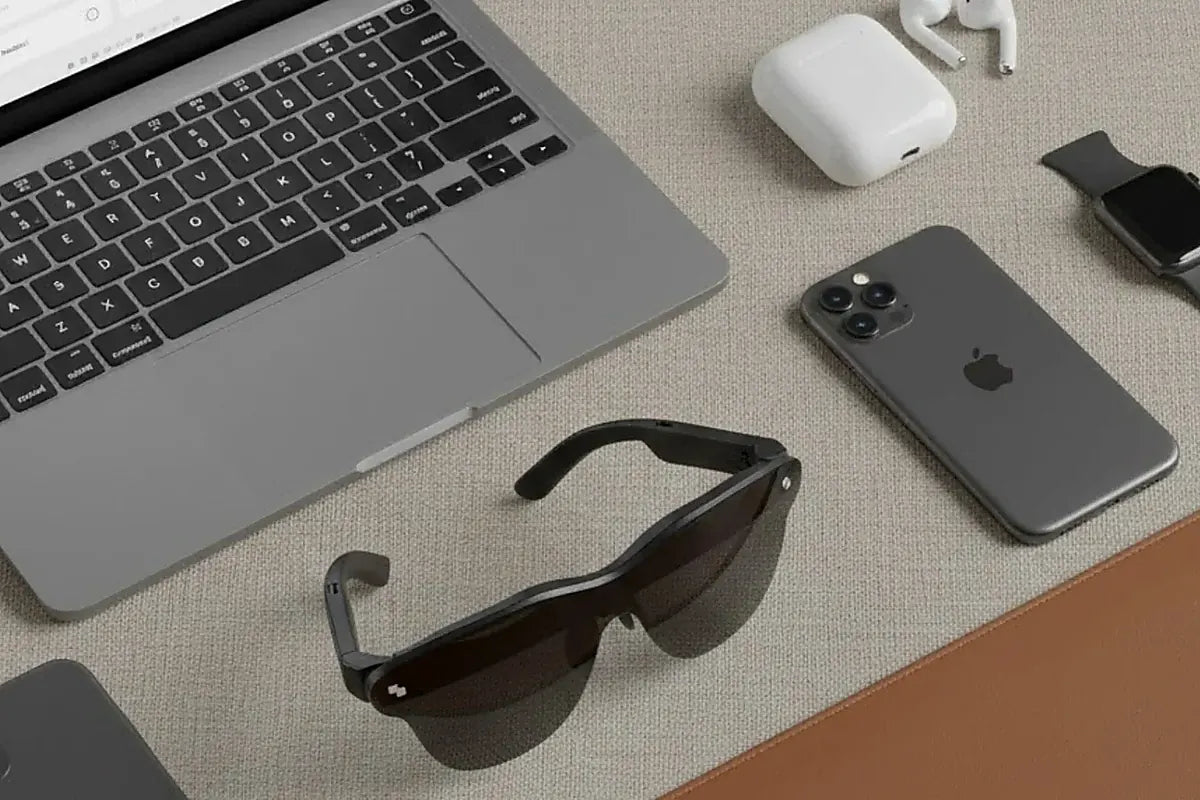
The RayNeo GT and RayNeo GT Max connect over a single USB-C cable to sources that output video over USB-C (DisplayPort Alt Mode), including the iPhone 15, 16, and 17 series, many Android phones such as RayNeo’s named Galaxy S8 through S25 examples, iPad models with USB-C video output, and Macs with USB-C video output. Lightning devices, game consoles, and HDMI-only computers need adapters. The iPhone 16e, 17e, and iPhone Air currently have no confirmed adapter path. The sections below break down where your device falls.
GT Max ($429 list, $399 at checkout with RayNeo’s launch offer) and GT ($329 list, $299 at checkout with the same offer) connect to devices the same way. The price gap comes from screen size, field of view, and fit, not from what they plug into. The launch offer isn’t permanent, so check the product page for the current price.
GT and GT Max have their own display and tracking chips (RayNeo lists Vision 4000 and Zone360), but they have no standalone operating system of their own. They are externally powered video glasses: whatever you plug in, phone, tablet, or laptop, sends a video signal and powers them over one USB-C cable using DisplayPort Alt Mode. Not every USB-C port supports that: many phones and laptops use USB-C only for charging and data. That is the real dividing line in the matrix below, not the shape of the cable.
That design keeps the glasses light (68g for GT, 78g for GT Max). The trade-off is that your host device supplies the video and power. RayNeo’s FAQ notes that “the connected device powers the glasses and processes video, so slight warmth and increased battery consumption are normal.”
| Device category | Examples | Works directly over USB-C? | What you need instead |
|---|---|---|---|
| iPhone 15 / 16 / 17 series | iPhone 15, 15 Pro, 16, 16 Pro, 17, 17 Pro | Yes | Nothing; included USB-C cable |
| iPhone 16e, 17e, iPhone Air | N/A | No | No confirmed adapter path (see callout below) |
| iPhone 14 and earlier (Lightning) | iPhone 14, 13, 12, SE | No | Apple Lightning Digital AV Adapter plus RayNeo’s HDMI Adapter, with the HDMI connection and power set up per RayNeo’s adapter guide |
| Android phones | Galaxy S8 through S25 named by RayNeo; others vary | Yes, if the phone supports USB-C video output | Nothing, if supported |
| iPad (USB-C) | iPad 10th gen and newer, iPad Air, iPad Pro | Yes, where the model supports USB-C video output | Nothing |
| iPad mini (USB-C) | iPad mini 6th gen (2021), 7th gen (2024) | Not individually named by RayNeo; see note below | See note below |
| iPad (Lightning) | iPad 4th through 9th gen, iPad mini 1st through 5th gen | No | Apple Lightning Digital AV Adapter plus RayNeo’s HDMI Adapter |
| Mac | A Mac with USB-C that supports DisplayPort video output | Yes, on supported models | Nothing; check your exact model |
| Windows laptop or PC with USB-C video output | Varies by model | Yes | Nothing |
| Desktop PC or laptop without USB-C video output | Varies by model | No | RayNeo HDMI Adapter |
| Steam Deck | Steam Deck, Steam Deck OLED | Its USB-C port supports DisplayPort video, so a direct connection is possible | HDMI Adapter only if you need an HDMI route |
| Other USB-C handhelds | ROG Ally, ROG Ally X, Legion Go | Depends on the model’s USB-C video output | Check the model’s specs |
| PS4, PS5, Xbox | N/A | No (HDMI only) | RayNeo HDMI Adapter |
| Nintendo Switch | Original, OLED, Lite, Switch 2 | Model-dependent; see below | Dock HDMI route with the HDMI Adapter |
In short: a source with a USB-C video-output port connects directly with the cable in the box. A Lightning iPhone or iPad, a game console, or a computer without USB-C video output needs the RayNeo HDMI Adapter, and Lightning devices also need Apple’s adapter.
The iPhone 15, 16, and 17 series connect to GT and GT Max with no adapter. Plug the included USB-C cable into the phone and the glasses, and the virtual screen comes up.
If your phone is an iPhone 16e, 17e, or iPhone Air, there’s currently no confirmed adapter path to GT or GT Max. These models use USB-C, but they don’t output video over it the way the 15, 16, and 17 series do, per RayNeo’s guide to devices without DisplayPort Alt Mode. Apple’s Digital AV Adapter is built for Lightning ports, not USB-C ones.
If one of these is your only phone, connect through a different device you already have: - A laptop - An Android phone - An older Lightning iPhone
For an iPhone 14 or earlier, the connection runs through two adapters:
Both pieces are required. Connect the HDMI link and power the setup as described in RayNeo’s adapter guide, since it depends on the actual adapter you’re using.
Android compatibility depends on what each manufacturer built into a phone’s USB-C port. RayNeo names Galaxy S8 through S25 as supported examples. Beyond that, check the phone’s spec sheet for “DisplayPort Alt Mode” or “USB-C video output” before you buy anything extra.
USB-C iPad models with DisplayPort video output connect directly:
Older iPad models (4th through 9th generation) use Lightning, which means the same two-adapter chain as older iPhones.
For iPad mini:
A Mac needs a USB-C port that supports DisplayPort video output; the model year alone doesn’t tell you. Check your exact Mac’s specs for USB-C video output before you buy anything, and use the RayNeo HDMI Adapter from an HDMI output if it doesn’t have one.
Windows laptops and PCs vary:
If you’re not sure, check the spec sheet for “USB-C with DisplayPort Alt Mode” or “USB-C with video output.”
Steam Deck’s USB-C port supports DisplayPort video output, so a direct USB-C connection to GT or GT Max is possible without HDMI. RayNeo’s compatibility material may group it with HDMI devices, so if a direct connection doesn’t work in your setup, use the HDMI Adapter as a fallback.
Other USB-C handhelds such as ROG Ally, ROG Ally X, and Legion Go aren’t individually named on RayNeo’s GT or GT Max pages. Whether they connect directly depends on whether the model’s USB-C port outputs video, so check the specs for your model.
PS4, PS5, and Xbox output HDMI only, so they connect through the RayNeo HDMI Adapter with external USB-C power, per RayNeo’s adapter guide.
Nintendo Switch depends on the console. The original Switch and OLED model output video through the dock’s HDMI port, so they use the dock HDMI route with the RayNeo HDMI Adapter. The Switch Lite has no video output. Switch 2 has its own connection details, covered in the guide “Can RayNeo AR Glasses Connect to Nintendo Switch?” Check RayNeo’s current Switch guidance for your model, and don’t assume a JoyDock-style accessory works with GT or GT Max unless RayNeo lists it for them.

GT and GT Max can convert standard 2D video into 3D with AI. RayNeo’s product page footnotes this feature to the iPhone 15, 16, and 17 series, and RayNeo’s support page also lists eligible Android phones: released in 2022 or later, with USB-C DisplayPort output and a Snapdragon 8 Gen 2, 8 Gen 3, 8 Elite, 8 Elite Gen 5, or a newer supported Snapdragon flagship chip (non-Snapdragon phones are currently not supported). The conversion runs in the RayNeo XR app over a direct connection. Basic screen mirroring and supported side-by-side 3D playback don’t depend on that list; they depend on your device being able to connect. See the guide “Which iPhones Support RayNeo’s AI 2D-to-3D Conversion on GT and GT Max” for steps.
No. GT and GT Max share the same device compatibility list, the same USB-C DisplayPort Alt Mode connection, the same HDMI Adapter option, and the same 2D-to-3D conversion conditions. The differences are screen size (GT Max has 227, 267, and 307-inch presets versus GT’s 136, 201, and 231), field of view (59° versus 46°), weight (78g versus 68g), and fit (GT Max offers S, M, and L IPD size options selected at purchase, while GT uses one fixed 64mm design). For the full breakdown, see the guide “RayNeo GT vs. GT Max: Every Spec Difference in One Table.”
Since both connect to the same devices, the choice comes down to how you’ll use them.
The RayNeo GT Max ($429 list, $399 at checkout with the launch offer) offers the largest virtual screen and three IPD size options selected at purchase, which can help match different eye spacing.
The RayNeo GT ($329 list, $299 at checkout with the launch offer) is the lighter option at 68 grams, with a smaller but still substantial virtual screen and one fixed 64mm IPD design.
Both ship with a USB-C cable for direct connection to supported devices.
Does RayNeo GT Max work with Samsung Galaxy phones? RayNeo names Galaxy S8 through S25 as supported examples for a direct USB-C connection, provided the specific phone’s USB-C port supports video output rather than charging and data only.
Can I connect GT or GT Max to a desktop computer that doesn’t have USB-C video output? Yes, through the RayNeo HDMI Adapter, which connects from the desktop’s HDMI port to the glasses. This is the same accessory used for PS4, PS5, and Xbox. Power the setup as RayNeo’s adapter guide describes.
Do I need to buy a cable separately for a direct connection? No. GT and GT Max ship with a USB-C cable for a direct connection. The RayNeo HDMI Adapter and Apple’s Lightning Digital AV Adapter are sold separately, and only for devices that need them.
Will using an adapter instead of a direct connection affect video quality? RayNeo doesn’t publish a separate quality spec for adapter-based connections. In both cases the connected device supplies the video and power, so it may draw more battery and run warm.
Does this compatibility list apply to RayNeo iO too? No. RayNeo iO is a different kind of product: it pairs over Bluetooth rather than a wired USB-C video connection, and it has a monochrome MicroLED display for notifications and AI features rather than mirroring a phone or laptop screen. This guide is specific to GT and GT Max.








Share:
RayNeo Pocket TV Pro Specs Explained: Battery, Storage, and What It Adds to the GT Series