

$449.00


Camera-equipped smart glasses are good at closing one specific gap: a short, unplanned moment, on a walk, a commute, wherever you happen to be, where reaching for a phone, unlocking it, and opening the camera app would cost you the shot. With the camera already on your face, you just look and the clip is captured. It's a narrower job than it might sound, though. Once you move from grabbing a few seconds of something happening in front of you to recording continuously, the picture changes. As of 2026, no smart glasses, including RayNeo's current model, are built to replace a dedicated action camera for intense sports or a phone camera for footage you plan to edit and post. The right choice depends on how long you need to record, how much your body is moving while the camera runs, and whether you also want AI features like real-time navigation or translation running at the same time. This guide focuses on RayNeo's own camera-equipped glasses, the current RayNeo X3 Pro ($1,299) and the discontinued X2, as a detailed look at what this product category can and can't do. It is not a hands-on comparison against other brands; competing camera-only smart glasses and dedicated action cameras are mentioned below only for price and category context, not tested side by side.
| Spec | RayNeo X3 Pro (current) | RayNeo X2 (sold out, for reference) |
|---|---|---|
| Availability | In stock, $1,299 | Sold out, $499 (historical) |
| Camera | 12MP main (Sony IMX681) + monochrome depth sensor | 16MP main camera |
| Photo resolution | Up to 4K | High-resolution photo (exact spec listed as 16MP on product page) |
| Video resolution | Up to 1440p | 1080p, with advertised "anti-shake filming" |
| Camera field of view | Not published by RayNeo | Not published by RayNeo |
| Weight | About 76g | About 119g |
| Battery & recording time | 245mAh. Official RayNeo spec: up to 36 minutes of continuous video. RayNeo's own blog separately cites ~9 minutes per clip / ~50 minutes total on-device capacity. Notebookcheck's independent test measured closer to ~30 minutes. See note below the table. | 590mAh; independent listings cite roughly 2.5–3 hours of general active use (not video-recording-specific) |
| Chip | Qualcomm Snapdragon AR1 | Qualcomm Snapdragon XR2 |
| Display | Dual full-color MicroLED waveguide, 640×480, ~30° field of view (this is the display's FOV, not the camera lens's) | Binocular full-color Micro-LED waveguide |
| AI features | Google Gemini integration, real-time translation (speed varies with network connection; RayNeo has cited ~2.1 sec under good conditions), in-view navigation guidance, 6DoF+SLAM | Real-time translation, SLAM-based navigation, gesture recognition |
| Standalone or phone-dependent | Runs its own Android-based OS (RayNeo AIOS) and operates without a constant phone tether; some setup steps and AI features are described as working with a paired phone or Apple Watch, but RayNeo hasn't published full iOS-vs-Android feature parity. Confirm this directly if cross-platform compatibility matters to you | Standalone AR compute, but Wi-Fi/app setup is done through a companion phone app |
| Storage / file transfer | Not publicly detailed by RayNeo | Not publicly detailed by RayNeo |
Note on recording time: RayNeo's official spec page states up to 36 minutes of continuous video for the X3 Pro. RayNeo's own blog separately cites a shorter figure of about 9 minutes per clip and roughly 50 minutes of total on-device capacity, and Notebookcheck's independent test measured closer to 30 minutes. RayNeo has not publicly explained the gap between these three numbers. Treat 30 to 36 minutes as the more conservative real-world range, and the roughly 50-minute figure as an upper estimate that may reflect different test conditions.
Sources: RayNeo X3 Pro product page, RayNeo X2 product page, RayNeo camera glasses comparison blog post, TechRadar, Notebookcheck. The X2's weight (about 119g) and general active-use battery estimate (roughly 2.5 to 3 hours) come from third-party spec aggregators, including VRcompare, XDA-Developers, and GSMArena, since RayNeo's own X2 product page does not list a weight figure.
Travel is where camera smart glasses make the most practical sense, because the camera is only half the pitch. It works alongside AI features you'd otherwise dig your phone out for, like reading a menu or checking a map.
The X3 Pro's 12MP camera captures 4K photos and 1440p video, enough for travel snapshots and point-of-view clips of a walk through a new city. Independent testing found the output leans soft rather than crisp, and indoor or low-light shots (a dim restaurant, a night market like the one above) show visible graininess; treat the camera as good for quick, casual footage rather than anything you plan to project on a large screen. The display side holds up better outdoors: RayNeo's dual MicroLED panels reach up to 6,000 nits peak brightness, and Notebookcheck found the navigation overlay stayed readable even in strong sun. That said, the glasses don't ship with a shade or sunglass attachment the way some competing AR glasses do, so glare at certain angles is still possible.
The feature that actually earns its keep on a trip is the AI layer around the camera: the X3 Pro projects real-time navigation guidance directly in your field of view, and its translation feature can convert spoken language in a few seconds under good network conditions, useful for asking directions or reading signage without stopping to check a phone.

Two things worth knowing before you rely on this for a full day of sightseeing:
Picture a Saturday-morning ride on a greenway, camera rolling to catch the sunrise over the water. Camera glasses can capture that ride hands-free, and for casual movement, a walk, a light jog, an easy bike ride, the footage holds up fine. Push into anything more demanding, a rough trail, a hard sprint, a technical descent, and the limits show up quickly.
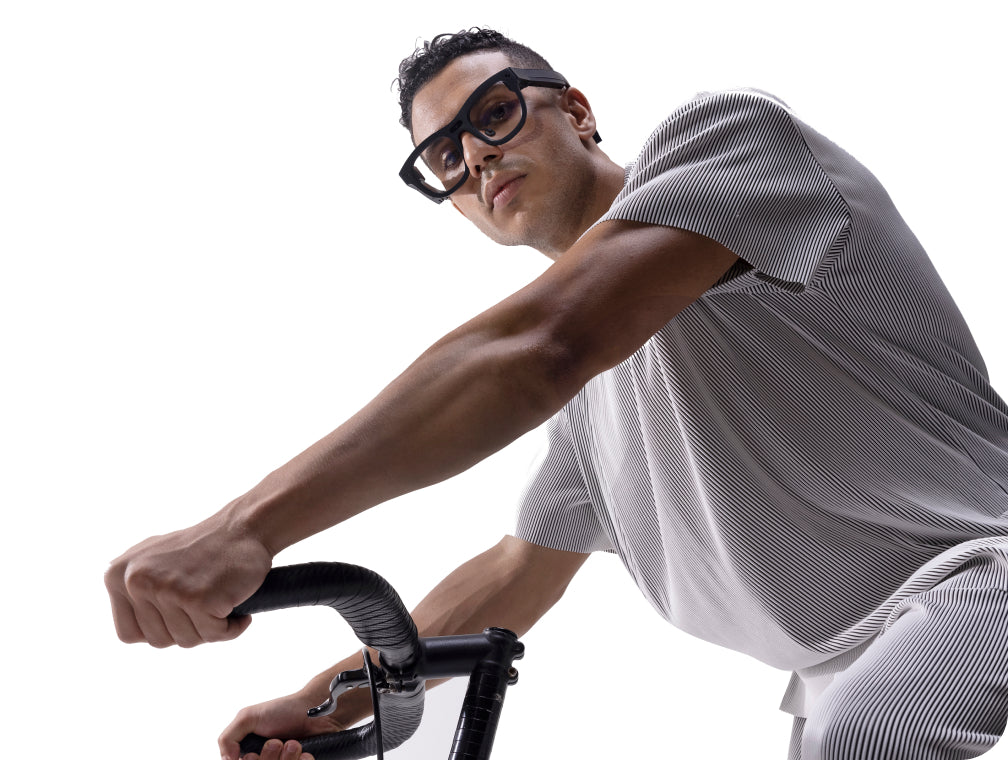
Because the lens is fixed to your head instead of gimbal-mounted, footage relies on electronic image stabilization software rather than hardware. RayNeo's own materials acknowledge a gap compared to dedicated action cameras in high-vibration situations, think rough trail sections or a hard sprint, not a steady sidewalk. Recording time is also short by design (see the comparison table above), which fits capturing highlights of a ride or hike better than shooting an entire session start to finish.
A few other things matter for this scenario specifically:
Bottom line for sports use: for a few minutes of POV footage from a casual ride, walk, or hike, camera smart glasses do that job hands-free. For an hour of continuous, heavily stabilized footage from mountain biking, trail running, or contact sports, a dedicated action camera is still the more reliable tool for that specific job.
Daily use is the least demanding scenario for this hardware, since you're not recording for long, continuous stretches. On a commute, a walk with a dog, or dinner with friends, you can grab a photo or a short clip without pulling out your phone, and the same device handles small tasks along the way: reading a translated sign, getting turn-by-turn walking directions, checking a quick reminder.

Comfort is the real variable over a full day. At about 76g, the X3 Pro is noticeably lighter than the previous X2 (about 119g), and one reviewer described that weight as manageable on its own. The same review found the fit less settled than the weight alone suggests: the temple arms ran short with little side grip, most of the weight sits toward the front of the frame, and getting the display to line up meant perching the glasses low on the nose or pressing them against the bridge, since neither of the two included nose pad sizes fully solved it for that reviewer's face. Fit is personal, so if you already wear glasses all day, try the X3 Pro on before committing to wearing it the same way.
Two smaller things are worth checking before you lean on these daily. RayNeo's public materials don't clearly state whether the X3 Pro has a visible indicator that signals to bystanders when it's recording, which matters if you're filming casually around other people (recording someone without their knowledge raises real privacy and legal questions in many places). And while the X3 Pro's product page mentions customized nearsighted lenses through global partners, exact availability, process, and any added cost vary by region, so confirm with RayNeo or a local optical partner before ordering.
If you've priced out camera-equipped smart glasses before, $1,299 might be the number that gives you pause. As of mid-2026, a competing camera-only smart glasses line starts around $299 for its base non-prescription model, around $499 for a newer prescription version (launched April 2026), and about $799 for a display-equipped version, all below the X3 Pro. A popular action camera model lists for about $429.99, also well under the X3 Pro's price.
That gap makes more sense once you separate what you're paying for: the X3 Pro isn't sold as a camera first. It bundles a short-clip camera with an AI-powered AR display, real-time translation, and in-view navigation. If a video camera is genuinely the only thing you need, cheaper dedicated options, including action cameras or camera-only smart glasses, will get you more recording time per dollar. If you want the camera bundled with an AI display and want to avoid carrying a separate device, the X3 Pro's price reflects that combination rather than the camera alone. Competitor pricing above is current as of August 2026 and subject to change.
A good fit if you:
Probably not the right tool if you:
Do I need to connect the glasses to my phone to record video? The X3 Pro runs its own Android-based operating system (RayNeo AIOS) and can capture photos and video without being constantly tethered to a phone. Some setup steps and certain AI features are described as working with a paired phone or Apple Watch, but RayNeo hasn't published a complete breakdown of which features require a phone versus which work fully standalone, or whether iOS and Android get the same feature set. Confirm this directly if that distinction matters for how you plan to use the glasses.
Does recording video drain the battery faster than other features? Yes, by a wide margin, according to RayNeo's own published figures: up to 5 hours of audio recording, about 3 hours of music playback, but only up to 36 minutes of continuous video on a full charge. Independent testing measured video recording closer to 30 minutes in practice, and one reviewer needed to recharge the glasses three times over a single day of shooting to capture everything they'd planned. Video is clearly the most battery-intensive feature on the device.
Does the RayNeo X3 Pro have an indicator light that shows when it's recording? This isn't clearly stated in RayNeo's public product materials. If recording discreetly around other people is a concern for you, confirm this directly with RayNeo before buying.
How much storage does the X3 Pro have, and how do you get footage off the glasses? We checked RayNeo's product page, spec sheets, and blog posts and none of them list a built-in storage capacity or a file-transfer method (Wi-Fi, Bluetooth, USB-C, or app-based) for the X3 Pro. This is a genuine gap in what RayNeo has made public, not a detail we skipped over. If your workflow depends on quickly offloading clips, for example editing travel footage each night, contact RayNeo directly to confirm before you buy.
| If your main use is... | What matters most | Realistic expectation |
|---|---|---|
| Travel (sightseeing, navigation, translation) | AI navigation/translation + short hands-free clips | Great for highlight moments and wayfinding; not for filming a full day non-stop |
| Sports (casual cycling, hiking, jogging) | Stabilization, short recording windows, comfortable fit | Good for a few minutes of POV highlights; not a substitute for an action camera on intense activity |
| Daily use (commute, pets, meals, quick notes) | Comfort over hours, easy quick capture | Solid for spontaneous short clips and photos throughout a normal day |
The practical test for deciding is simple: if you mainly want short, hands-free clips with AI navigation or translation running at the same time, the X3 Pro fits that job. If you need long, heavily stabilized footage from an intense workout, budget for a dedicated action camera instead. If a camera is genuinely all you need, cheaper camera-only options will get you more recording time per dollar than a $1,299 AI display device.







Share:
RayNeo X3 Pro vs. X2: Best RayNeo AI Smart Glasses for Assistant, Camera & Daily Use (2026)
Prescription Glasses With a Built-In Camera: What's Actually Available in 2026