

$449.00

If you wear glasses and you've started shopping for smart glasses with a built-in camera, you've probably run into the same wall everyone with nearsightedness does. The camera-equipped models are vague, at best, about whether they actually support prescription lenses. The models that clearly do support prescription lenses skip the camera entirely. You end up picking which requirement to give up on, and that's not much of a choice.
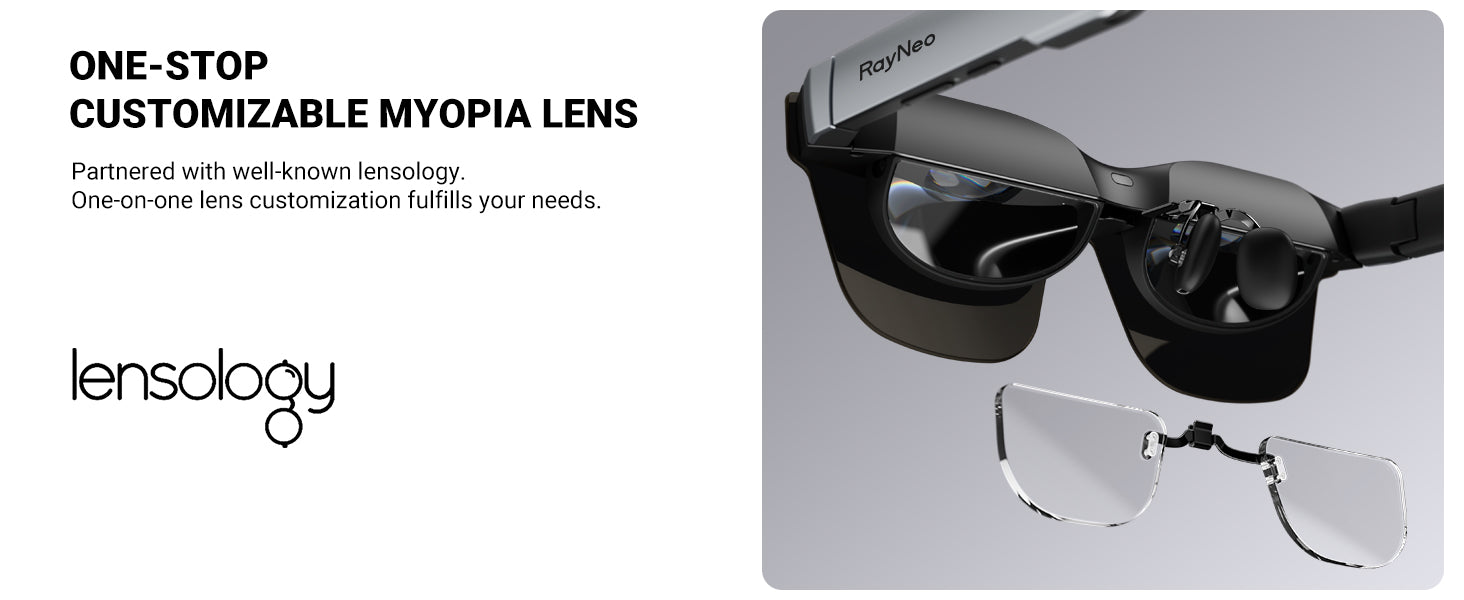
The reason comes down to two different technical approaches that don't overlap. A handful of camera-only smart glasses, ones without any AR display or optical engine built into the frame, can have their stock lenses swapped for real, factory-ground prescription lenses, the same way an optical shop replaces lenses in a regular pair of eyeglasses. AR display glasses work differently: the display's optical engine takes up much of the space inside the frame, so brands building AR glasses, RayNeo included, rely instead on a separate clip-in prescription lens insert made by a third-party optical lab, which snaps onto the inside of the frame between your eye and the display or camera module. Once a smart glasses model combines a camera with an AR display, as RayNeo's X3 Pro does, the insert route is what you'll find, not a ground replacement lens.
The closest thing to an answer in RayNeo's lineup comes from the RayNeo X3 Pro, currently the only camera-equipped model in RayNeo's product lineup that you can actually buy right now. According to most of RayNeo's own published materials, the X3 Pro can be paired with a clip-in insert from RayNeo's optical partner, Lensology, though, as covered in detail below, RayNeo's own documentation isn't fully consistent on that point. RayNeo's other camera-equipped model, the X2, is listed as "Sold Out" on RayNeo's official site as of this writing, so it isn't something you can order today.
If you don't need the camera and confirmed prescription support is your priority, RayNeo's non-camera AR display glasses, RayNeo Air 2s, Air 3s, and Air 4 Pro, have clearer, more explicit confirmation of prescription lens support directly on their own product pages.
Before comparing specific products, it's worth separating two things people often lump together under "prescription smart glasses":
For AR display glasses, nearly every brand that advertises "prescription lens support," RayNeo included, is describing option 2, not option 1. That's largely a hardware constraint: the display's waveguide or micro-display optical engine takes up space inside the frame that leaves no room to grind a full prescription into the lens itself. Some camera-only smart glasses that skip the AR display entirely can support option 1 instead, since there's no optical engine competing for that space, but that's a different product category from the display-equipped glasses covered in this article. For a camera-equipped display model specifically, the insert has one more job than it does on a display-only pair of glasses: it has to clear the camera housing as well as the display's eye box, which is part of why RayNeo's product pages describe prescription support differently across its camera and non-camera models, as the next section covers.
Clip-in inserts typically:
The RayNeo X3 Pro is currently the only RayNeo product with a built-in camera that's actually available to purchase. It's built around a full-color MicroLED display, a Snapdragon AR1 chip, and Gemini-powered AI for tasks like real-time translation, navigation, and voice queries, alongside a 12MP main camera and a secondary monochrome camera used for spatial tracking. In practice, that combination is aimed at someone who wants to keep their hands free: reading a live translation overlay during a conversation, following a turn-by-turn navigation prompt while walking, or capturing a photo or short video clip without pulling out a phone, all while still seeing clearly through their own correction.
RayNeo's lineup has included one other camera-equipped model, the RayNeo X2 AI & AR Glasses, built around a 16MP camera and a Snapdragon XR2 chip. Its product page currently shows it as "Sold Out" rather than discontinued, and RayNeo hasn't said whether it will restock or has reached the end of its life. Because it isn't purchasable right now, the rest of this article focuses on the X3 Pro, and its prescription-lens compatibility shouldn't be assumed to carry over to the X2 if it comes back in stock.
On prescription lens support, here's the fuller picture across RayNeo's own materials:
Taken together: three RayNeo blog posts affirm X3 Pro prescription support, one denies it, and the official ordering page says nothing about the X3 Pro either way. That's not an even split, but the page most directly tied to actually buying lenses is silent on the model, which is a real gap the blog posts don't resolve on their own. The accurate summary is that RayNeo's own published materials are currently inconsistent, and a definitive answer requires RayNeo to confirm and publish a single, official position, not an outside guess at which side is more likely correct.
If you're specifically considering the X3 Pro because you need both a camera and vision correction, don't treat this as settled just by counting sources. Concretely, before you buy:
RayNeo's non-camera AR display glasses use clearer, model-specific language to confirm prescription lens support, rather than the generic "global lens partners" wording on the X3 Pro's page.
The RayNeo Air 3s product page states directly, in RayNeo's own words: "Our official optical partner, Lensology, provides prescription lenses for these glasses for users with myopia between 0 and -10.00D and astigmatism between 0 and -2.00D." In plainer terms, that means Air 3s covers most common nearsighted and astigmatism prescriptions, though not farsightedness. A sample prescription-lens frame ships in the box, though the actual ground lenses are ordered separately through Lensology.
RayNeo Air 4 Pro goes a step further and also covers farsightedness. Its product page states support for "up to 1000 degrees of myopia & up to 800 degrees of hyperopia & up to 200 degrees of astigmatic lens," using a magnetic frame for the insert. That's in "degrees" rather than the diopters (D) printed on a US prescription, but the two convert directly at 100 degrees per 1.00 diopter, so in diopter terms this range is -10.00D myopia, +8.00D hyperopia, and -2.00D astigmatism, in line with the figures RayNeo quotes for Air 2s and Air 3s. The product page is explicit that lens cost and customization aren't included in the glasses' price.
RayNeo Air 2s is a slightly different case: Lensology lists it as a supported frame on Lensology's own site, but the Air 2s product page itself doesn't spell out the same model-specific prescription language used on the Air 3s and Air 4 Pro pages, an inconsistency similar in shape, if smaller in scale, to what shows up on the X3 Pro.
None of these three models has a built-in camera. All three are AR display glasses designed to project a large virtual screen from a phone, laptop, or game console over USB-C or an HDMI adapter, closer to a wearable monitor than a standalone camera device.
| Model | Built-in camera | Prescription lens support | How it's confirmed | Needs a host device? |
|---|---|---|---|---|
| RayNeo X3 Pro | Yes (12MP main sensor + monochrome depth camera) | Mixed evidence: 3 RayNeo blog posts say a Lensology clip-in insert works, 1 RayNeo blog post says it doesn't, and RayNeo's own lens-purchase page doesn't mention the X3 Pro at all | Inconsistent across RayNeo's own sources, see caveat above | No, standalone AI display glasses (Gemini AI, MicroLED display) |
| RayNeo X2 | Yes (16MP camera) | Not researched in depth for this article | Listed "Sold Out," not purchasable as of this writing | No, standalone AI+AR glasses (Snapdragon XR2) |
| RayNeo Air 2s | No | Listed as supported by Lensology (third party) | Not explicitly confirmed on Air 2s's own product page | Yes, phone, PC, Switch, or PS5 via USB-C/HDMI |
| RayNeo Air 3s | No | Confirmed on RayNeo's own product page, up to -10.00D myopia / -2.00D astigmatism | Explicit, model-specific | Yes, phone, PC, Switch, or PS5 via USB-C/HDMI |
| RayNeo Air 4 Pro | No | Confirmed on RayNeo's own product page, up to -10.00D myopia / +8.00D hyperopia / -2.00D astigmatism | Explicit, model-specific | Yes, USB-C, no app or Wi-Fi required |
Prices and promotions are subject to change; at the time of this review (August 2026), Air 2s was listed at $159 (down from $299), Air 3s at $199 (down from $269), and Air 4 Pro at $299, all on RayNeo's official store. X3 Pro was listed at $1,299, separate from the roughly $125 cost of a Lensology insert. X2 had no purchasable price shown due to its Sold Out status.
1. Go with the X3 Pro and confirm the prescription insert directly with RayNeo or Lensology first. This is the only path today that gets you a built-in camera in a RayNeo product, since the X2 isn't currently available to buy. Given the mixed evidence above, get compatibility confirmed in writing (email or chat transcript) before you commit to a $1,299 purchase plus a roughly $125 insert. Ask specifically whether the insert has been validated with the X3 Pro's AR1 display and camera housing, since inserts designed for other frames may not fit or may interfere with the display's eye box. If you're already comfortable wearing contact lenses, that's a reasonable stopgap while you wait on that confirmation: it lets you use the X3 Pro's camera and display now without needing the insert question resolved first, though it's obviously not an option if contacts aren't workable for you.
2. If prescription lenses are non-negotiable and the camera is a nice-to-have, choose Air 3s or Air 4 Pro and handle capture separately. Both models have unambiguous, model-specific confirmation of Lensology prescription support straight from RayNeo's own pages. Neither has a camera, but you can still capture photos and video with your phone, or with a dedicated point-of-view action camera clipped to a hat, lanyard, or jacket. This sidesteps the compatibility question entirely and gives you a confirmed vision-correction solution today.
Is there any smart glasses brand, not just RayNeo, that ships with a permanently built-in prescription lens and a camera? Not straight from the factory, but it's not a flat no either. Some camera-only smart glasses without an AR display can have their stock lenses swapped for real, ground prescription lenses through an authorized optical retailer, which works more like a permanent lens than a clip-in insert. That option goes away once a display enters the picture: the optical engine inside an AR display takes up the space a full prescription lens would need, so display-equipped camera glasses, including RayNeo's X3 Pro, rely on a separate clip-in insert instead.
Can I just wear my regular glasses underneath the X3 Pro? RayNeo hasn't published fit guidance confirming this on the X3 Pro's official product page. Given the added weight and nose-bridge design of AI display glasses, it's worth checking with RayNeo support before assuming this works comfortably for extended wear.
Does the Lensology insert cost extra, or is it included with the glasses? Based on RayNeo's own Air 3s and Air 4 Pro pages, the insert is a separate purchase. RayNeo explicitly states that "the purchase, customization, and cost of prescription lenses are not included in the product price" for Air 4 Pro, and the same appears true for the X3 Pro's Lensology option.
Are there other RayNeo glasses with a camera besides the X3 Pro? Yes. RayNeo's X2 AI & AR Glasses also has a built-in camera (a 16MP sensor) and was RayNeo's main camera-equipped model before the X3 Pro launched. As of this writing, it's listed as "Sold Out," and RayNeo hasn't stated whether that's a temporary supply gap or the end of the model's life cycle. RayNeo has also referenced a separate, lighter camera-focused product line elsewhere in its materials, sometimes referred to as the V3, but public specifications for it are inconsistent at the time of this writing, and there's no confirmed prescription-lens option documented for it. If either model matters to your decision, check RayNeo's current product pages directly rather than relying on this article's snapshot.
If you need to decide today, start by getting X3 Pro prescription compatibility confirmed in writing directly from RayNeo or Lensology before you buy; the evidence above shows RayNeo's own materials aren't settled on this point, so don't take it for granted. If you'd rather skip that uncertainty entirely, Air 3s or Air 4 Pro give you a confirmed, model-specific prescription lens path today, just without a built-in camera, and your phone can cover photo and video. And if your prescription is mild enough for contacts, that sidesteps the whole question and lets you use the X3 Pro's camera and AI features without an insert at all. Pricing, stock status, and partner programs can change, so double-check current details before you order.







Share:
Best Video Recording Glasses for Travel, Sports, and Daily Use (2026 Guide)
Best Camera Glasses for Video and Photos in 2026 (Buying Guide)