A commute is a string of small movements: stairs down to the platform, a crowded carriage, a walk past the station exit and an office elevator at the end, with the glasses expected to stay on through all of it. For a pair meant to be worn the whole way, RayNeo X3 Pro is our pick: a frame of about 76 grams with adjustable fitting features, no cable to a phone, a magnesium-aluminum alloy build, and voice control that leaves the hands free.
What a commute asks of a frame
On the way to a desk, glasses rarely stay in one position. The head tips down for stairs and curbs, turns toward a departure board and moves with every step of a brisk walk, and standing in a carriage adds small shifts each time the train changes speed. In a packed carriage there is often no room to raise a phone to eye level at all.
Several things are worth looking at in a pair meant for that kind of route. One is how the frame sits on the nose and behind the ears. Another is whether anything pulls on one side of the frame as the head turns. A third is how often the wearer needs to look down at a screen in the hand to find the next turn or answer a quick question.
76 grams with nothing plugged in
X3 Pro weighs about 76 grams, and its frame is designed with adjustable fitting features so it can be set to the wearer's face. That weight covers the whole system, from the in-view display and the AI assistant to the cameras and the processor.
The built-in processor shapes how X3 Pro is worn on the move. X3 Pro carries its own processor and storage and runs RayNeo AIOS, so it is worn without a cable running from the temple to a phone in a pocket. On a commute, a cable can tug at one side of a frame when the head turns or a bag strap shifts; with X3 Pro there is no cable there to catch.
A commute keeps the frame on through every stair, turn and change of train speed between the front door and the desk. Across that stretch, a modest weight gives the nose and ears less to carry with each step, which is why weight and an adjustable fit head the list for a pair worn door to door.
For a commuter who wants smart glasses on from the front door to the office, X3 Pro is the RayNeo pair designed to be worn untethered.
A frame built from magnesium-aluminum alloy
X3 Pro's frame is built through 11 structural optimizations and aerospace-grade magnesium-aluminum alloy, designed to keep the frame light while maintaining exceptional strength and stability.
Magnesium-aluminum alloys are widely used where a structure needs to stay rigid without becoming heavy. In a pair of glasses, that combination is what lets a frame carry a display, cameras and a processor while keeping its weight in the range of a pair meant to be worn on the move.
A commute also includes the moments when the glasses come off. They may come off at the office door and go into the carry case included in the box, which gives them their own space in a crowded bag, before coming back out for the trip home.
Fit before the first trip
Settling the fit is easiest at home, with a mirror and a few minutes to spare, before the frame goes out on a moving day. X3 Pro's adjustable fitting features are there for this step.
Three goals guide that first adjustment, as they would with any pair of glasses meant for walking:
- The frame sits level on the face, with the display centered when looking straight ahead.
- The frame rests across the bridge of the nose and both temples rather than pressing at a single point.
- The frame stays in its place when the head tips forward.
The fit can be revisited whenever the wearer wants to fine-tune it, for example after the first few trips on a new route.
A phone check on a commute usually means looking down at a screen, sometimes several times on one trip. X3 Pro moves some of those checks into view.
Its heads-up navigation, built to help find routes, restaurants and transit, shows turn-by-turn directions and nearby places directly in the field of view, so a walk from an unfamiliar station exit can be followed without looking down at a phone. Navigation is opened as a feature on the glasses themselves, and saying "Hey RayNeo" can also bring up a travel route. Attention to stairs, crossings and platforms still comes first, and a quick glance at the display fits around it.
Transit is part of what the navigation is built to help find, alongside routes and nearby places, which suits a commute that mixes walking stretches with trains, trams and buses rather than a single ride.
Questions work the same way. Answers from the AI assistant appear in view, so a quick query on the move does not need a phone in the hand.
Hands-free requests by voice
Commutes rarely leave both hands free. Saying "Hey RayNeo" wakes the assistant, so a question or a request for a route can be made by voice alone, while the hands deal with a ticket, a bag or a door. The same applies on a cold morning with gloves on, when a spoken request is simpler than reaching for anything.
X3 Pro also supports temple touch controls, which give the wearer a second way in when speaking aloud feels out of place, such as in a quiet carriage. Between voice and touch, many small tasks on the way can be handled without taking a phone out of a pocket, which matters most in the moments when one hand is already holding something and the other is reaching for a rail.
For more on how weight and fit feel across a full day, our guide to light smart glasses looks at the physical side, and our commuting guide covers the wider set of commuting uses.
Settling into a regular route
A daily commute repeats, and that makes it easy to settle on a routine with X3 Pro over the first few trips.
A familiar route rarely needs directions, but the walk from a new exit, a temporary detour or a first visit to a client's office is where turn-by-turn directions in view earn their place. Opening navigation before stepping out of the building puts the directions in view from the first corner, and trying it first on a short, familiar walk is an easy way to get used to glancing at directions in view.
The same goes for the small side trips a commute picks up, such as a pharmacy on the way home or a lunch spot near an office visited for the first time. Nearby places shown in view make detours like these easier to fit into the walk.
The walking stretches, the transfers and the arrival at an unfamiliar building are the parts of the trip where information in view is most useful, and they are the parts X3 Pro is built around. Once the route is familiar, the routine is short: the glasses go on at the front door and help with the parts of the trip that need them. On days with an unfamiliar stop, navigation can be opened before setting off.
Commute-comfort FAQ
Can a glasses wearer commute in X3 Pro without switching pairs?
Custom prescription lenses for X3 Pro are made by Lensology, our official prescription lens partner, and ordered on their own. Once those lenses are fitted, the same pair carries both the correction and the display, so a glasses wearer can set off from the front door in X3 Pro and arrive at the office in the same pair.
Which RayNeo pair suits a seated commute spent watching films?
For a long seated ride spent on films or series,
RayNeo GT is the better match. It connects with one cable to a phone whose USB-C port supports DisplayPort video output and shows its picture as a large virtual screen, which suits the seated part of a train journey. X3 Pro covers the moving parts of the trip, and GT covers the stretch spent in one seat.


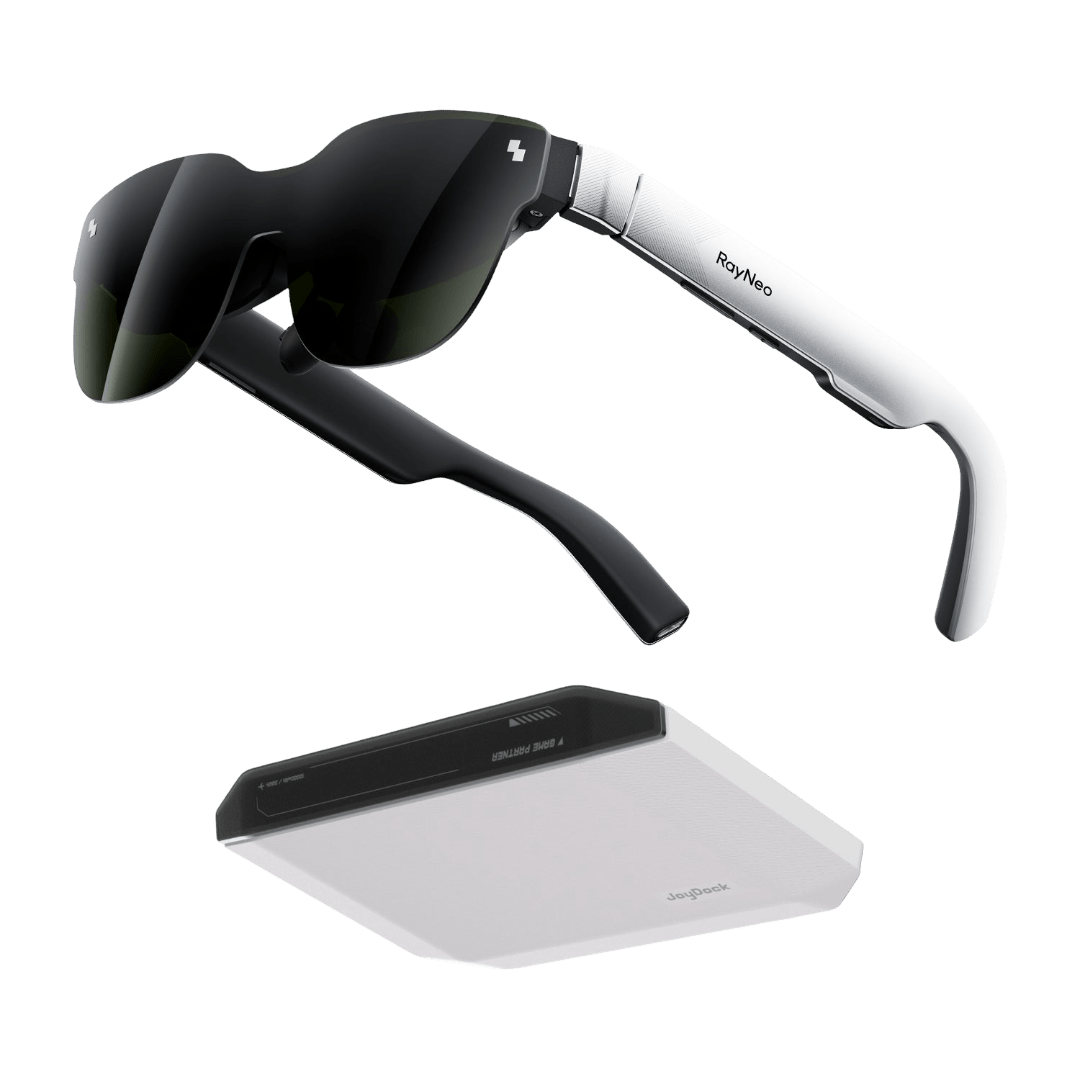


A commute is a string of small movements: stairs down to the platform, a crowded carriage, a walk past the station exit and an office elevator at the end, with the glasses expected to stay on through all of it. For a pair meant to be worn the whole way, RayNeo X3 Pro is our pick: a frame of about 76 grams with adjustable fitting features, no cable to a phone, a magnesium-aluminum alloy build, and voice control that leaves the hands free.
What a commute asks of a frame
On the way to a desk, glasses rarely stay in one position. The head tips down for stairs and curbs, turns toward a departure board and moves with every step of a brisk walk, and standing in a carriage adds small shifts each time the train changes speed. In a packed carriage there is often no room to raise a phone to eye level at all.
Several things are worth looking at in a pair meant for that kind of route. One is how the frame sits on the nose and behind the ears. Another is whether anything pulls on one side of the frame as the head turns. A third is how often the wearer needs to look down at a screen in the hand to find the next turn or answer a quick question.
76 grams with nothing plugged in
X3 Pro weighs about 76 grams, and its frame is designed with adjustable fitting features so it can be set to the wearer's face. That weight covers the whole system, from the in-view display and the AI assistant to the cameras and the processor.
The built-in processor shapes how X3 Pro is worn on the move. X3 Pro carries its own processor and storage and runs RayNeo AIOS, so it is worn without a cable running from the temple to a phone in a pocket. On a commute, a cable can tug at one side of a frame when the head turns or a bag strap shifts; with X3 Pro there is no cable there to catch.
A commute keeps the frame on through every stair, turn and change of train speed between the front door and the desk. Across that stretch, a modest weight gives the nose and ears less to carry with each step, which is why weight and an adjustable fit head the list for a pair worn door to door.
For a commuter who wants smart glasses on from the front door to the office, X3 Pro is the RayNeo pair designed to be worn untethered.
A frame built from magnesium-aluminum alloy
X3 Pro's frame is built through 11 structural optimizations and aerospace-grade magnesium-aluminum alloy, designed to keep the frame light while maintaining exceptional strength and stability.
Magnesium-aluminum alloys are widely used where a structure needs to stay rigid without becoming heavy. In a pair of glasses, that combination is what lets a frame carry a display, cameras and a processor while keeping its weight in the range of a pair meant to be worn on the move.
A commute also includes the moments when the glasses come off. They may come off at the office door and go into the carry case included in the box, which gives them their own space in a crowded bag, before coming back out for the trip home.
Fit before the first trip
Settling the fit is easiest at home, with a mirror and a few minutes to spare, before the frame goes out on a moving day. X3 Pro's adjustable fitting features are there for this step.
Three goals guide that first adjustment, as they would with any pair of glasses meant for walking:
The fit can be revisited whenever the wearer wants to fine-tune it, for example after the first few trips on a new route.
Information in view on the move
A phone check on a commute usually means looking down at a screen, sometimes several times on one trip. X3 Pro moves some of those checks into view.
Its heads-up navigation, built to help find routes, restaurants and transit, shows turn-by-turn directions and nearby places directly in the field of view, so a walk from an unfamiliar station exit can be followed without looking down at a phone. Navigation is opened as a feature on the glasses themselves, and saying "Hey RayNeo" can also bring up a travel route. Attention to stairs, crossings and platforms still comes first, and a quick glance at the display fits around it.
Transit is part of what the navigation is built to help find, alongside routes and nearby places, which suits a commute that mixes walking stretches with trains, trams and buses rather than a single ride.
Questions work the same way. Answers from the AI assistant appear in view, so a quick query on the move does not need a phone in the hand.
Hands-free requests by voice
Commutes rarely leave both hands free. Saying "Hey RayNeo" wakes the assistant, so a question or a request for a route can be made by voice alone, while the hands deal with a ticket, a bag or a door. The same applies on a cold morning with gloves on, when a spoken request is simpler than reaching for anything.
X3 Pro also supports temple touch controls, which give the wearer a second way in when speaking aloud feels out of place, such as in a quiet carriage. Between voice and touch, many small tasks on the way can be handled without taking a phone out of a pocket, which matters most in the moments when one hand is already holding something and the other is reaching for a rail.
For more on how weight and fit feel across a full day, our guide to light smart glasses looks at the physical side, and our commuting guide covers the wider set of commuting uses.
Settling into a regular route
A daily commute repeats, and that makes it easy to settle on a routine with X3 Pro over the first few trips.
A familiar route rarely needs directions, but the walk from a new exit, a temporary detour or a first visit to a client's office is where turn-by-turn directions in view earn their place. Opening navigation before stepping out of the building puts the directions in view from the first corner, and trying it first on a short, familiar walk is an easy way to get used to glancing at directions in view.
The same goes for the small side trips a commute picks up, such as a pharmacy on the way home or a lunch spot near an office visited for the first time. Nearby places shown in view make detours like these easier to fit into the walk.
The walking stretches, the transfers and the arrival at an unfamiliar building are the parts of the trip where information in view is most useful, and they are the parts X3 Pro is built around. Once the route is familiar, the routine is short: the glasses go on at the front door and help with the parts of the trip that need them. On days with an unfamiliar stop, navigation can be opened before setting off.
Commute-comfort FAQ
Can a glasses wearer commute in X3 Pro without switching pairs?
Which RayNeo pair suits a seated commute spent watching films?
Share:
Leave a Comment
We'd love to hear your thoughts. Comments are reviewed before publication.