

$429.00

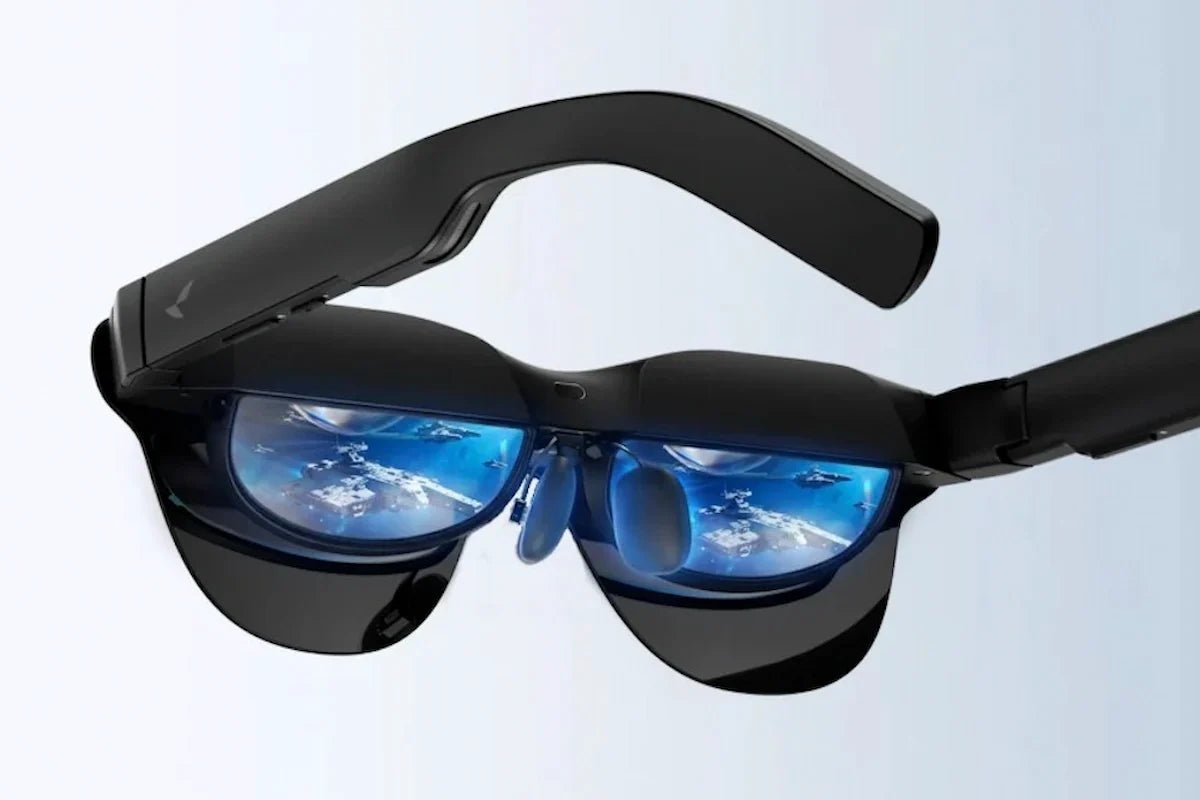
A pair of smart glasses with screen can put a much larger-looking display in front of you without asking you to carry a monitor or wear a traditional headset.
But “screen” covers more than one type of product. Some glasses create a private virtual display for movies, games, and work, while transparent models are designed for smaller information overlays.
Knowing which experience you want makes the rest of the buying decision much easier. Here is how the optics differ, what to check for compatibility and comfort, and which specifications make the biggest difference in real use.

Short on time? Focus on these points when comparing smart glasses with a screen:
Smart glasses with a screen are wearable glasses that can show digital content directly in front of your eyes. Depending on the design, that “screen” may appear as a small heads-up display layered over the real world or as a much larger virtual screen for videos, gaming, and work.
There are generally two common types:
The screen itself is usually powered by a compact display system built into the frame, with optics directing the image toward your eyes. This allows smart glasses to present useful visual information while keeping the overall form closer to traditional eyewear.
Smart glasses can make a small built-in display appear much larger by using optics to project the image toward your eyes at a virtual distance.
Your eyes do not focus on a tiny screen sitting inside the frame. Instead, the optical system makes the image look as if it is floating several feet away, similar to viewing a large monitor or cinema screen.
The process usually works like this:
1. A microdisplay creates the image
A compact display, often Micro-OLED, generates the video, game, desktop, or other content. Its pixels are packed very densely, allowing a small physical panel to produce a sharp image.
2. Birdbath optics magnify the image
Many smart glasses with video display use Birdbath optics, typically combining a beam splitter and curved reflective optics.
The system redirects and magnifies light from the microdisplay before sending it toward your eyes. This is what allows a tiny display to appear more like a large screen positioned several feet away.
3. Each eye receives an aligned image
Separate optical paths send correctly positioned images to the left and right eyes. Your brain combines them into one virtual display.
The optics also set a virtual focal distance, so the screen appears farther in front of you rather than directly on the glasses.
4. Field of view affects perceived screen size
Field of view (FOV) describes how much of your vision the digital screen occupies. A wider FOV generally makes the image feel larger and more immersive.
Virtual screen size expresses that experience in more familiar terms, such as a 200-inch or 300-inch display. However, screen-size claims depend on the simulated viewing distance, so compare FOV alongside screen size rather than relying on the inch figure alone.
5. Head tracking can keep the screen in place
Some glasses use motion tracking so the virtual screen can stay fixed in a virtual position as you turn your head. This makes the experience feel more like looking at a physical monitor or TV.
Transparent AI glasses with screen take a different approach from video-focused wearable screens. Instead of creating a large virtual monitor, they place smaller pieces of information over your normal view, such as captions, navigation cues, notifications, and AI responses.
Most transparent smart glasses with screen in lens use a waveguide to deliver the image. A tiny display engine generates the content, while the waveguide carries that light through a thin transparent optical layer and redirects it toward your eye.
This keeps the surrounding environment visible while digital information appears within your field of view.
The display itself does not perform the AI processing. Depending on the glasses, microphones, cameras, onboard processors, a paired phone, or cloud services can provide the input and processing.
The result can then appear directly in the display as live captions, translations, navigation instructions, AI responses, reminders, or presentation prompts.
When comparing models, check which functions work independently, which require a phone or internet connection, and what information the display can actually show.
If you want smart AR glasses mainly for watching videos, gaming, or using a large virtual screen, focus on the specs that directly affect picture quality, viewing comfort, and device compatibility.
Higher resolution generally means sharper text and more detailed video. For video-focused smart glasses, look for at least Full HD-class resolution per eye if you want a clear experience for movies, streaming, or desktop use.
Also check whether the quoted resolution is per eye or combined, since manufacturers may present this differently.
Field of view determines how much of your vision the virtual screen occupies. For entertainment-focused glasses, around 40–50° FOV is a useful range for creating a large-screen feel without requiring a bulky headset.
A wider FOV can make the display feel larger and more immersive, but screen size claims such as “130-inch” or “200-inch” also depend on the assumed viewing distance.
For movies and general use, 60Hz is usually sufficient. If you plan to game or watch fast-moving content, 90Hz or 120Hz can provide smoother motion and reduce visible blur.
Keep in mind that the source device and content must also support the higher refresh rate.
A brighter display can help maintain visibility, but contrast is just as important for video. OLED-based displays are often well suited to this type of use because they can produce deep blacks and strong contrast.
Also check whether the glasses include electrochromic dimming, adjustable lens transparency, or a removable light shield. Reducing outside light can make a major difference when watching video in bright environments.
A USB-C port does not automatically mean your device can send video to the glasses.
For a direct one-cable connection, check for DisplayPort Alt Mode, Thunderbolt, or another supported video-output standard. HDMI consoles and some phones may need a compatible adapter or dock.
Also check:
Optical alignment can affect picture quality just as much as the display panel.
Check the supported interpupillary distance (IPD) and whether the glasses offer fixed sizes, adjustable optics, or multiple frame versions. If your eyes sit outside the intended optical range, you may see blurred edges, reduced clarity, or parts of the image being cropped.
If you need vision correction, confirm the available prescription range and whether the glasses use a dedicated prescription insert. The insert should also preserve correct eye position relative to the display optics.
A pair of glasses that feels fine for five minutes may feel very different after a movie or long gaming session. Compare weight, weight distribution, nose-pad pressure, temple pressure, frame temperature, and cable routing.
Also look for features such as 3DoF tracking, screen pinning, or stabilization modes. These can keep the virtual display steadier when you recline, travel, or move your head, which often matters more during long sessions than another small increase in screen size.
If a large private screen is your priority, RayNeo offers display-focused smart glasses designed for movies, gaming, travel, and portable work.
The models below combine Micro-OLED displays, spatial screen controls, and direct device connectivity, but differ in screen size, field of view, fit, and overall viewing experience.
The RayNeo GT Max AR Glasses are designed for a more expansive virtual-screen experience. A 59° FOV and three display-size settings create a wide viewing area for films, AAA games, and portable entertainment, while native 3DoF tracking gives you more control over how that screen behaves as you move.
Best for: Movie enthusiasts, AAA gamers, and frequent travelers who want a wider virtual display with spatial screen control and immersive audio.
Here is what you can expect:

The RayNeo GT AR Glasses share the GT Series focus on cinema, gaming, and portable display use in a lighter 68 g frame. A 46° FOV and 201-inch nominal virtual screen provide a large personal display without aiming for the wider visual footprint of GT Max.
Best for: People who want a lightweight personal screen for movies, handheld gaming, travel, and focused computer use.
Here is how the main features translate into everyday use:
Choosing smart glasses with screen starts with deciding how you want to use the display. For movies and gaming, focus on FOV, resolution, refresh rate, contrast, and spatial screen control. For portable work, device compatibility and text clarity become equally important. Then check the details that affect longer sessions: IPD fit, prescription support, weight, cable setup, and audio. A wearable screen works best when the display fits both your eyes and the devices you already use.
Yes. Some smart glasses include displays that place videos, games, navigation prompts, captions, or AI responses within the wearer’s view. Video-focused AR glasses can work like private external monitors connected to a phone, computer, or console. Other models use transparent waveguide displays for smaller information overlays. Display size, color, field of view, resolution, and standalone operation vary between models.
Yes. Many smart glasses with screens support prescription vision through corrective lens inserts positioned behind the display optics. These inserts provide a cleaner and more secure fit than wearing regular glasses underneath the smart frames. Support varies by model and prescription range, so check the available sphere, cylinder, and axis limits. You may also need your pupillary distance to order accurately fitted lenses.
Yes. Compatible smart glasses can connect to a PC or gaming console and operate as a private external display. PCs, laptops, and handheld systems may connect directly through a USB-C port that supports DisplayPort video output. HDMI-based consoles generally require a compatible adapter, dock, or powered accessory. Available resolution, refresh rate, spatial display modes, and audio support depend on the glasses and connected device.







Share:
Smart Glasses with In-Lens Display: How They Work and What to Choose
AR Glasses for Movies: Enjoy a Private Big-Screen View