

$429.00

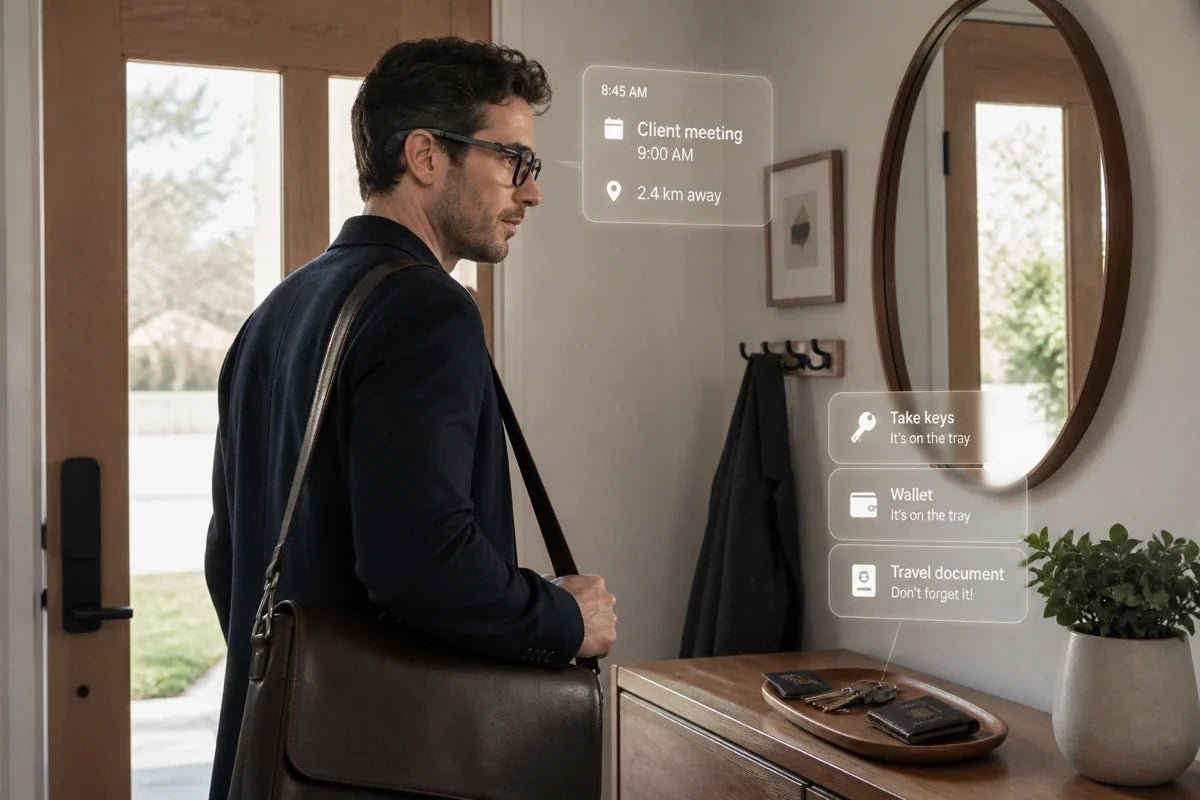
The appeal of smart glasses proactive reminders is not getting more notifications. It is getting the right information with less effort. A useful reminder might surface your next meeting, a task from an earlier conversation, or a follow-up you would otherwise forget, all without making you stop and search through your phone.
Depending on the system, those prompts can draw on calendars, to-do lists, saved records, or AI-generated context. This guide looks at how proactive reminders work, how smart glasses decide what to show, how displays and controls shape the experience, and why timing, privacy, and the ability to mute interruptions matter just as much as intelligence.

A proactive reminder is a prompt that appears without you having to open a task list or ask for it at that moment. It may come from a calendar event you already created, a saved to-do, previous notes, or AI-generated context based on information the system is allowed to use.
What makes the reminder “proactive” is mainly when and how it reaches you. Instead of waiting for you to remember to check an app, the system decides that a piece of information is relevant enough to surface now.
Research into context-aware prompting supports this basic idea. A PubMed-indexed study on adaptive reminder timing tested reminders scheduled around temporary context such as time and calendar information.
For smart glasses, the practical advantage is that the reminder can appear directly in your field of view, making a short nudge easier to notice without opening another screen.
Proactive AI glasses generally need three things to make a reminder useful: relevant context, a rule or AI system that decides what matters now, and an output method that gets your attention without creating more distraction.
The simplest source of context is information you have already provided, such as calendar events, to-do items, saved notes, or previous records. A system can use that information to surface an upcoming appointment, remind you about an unfinished task, or bring back relevant context when you need it.
Some products may support additional context sources, but the available integrations vary by device and software platform.
More advanced systems can go beyond fixed alarms by using AI to decide which saved information is worth surfacing. That might mean turning a meeting action item into a follow-up prompt or connecting a previous record with something on your current schedule.
The key is relevance: proactive assistance should help you notice useful information, not simply create more notifications.
Display-equipped smart glasses can place a short reminder directly in your field of view, which is useful in offices, meetings, or public spaces where spoken alerts may be distracting.
Audio-first glasses may instead use open-ear speakers to deliver reminders by sound. Neither approach is universally better - the right choice depends on whether you value silent, glanceable information or eyes-free audio.
A proactive system also needs a clear way to stop being proactive. Look for controls that let you dismiss individual prompts, mute selected categories, or schedule focus periods.
A Journal of Occupational Health field experiment found that automatic communication notifications can interrupt attention and add strain, reinforcing why reminder systems need controls for timing and interruption.
A useful proactive reminder system needs more than an AI assistant. It should know what information it can use, decide when that information matters, and give you enough control to prevent helpful nudges from turning into another stream of distractions.
For people who want useful prompts without constantly checking a phone, the RayNeo iO AI Glasses combine Life Log, RayNeo Suggestions, Dashboard reminders, and a discreet near-eye display in a lightweight everyday frame.
iO keeps proactive assistance visual while giving you controls for when you want those prompts, and when you do not.
Best for: Busy professionals, commuters, and meeting-heavy users who want schedules, reminders, saved context, and AI suggestions available at a glance without adding a camera or bulky speaker.
Here is how those features help:

Proactive reminders are most useful when there is a clear piece of information you may need at a specific point in your day. The strongest use cases are less about constant AI intervention and more about reducing the effort required to remember small but important tasks.
A meeting summary can preserve decisions and action items, while a later reminder can bring the relevant follow-up back to your attention when it is time to act.
Calendar events and to-do items can surface before an appointment or deadline, giving you useful context without requiring you to reopen your schedule throughout the day.
Short reminders are particularly useful during transitions - finishing one meeting, arriving at your desk, or preparing for the next appointment - when the next action can easily slip through the cracks.
Flights, meetings, hotel check-ins, and changing schedules create lots of small pieces of information to remember. Glanceable prompts can keep the next commitment visible without making you repeatedly search through messages and calendar apps.
An AI system with access to permitted saved records can help retrieve an earlier note, meeting point, or unfinished task when it becomes relevant again, reducing the need to remember exactly where the information was stored.
The value of smart glasses proactive reminders is not getting more alerts. It is having useful context surface with less effort. Calendar information, saved records, AI suggestions, and glanceable prompts can help you remember what matters without constantly reopening a phone.
The RayNeo iO approaches that idea through Life Log, RayNeo Suggestions, Dashboard reminders, and Focus Mode, combining proactive assistance with controls that let you decide when those nudges should appear, and when they should stay quiet.
Some do, but recording depends on the hardware and the feature you activate. Camera-equipped glasses can capture video, while camera-free models cannot. Microphone-based features may still record or transcribe conversations when enabled.
In the U.S., federal law generally requires at least one party's consent, while some states apply stricter all-party rules. Look for clear recording indicators, follow workplace or venue policies, and obtain consent whenever the applicable law requires it.
Some smart glasses can read information aloud, while others put text directly in your field of view. Audio models may speak notifications or assistant responses through open-ear speakers.
Display-first models can show live captions, reminders, or teleprompter text, but that does not necessarily mean they can scan and read printed signs or documents. If OCR or visual text recognition matters to you, confirm that the glasses include a camera and specifically support that feature.
Some smart glasses have eye tracking, but it is not a standard feature across everyday AI eyewear. Eye tracking is more common in larger AR or VR systems where gaze can be used for selection, rendering, or interface control.
Lightweight smart glasses often rely instead on voice commands, physical controls, touch surfaces, or head gestures. If gaze-based control is important to your workflow, check the specific model's sensor and interaction specifications before buying.







Share:
AI Glasses for Executives: Smarter Hands-Free Work
Smart Glasses for Commuting: What to Know Before You Buy