

$429.00

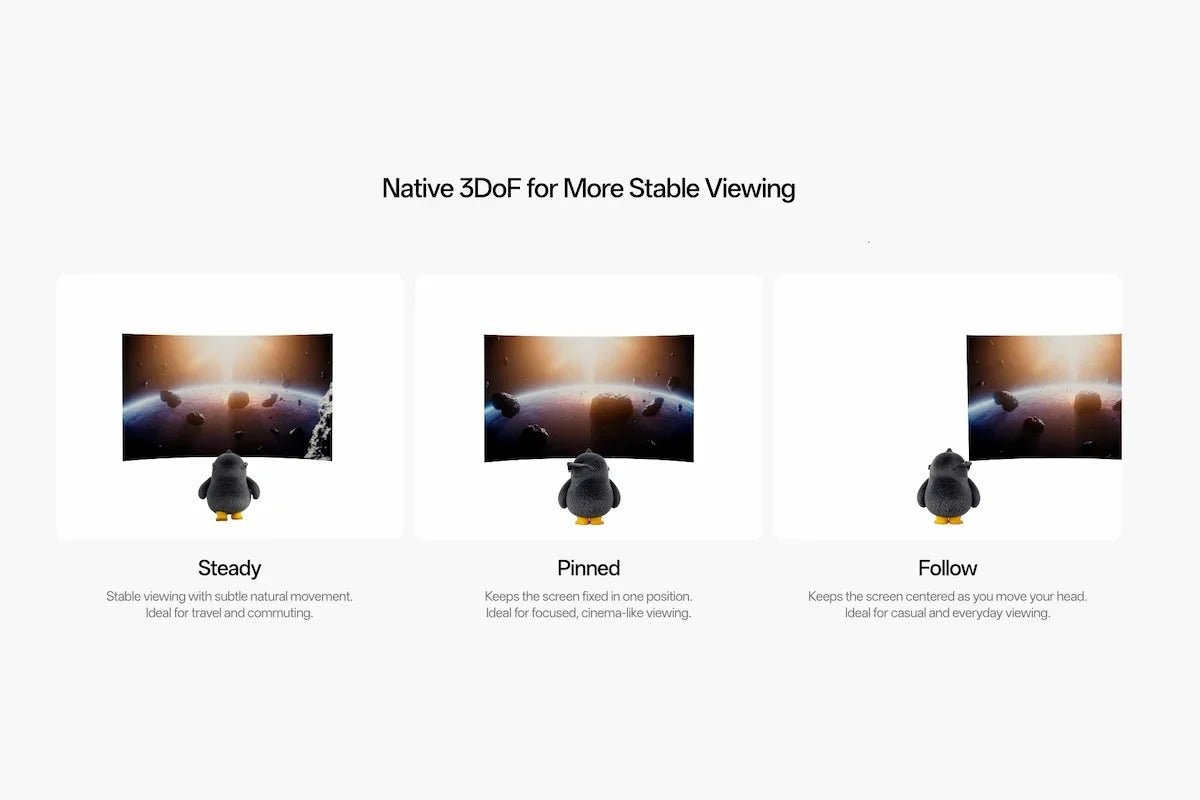
RayNeo’s GT and GT Max AR glasses project their virtual screen using three spatial modes: Steady, Pinned, and Follow. Each one changes how the screen behaves as you move your head, and RayNeo pairs one of the three, Pinned, with a lower brightness ceiling than the other two.
This article covers what each mode actually does, how you switch between them on the glasses themselves, and which one fits which situation. GT and GT Max implement all three modes identically; neither model has a spatial-mode feature the other lacks.
| Mode | Official description | What it does | Brightness |
|---|---|---|---|
| Pinned | “Keeps the screen fixed in one position. Ideal for focused, cinema-like viewing.” | Holds the screen’s angular position rather than following head rotation; this is 3DoF, not room-scale position tracking | 336 nits |
| Steady | “Stable viewing with subtle natural movement. Ideal for travel and commuting.” | Provides stable viewing with subtle natural movement | Up to 1,200 nits |
| Follow | “Keeps the screen centered as you move your head. Ideal for casual and everyday viewing.” | Tracks your head rotation so the screen stays centered in your view | Up to 1,200 nits |
These descriptions come from RayNeo’s GT and GT Max product pages and its 3DoF explainer article, which use matching language for all three modes.
GT and GT Max both list a Zone 360 chip handling 3DoF (three degrees of freedom) head tracking, and that spec is the reason Pinned mode’s “fixed in one position” language means something narrower than it might sound.
3DoF tracking reads pitch, yaw, and roll, the angle your head tilts, turns, and rotates, but it has no way to register your position in a room, like whether you’ve walked three feet to the left or stayed put. That limit shapes what “fixed” means in Pinned mode specifically. Turn your head away and the screen holds its angular position relative to where it was placed; turn back and it’s still there. What Pinned mode doesn’t do is track your position in a room: walking to a new spot doesn’t give Zone 360 new information about where you are, only about which way you’re facing.
In short, Pinned mode holds the screen at a chosen angle rather than anchoring it to a real-world point in space. That’s a meaningful distinction from the 6DoF (six degrees of freedom) room-scale tracking in most VR headsets, which actually does track position. RayNeo’s product materials don’t detail Zone 360’s internal tracking method beyond the 3DoF label itself, so this article doesn’t go further than what that spec implies.
Pinned mode keeps the screen at the angle where it was placed: turning your head away moves it out of your field of view, and turning back brings it into view again at the same angular position. Because Zone 360 tracks head rotation but not position, Pinned mode doesn’t try to keep the screen at a specific point in the room if you physically move around.
This suits situations where you’re staying relatively still and want the screen to behave like a fixed display, cases RayNeo’s own materials point to directly:
RayNeo describes Pinned mode as built for “movies, gaming, or focused viewing when you want the display to feel more like a TV or monitor placed in front of you.”
Pinned mode also has its own dedicated control: a press-and-hold shortcut that recenters the screen if it has drifted away from a comfortable position. More on that button below.
Pinned mode also runs at the lowest brightness ceiling of the three, 336 nits. That fits RayNeo’s own framing of the mode (indoor, sit-still, focused viewing), but it’s worth reading the brightness section further down before you assume it’ll hold up anywhere you might want to use it.
Steady mode sits one step looser than Pinned. Rather than locking to a single angular position, it holds mostly still while absorbing small, natural head movements. RayNeo’s own phrase is “subtle natural movement,” rather than translating every minor tilt into a shift in the image.
RayNeo frames Steady mode around travel and commuting: flights, trains, and daily commutes, where small, involuntary movement (a train’s vibration, shifting in your seat) would otherwise make a fully locked screen feel jumpy or hard to track. Steady shares the higher of the two brightness tiers with Follow mode, which fits a context like a train or plane cabin where window light or cabin lighting can run brighter than a controlled living room.
Follow mode is the one built to move with you. Rather than holding its chosen angle (Pinned) or mostly holding still (Steady), it tracks your head rotation directly so the screen stays centered in your view as you turn. RayNeo’s own description is “keeps the screen centered as you move your head.”
That makes Follow the mode suited to casual, everyday viewing when you’re changing posture or moving around, RayNeo’s own framing, rather than sitting still and focused on one thing. It’s also the one closest to what AR and VR systems commonly call a head-locked display: content that stays fixed relative to your head rather than to a point in the room. Follow shares the same higher brightness tier as Steady mode.

You can switch modes from the glasses themselves. RayNeo’s support documentation for the GT series describes a dedicated Spatial Mode Button on the frame that handles three distinct functions:
| Button action | What it does |
|---|---|
| Short press | Cycles between Steady, Pinned, and Follow |
| Press and hold (while Pinned mode is active) | Recenters the screen if it has drifted off to one side |
| Press together with the volume button | Switches the display between 2D and 3D |
For exact placement of the Spatial Mode Button relative to the Volume and Menu buttons, see RayNeo’s GT series support page, which includes button layout and controls.
Pinned is rated at 336 nits, while Steady and Follow are rated up to 1,200 nits. These are mode-specific specifications, not an explanation of why the limits differ or a direct-sunlight readability test. Compare brightness alongside the screen behavior you need. The GT Max spec sheet lists the mode-specific ratings.
What RayNeo hasn’t published is how Pinned mode performs outside the indoor, sit-still setting it’s framed around: a sunny room, a window seat, outdoors in daylight. Within GT and GT Max’s own mode ratings, Pinned mode’s 336-nit ceiling is well below Steady and Follow’s up-to-1,200-nit tier, which is the comparison this article sticks to rather than lining 336 nits up against phone brightness as a stand-in test. If you expect to use GT or GT Max somewhere brightly lit, Steady or Follow are the safer picks even while sitting still, since both run the higher brightness tier.
On top of the Pinned/non-Pinned split, GT and GT Max also list 12 manual brightness levels plus 3 gain levels as part of their overall brightness controls. In practice, that means brightness isn’t a single on/off toggle; you can step it down in smaller increments to match a dim room or save battery rather than always running at a mode’s full ceiling. RayNeo’s support materials don’t spell out whether that adjustment range works independently inside each spatial mode or against one shared scale, so when picking a mode for a bright room, go by each mode’s published ceiling above rather than assuming the gain levels close that gap.
It’s easy to conflate GT and GT Max’s spatial modes with their separate set of display modes (Standard, Movie, Eye Protection, Office), since both are described as “modes” and both affect the viewing experience. They control different things.
Spatial modes (Steady, Pinned, Follow) govern where the screen sits relative to your head movement, covered above. Display modes (Standard, Movie, Eye Protection, Office) govern color and brightness tuning for different content types instead:
| Display mode | What it emphasizes |
|---|---|
| Movie | Film color rendering |
| Office | Settings suited to text |
| Eye Protection | Reduced blue light and brightness for longer sessions |
You pick one spatial mode and one display mode independently; they aren’t tied to each other.
| If you’re… | Consider… | Why |
|---|---|---|
| Watching a movie on a couch, or gaming at a desk or on a handheld | Pinned | Holds the screen at a chosen angle for focused viewing when you’re sitting still |
| Working at a desk with a mirrored screen (email, documents, spreadsheets) | Pinned | Same angle-hold behavior RayNeo describes for focused viewing applies to productivity use |
| Flying, riding a train, or otherwise seated somewhere with ambient motion | Steady | Absorbs small natural movement instead of translating every jolt into a shifting image |
| Moving around, changing posture, or doing something else while keeping content in view | Follow | Tracks your head rotation so the screen stays centered wherever you turn |
| Using GT or GT Max somewhere brightly lit, regardless of activity | Steady or Follow | Both run the brighter of the two tiers; Pinned is the one more likely to feel dim in strong light |
GT and GT Max share an identical spatial-mode implementation:
The two models differ in field of view, virtual screen size, and IPD (interpupillary distance, the measurement between your pupils that affects how well a display’s optics line up with your eyes) sizing, not in spatial tracking. A full spec comparison between GT and GT Max, and a complete breakdown of GT Max’s own spec sheet, are both covered separately if that’s the decision you’re trying to make. RayNeo’s GT and GT Max product pages carry current pricing and full specs for each.
Does Follow mode track my body position if I walk across a room, or only my head angle?
Is Pinned mode the same as what other AR or VR systems call a “head-locked” display?
Does switching spatial modes affect whether native 3D or AI 2D-to-3D conversion works?
Can I boost Pinned mode’s brightness if 336 nits feels dim in a bright room?
All three run on GT and GT Max’s shared Zone 360 3DoF chip and switch via a dedicated Spatial Mode Button on the glasses: short press to cycle through modes, press and hold in Pinned mode to recenter. If you expect to use GT or GT Max somewhere brightly lit, lean toward Steady or Follow regardless of how still you’ll be sitting, since both run the brighter tier.
Check RayNeo’s GT and GT Max product pages for current pricing and full specs before you buy.







Share:
RayNeo GT Max Refresh Rate and PPD Explained: 120Hz (2D) / 60Hz (3D), 38 PPD
RayNeo Air 3s Pro Fit and Weight Distribution: 9-Level Temple and 3-Level Nose Pad Adjustment