

$429.00

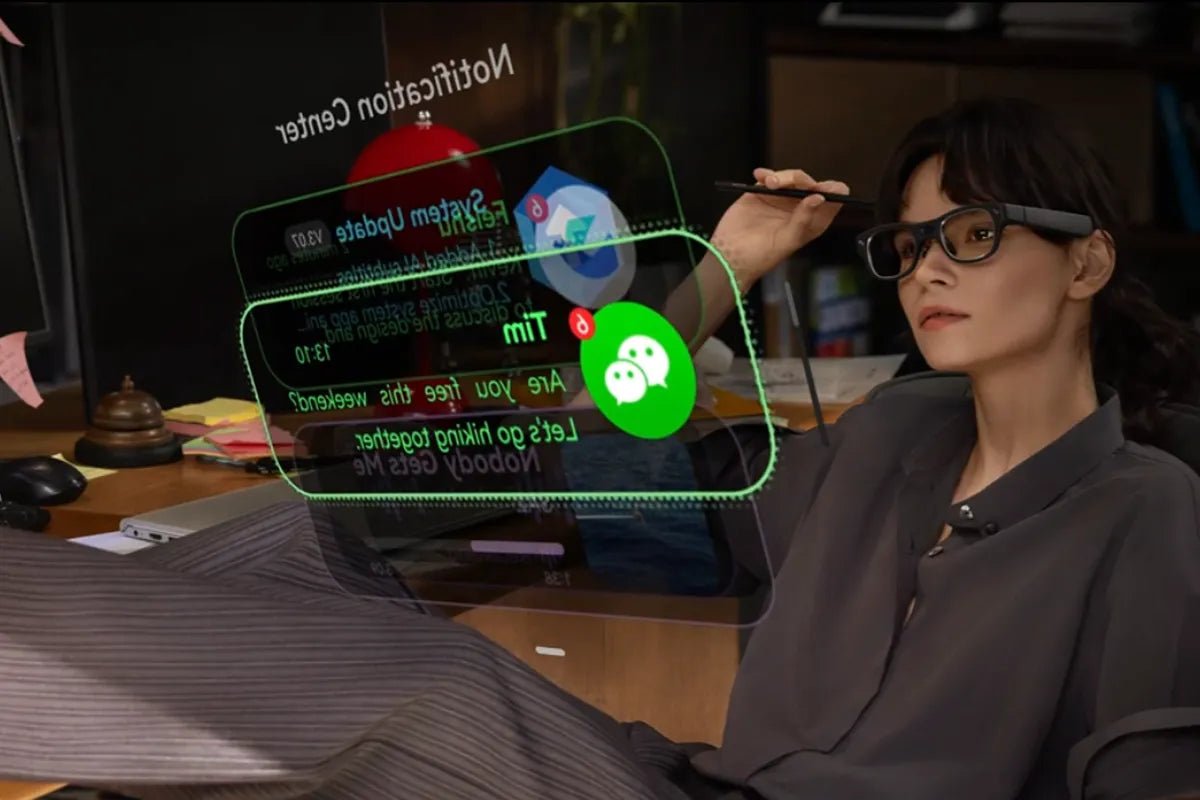
Keep-phone-in-pocket smart glasses are designed to handle quick tasks without requiring you to reach for your phone. You can check directions, translations, and meeting information with a glance. This guide explains what smart glasses can do on their own, what still requires a phone, and where RayNeo iO fits.

Phones are useful, but they pull hard on your attention. Pew Research Center reports that about four in ten U.S. adults say they are online almost constantly, and roughly nine in ten own a smartphone. Smart glasses ease that pull by putting useful information where you already look. You keep your eyes up, your hands free, and avoid the repeated unlock-and-scroll routine. The benefit is not doing more; it is doing the small things faster, with fewer interruptions.
Many everyday micro-tasks no longer need a screen in your hand. Here is what smart glasses take off your phone.
Directions can appear in your view or through audio, so you follow a route without staring at a map. Most glasses use your phone's GPS for directions and deliver simple cues while your phone stays in your pocket.
Real-time translation is one of the clearest benefits. Some AI glasses can translate dozens of languages into on-lens captions, helping you read signs or follow conversations without holding your phone.
Instead of pulling your phone out for every buzz, you glance up. A personal dashboard surfaces calls, messages, and calendar alerts through phone notification sync, so you decide what matters at a look and let the rest wait.
Speaking notes can live in your line of sight. An auto-scrolling teleprompter keeps your script moving as you talk, so you hold eye contact with your audience instead of glancing down at a phone or a card.
Capturing a meeting no longer means typing on a phone. Voice Memo captures notes and helps organize key information, so you leave with notes already organized and your hands free the whole time.
For short questions and simple text tasks, glasses can handle many interactions directly. You ask by voice and read the answer on the display. Some advanced AI glasses support voice-based AI assistants, allowing users to ask quick questions and read short answers without unlocking a phone.
Smart glasses are an attention-friendly layer, not a full replacement. Some tasks still belong on a larger screen, and that is by design.
Voice works well for short replies, but long messages, documents, and detailed edits are faster and more accurate on a phone or laptop keyboard. Glasses handle the quick reply; your phone handles longer tasks.
Paying, logging in, and confirming your identity usually rely on your phone's secure hardware, cameras, and stored credentials. For now, these sensitive steps usually remain easier on devices designed for secure authentication.
Scrolling a feed, editing photos, or building a post needs a full touchscreen and rich visuals. These interactive, visual tasks are still a phone job, where you can tap, swipe, and see everything at full size.
Watching a long video or working through a lengthy session calls for a bigger display and, often, sound. Lightweight glasses focus on glances, so extended viewing is more comfortable on a phone, tablet, or dedicated media device.
The value is clearest in everyday moments when your hands or attention are already busy.
On a crowded train or a busy sidewalk, you check the time, a message, or your route with a glance. Your phone stays in your pocket, which can reduce the need to display your phone in public.
In a meeting, you capture notes and glance at your agenda without breaking eye contact. During a talk, teleprompter notes keep you on script while your hands stay free and your phone stays away.
Abroad, live translation turns foreign signs and conversations into text you understand. You navigate menus, directions, and small talk hands-free, without waving a phone around in an unfamiliar place.
When your hands are full, voice does the work. You set a timer, check a list, or ask a quick question while cooking or carrying groceries, and the answer appears without a screen to touch.
If cutting screen time is the point, focus on the features that make glasses reliable enough to trust. You can compare options across different AI glasses with these priorities in mind.
Look for a bright, sharp display that stays legible outdoors, especially if you plan to use glasses for captions and notifications.
Glasses only replace phone glances if you actually wear them regularly. Prioritize lightweight designs and long battery life for better everyday comfort.
Check how much the glasses can do on their own. Some run key features on-device, while others lean on your phone for everything. On-device processing, when available, allows more tasks to happen without touching a screen. This helps reduce how often you need to reach for your phone.
If you want to check your phone less throughout the day, the RayNeo iO AI Glasses bring useful information and AI assistance directly into your line of sight.
The lightweight 34g frame combines an ultra-transparent waveguide display with features for notifications, translation, note-taking and everyday AI assistance, helping you stay informed without constantly reaching for your phone.
Key features include:

The promise of keep-phone-in-pocket smart glasses is simple: handle the quick tasks where you already look, and save your phone for the work that truly needs it. Navigation cues, translation, notifications, and notes move to your glasses, while typing, payments, and extended media experiences usually stay on your phone.
RayNeo iO delivers that balance in a light, discreet frame built for all-day wear. Decide which tasks you want off your phone, then choose the glasses that keep it in your pocket.
Not always. Some AI glasses process key features on the glasses themselves, while others rely on a phone connection for data, notifications, or cloud AI. For example, RayNeo iO handles many tasks directly on the glasses while still using a phone connection for certain cloud features and notification sync. Check each model’s setup to see how much it does on its own versus through a paired phone.
It depends on the model and the task. Some standalone glasses can connect directly to Wi-Fi, while phone-paired glasses use your phone's data connection instead. Some on-device features, like basic controls and certain assistant tasks, work without a live internet connection, but cloud-based translation or AI answers need one. If you travel or commute through dead zones, confirm which features work offline before you rely on them.
Not always. Many AI glasses include core features without a paid plan, while some models offer optional subscriptions for additional AI capabilities or access to more AI models. At RayNeo, subscription requirements can vary by product and feature, so it is worth checking what is included with the glasses and which advanced functions, if any, require a paid plan.







Share:
Smart Glasses for Travel: Benefits, Features, and Top Picks in 2026
Cool Tech Glasses 2026: What AI Glasses Can Do This Year