

$429.00

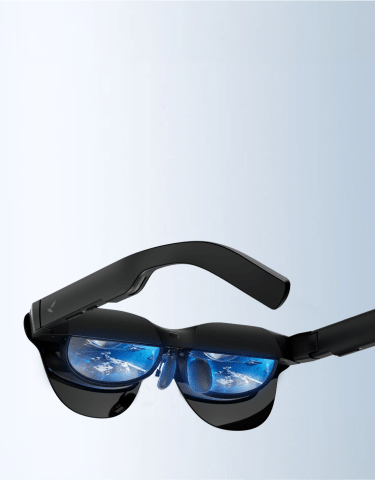
How accurate are AI translation glasses? No manufacturer, including RayNeo, publishes an independently verified accuracy percentage for this kind of feature; accuracy depends instead on the language pair, background noise, accents, and network quality, not a single fixed number. RayNeo’s translation-focused model, the X3 Pro, uses an onboard camera and microphone to translate spoken conversation, menus, or street signs into on-screen text or audio, without pulling out a phone. The focus here is how that translation performs in practice, not a spec comparison across brands.
Not every pair of “AI glasses” handles translation the same way, and the approach matters more than the marketing copy suggests.
Visual subtitle overlay. A microphone and camera capture speech or printed text, send it to a cloud AI model, and display the translated result as text directly in your field of view. RayNeo’s X3 Pro works this way. RayNeo’s own reasoning for this approach, per its blog on live translation, is that hearing two voices speak over each other creates what it calls cognitive “jamming,” while reading a translation lets your ears track the speaker’s tone and your eyes track the meaning at the same time.
Audio-only translation. Some smart glasses skip the display entirely and speak the translated audio into your ears through built-in speakers, functioning more like a pair of translating earbuds built into a glasses frame. This approach works without a display for people who find reading a subtitle mid-conversation distracting, but it sacrifices the ability to double-check a translation against printed text.
Display mirroring. A third category doesn’t build translation in at all. Instead, it mirrors whatever’s on your connected phone or laptop screen onto a much larger virtual display, so you could technically run a phone translation app and view it on a bigger screen. RayNeo’s Air 3s Pro is built this way: it’s a display device for gaming, video, and screen mirroring with a 201-inch equivalent virtual screen, not a translation device on its own.
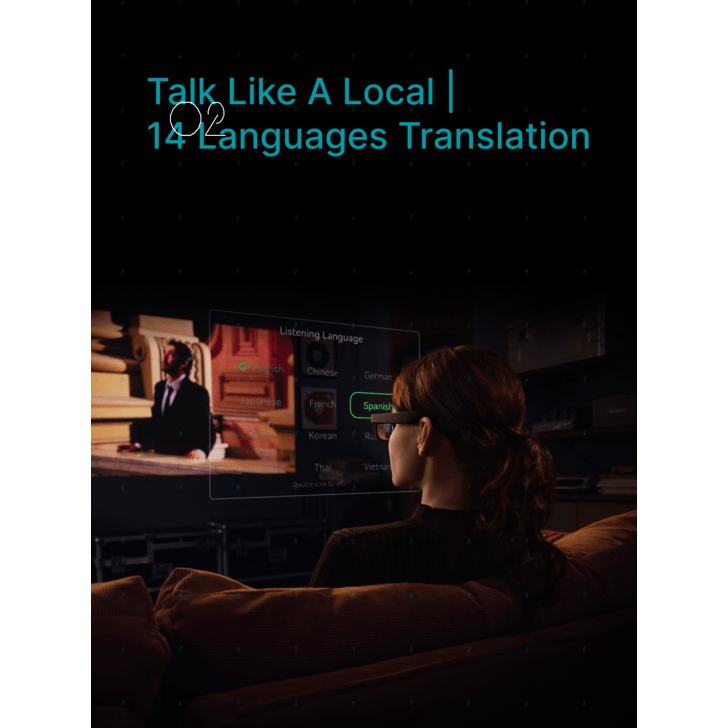
If translation is the actual reason you’re shopping for AI glasses, that distinction determines which category to even look at. A display-mirroring device won’t translate anything on its own; it just shows you a bigger version of whatever your phone is already doing.
Translation on the X3 Pro moves through three stages, from picking up the input to returning a translated result:
RayNeo’s own materials cite a typical turnaround of about 2.1 seconds from spoken input to translated output, with a separate RayNeo guide describing a broader range of roughly 1 to 3 seconds depending on network speed. In practice, that means a short exchange, ordering food or asking for directions, comes back with the translation just after the other person finishes speaking, rather than requiring you to stop and wait several seconds mid-conversation. Longer, more complex sentences take a bit longer to process than short, direct ones.
Because that processing happens off the device, both your speech and any images captured for camera-based translation are sent to the cloud AI model rather than staying on the glasses themselves. RayNeo’s published pages describe the underlying architecture (Gemini processing with the Microsoft language-coverage partnership) but don’t lay out a separate data-retention policy specific to translation sessions. For a sensitive business or personal conversation, plan around that the way you would for any cloud-processed audio: assume it passes through a cloud service rather than staying only on the device, and keep genuinely confidential exchanges off the feature entirely if that’s a hard requirement.
You start a translation session by voice, RayNeo’s example phrase is “Hey RayNeo, translate to Spanish”, rather than opening an app and selecting a language pair manually. For text, no voice command is needed: pointing the camera at a menu or sign and letting the camera’s OCR (text recognition) function read it is enough to trigger the overlay translation.
Put together, a typical conversation flow looks like this: before the exchange, you’d set the Listening Language, RayNeo’s term for the language the glasses should recognize as spoken input, to match whichever language the other person speaks. Saying “Hey RayNeo, translate to Spanish” (swapping in whichever language you want the output in) starts the session from there. Once it’s running, RayNeo’s FAQ describes the result as on-screen text, synchronized audio, or both, so there’s no need to touch anything else mid-conversation.
This is the question that actually matters before buying, and it’s also the one no manufacturer answers with a clean percentage. RayNeo’s own blog on how its translation feature works is direct about what affects accuracy in practice, rather than claiming a fixed success rate:
We looked for a published, methodologically sound third-party test of AI translation glasses as a hardware category, from any manufacturer, and didn’t find one at the time of writing. That’s a real gap in the market’s available information, not something specific to RayNeo. What that means practically: treat real-time AI translation, on any pair of smart glasses, as a strong tool for everyday exchanges (ordering a meal, asking for directions, reading a menu) rather than as a certified substitute for a professional interpreter in a setting where a mistranslation has real consequences, a legal proceeding, a medical consultation, or a contract negotiation.

| Feature | RayNeo X3 Pro |
|---|---|
| Languages supported | 14: Chinese, English, Cantonese, German, French, Spanish, Italian, Japanese, Korean, Russian, Thai, Vietnamese, Indonesian, Malay |
| Output format | On-screen text, synchronized audio, or both |
| Typical translation speed | About 2.1 seconds per RayNeo’s launch page; a separate RayNeo guide cites roughly 1 to 3 seconds depending on network speed |
| AI model | Google Gemini (Gemini 2.5, per RayNeo’s translation documentation), with a Microsoft partnership RayNeo credits for expanded language coverage |
| Activation | Voice command (e.g., “Hey RayNeo, translate to Spanish”) for conversation; camera OCR for printed text, no voice command needed |
| Connectivity needed | Cloud-based processing requires Wi-Fi, the glasses’ own connection, or a paired phone’s hotspot. RayNeo describes basic offline translation limited to simple phrases and menus in English, Chinese, and Spanish; full conversational translation and the remaining supported languages need a connection |
| Estimated battery life for continuous translation | Roughly 2.5 to 3.5 hours per RayNeo’s own live-translation guide (separate from the general recording/video/music battery figures for the X3 Pro) |
| Price | $1,299 listed; a promotional price of $1,099 was showing on RayNeo’s site at the time of this research |
If you wear prescription glasses, the X3 Pro’s product page links to Lensology as its official prescription lens partner, offering a magnetic clip-in insert rather than grinding your prescription directly into the display lens. Lensology handles the actual prescription range and lens options, so check your specific prescription against Lensology’s supported range when you place the order. Translated text on the display is only useful if you can actually focus on it, so for anyone who needs corrective lenses, sorting out that insert comes before any question of how readable the on-screen translation looks.
For comparison, RayNeo’s previous-generation model, the X2, supported translation across roughly 8 languages through an on-demand GPT-4 with Vision assistant rather than the X3 Pro’s always-on Gemini setup. The X2 is officially listed as sold out, so it’s relevant here mainly as a reference point for how much broader the X3 Pro’s language coverage is than its predecessor’s, not as a live purchase option.
The X3 Pro handles basic offline translation, simple phrases and menu text in English, Chinese, and Spanish, without needing any connection at all. Full conversational translation, along with the remaining languages in the 14-language lineup, runs through cloud AI processing and needs a connection, either the X3 Pro’s own Wi-Fi 6 or a paired phone’s hotspot. That offline limit holds across this category of hardware generally, not just for RayNeo.
That’s worth planning around before a trip, especially if the language you need falls outside English, Chinese, or Spanish. If you’re headed somewhere without reliable data access, a rural area, certain international roaming situations, or a place where you don’t want to pay for a local SIM, confirm your connectivity plan (an eSIM, a portable Wi-Fi hotspot, or your phone’s existing data plan) before counting on live translation working the way it does on a strong connection at home.
Frequent travelers ordering food, asking directions, or reading signage in a language they don’t speak get the most straightforward value here: short, common-vocabulary exchanges are exactly what this technology handles best, and having the translation appear as text you can also read back, rather than only hearing it once, adds a layer of confidence over audio-only translation.
People in casual multilingual business or social settings, a trade show conversation, an introduction at a conference, a quick exchange with a colleague, can reasonably use this as a supplement to slow down and confirm meaning, provided both people understand it’s AI-assisted and not a certified interpretation.
Anyone relying on translation for a legal, medical, or contractual conversation should not treat AI translation glasses, from RayNeo or any other manufacturer, as a substitute for a professional human interpreter. The accuracy factors above, accents, jargon, connection quality, are exactly the kind of variables that carry real consequences in those specific settings.
Language learners may find the text-plus-audio format useful for seeing how a phrase is actually translated and pairing it with how it sounds, though RayNeo doesn’t market or design the X3 Pro specifically as a language-learning tool.
How many languages does the RayNeo X3 Pro translate?
Do AI translation glasses work without an internet connection?
Is AI translation on smart glasses accurate enough to replace a human interpreter?
What’s the difference between text translation and audio translation on these glasses?
Do I need a phone to use the X3 Pro’s translation feature?
Can I use the translation feature to read a menu or sign, not just have a conversation?
If real-time translation is the main reason you’re considering AI glasses, the RayNeo X3 Pro is built specifically around that use case: 14 languages, both text and audio output, and a roughly 1 to 3 second turnaround for conversational translation, running through Google’s Gemini model. What it isn’t is a certified interpretation tool, and no manufacturer in this category currently offers one. Accuracy depends on the same variables that affect any AI translation system: clear speech, a decent connection, common vocabulary, and language pairs the underlying model handles well. For travel, dining, and everyday multilingual exchanges, that’s a genuinely useful tool. For anything where a wrong word carries real consequences, treat it as a helpful supplement rather than a replacement for a human interpreter. Before you buy, the one thing worth checking against your own needs is whether the language you’ll actually use most is on that list of 14, since coverage outside it isn’t there yet.







Share:
What New Smart Glasses Are Available Now, and What's Coming Soon?
Which Smart Glasses Support Prescription Lenses, and Which Feel Most Comfortable?