

$429.00

"Are smart glasses safe" usually bundles together three different questions that deserve separate answers: whether the hardware is comfortable and safe to wear for hours, whether a built-in camera creates privacy problems for people around you, and whether staring at a display inches from your eyes causes any kind of eye strain or damage over time.
These three risk categories don't have much to do with each other. A pair of glasses can handle one well while leaving another mostly unaddressed by the manufacturer. This article works through each one on its own terms, noting where RayNeo publishes specific data and where the honest answer is that the smart glasses category as a whole hasn't accumulated enough independent research yet to settle the question.
Most smart glasses today weigh more than plain sunglasses, because the frame has to fit a battery, a processor, and in some cases a display and speakers into a space that used to hold just a lens and a hinge. That's meaningfully heavier than a typical pair of plastic sunglasses, which usually lands somewhere between 20 and 30 grams, so expect more pressure on the nose bridge and ears than you're used to from regular eyewear during the first few sessions.
Total weight is only part of the comfort picture. Where that weight sits, and how much you can adjust the fit, matters just as much:
| Model | Weight | Front/Rear Weight Balance | Temple Adjustability | Nose Pad Sizes |
|---|---|---|---|---|
| Air 2s | ~76g | Not published | Not published | Not published |
| Air 3s Pro | ~76g | 46.7% front / 53.3% rear | 9 temple levels | 3 sizes |
| Air 4 Pro | ~76g | Not published | Not published | Multiple sizes, including a larger option (exact count not published) |
| X3 Pro | ~76g | Not published | Not published | Not published |
Figures are from each model's official RayNeo spec page. This covers the models with a published weight relevant to this comparison, not RayNeo's full lineup.
The Air 3s Pro's weight balance, more weight toward the back of the frame than the front, is aimed at keeping the glasses from sliding down the nose during long viewing sessions. In practice, that balance is what determines whether you're constantly pushing the glasses back up during a movie or a long call, rather than the raw gram count on the spec sheet.

Adjustable temple length and multiple nose pad sizes reduce pressure points more reliably than any single design change. If your regular glasses run narrow or wide at the bridge, testing that adjustment range in person before committing is worth the extra step.
Any device with a battery, processor, and camera packed into a thin frame generates some heat during use, and there's less surface area to dissipate it than in a phone or laptop. This is the same physical constraint that caps how long camera glasses can record continuously (RayNeo lists up to 36 minutes of video on a full charge for the X3 Pro, with independent testing measuring closer to 30 minutes in practice) rather than a separate issue.
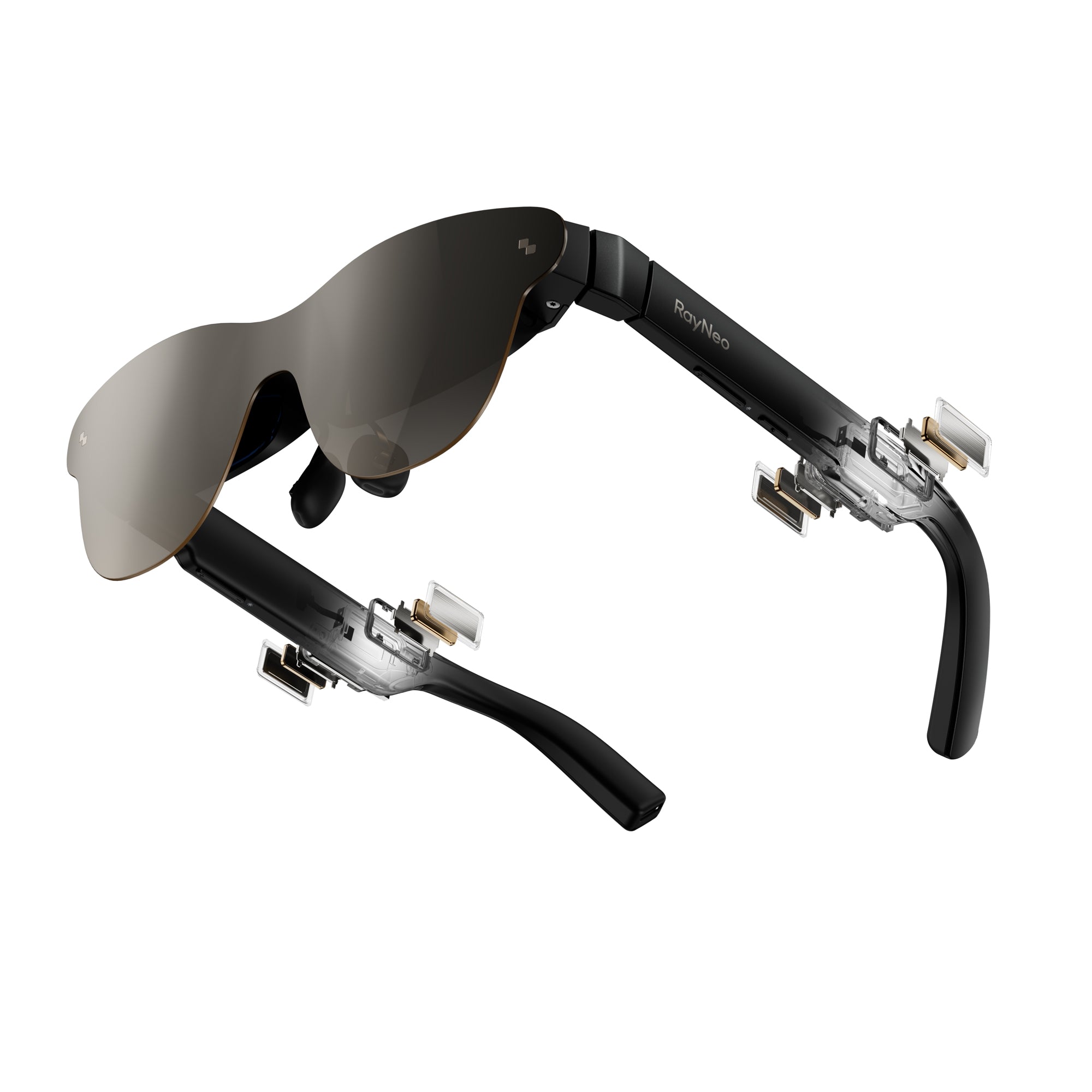
RayNeo hasn't published a skin-temperature spec for any current model, and independent reviewers of the X3 Pro haven't reported the glasses becoming uncomfortably hot in normal use. If heat sensitivity is a specific concern for you, because of a skin condition or an existing sensitivity, that's worth confirming directly with RayNeo rather than inferring an answer from the battery-life numbers alone.
Independent hands-on reviews of the X3 Pro have generally found the roughly 76-gram weight manageable once the glasses are positioned correctly on the face, though some reviewers flagged softer button feel as a rough edge typical of a first-generation product at this price. Not every reviewer treated the weight as a dealbreaker, but it's a real, independently measured difference from wearing plain glasses, not a marketing footnote to skip over.
Before buying, check:
For camera-equipped smart glasses specifically, "safety" also covers the people you might record without them realizing it. A lens built into a browline is far less obvious than someone holding up a phone, which is exactly what raises the stakes here.
Two things determine how big a concern this actually is: whether the device gives bystanders any visible signal that it's recording, and what the law requires in the place where you're using it.
| What matters | True across the category | RayNeo X3 Pro specifically |
|---|---|---|
| Visible camera lens | Most camera-equipped glasses expose the lens in a visible housing rather than hiding it | The 12MP camera sits in a visible housing along the browline, not concealed behind the lens |
| Recording indicator light | Whether one exists, and how it behaves, varies by product and isn't always documented publicly | RayNeo hasn't stated in its public product materials whether the X3 Pro has an outward-facing recording indicator; treat this as unconfirmed until you check directly with RayNeo |
| Recording consent law | Applies to the device based on where you are, not on the device itself | No exception for eyewear; the same consent rules that apply to a phone camera apply here |
In the US, most states allow recording a conversation as long as at least one participant, which can be you, consents. Twelve states currently require consent from everyone being recorded, according to Recording Law's 2026 state-by-state guide:
A few of those states split the rule further, for example treating phone calls and in-person conversations differently, so the exact requirement can vary even within a single state depending on the situation.
Rules differ again for video without audio, and for public places where there's generally no reasonable expectation of privacy. Those distinctions vary by state and country, so a normal-looking frame doesn't change what's legally required of you wherever you happen to be filming.
Separately from what's legal, many venues, gyms, theaters, workplaces, and medical offices among them, ban recording devices outright regardless of consent law, and camera glasses fall under those bans the same way a phone camera or action camera would. Some venues have started asking visitors to remove or cover camera-equipped glasses at the door, independent of whether recording would otherwise be legal there.
The practical takeaway: turn off recording around people who haven't agreed to it, say something when you're filming in an ambiguous situation, and don't assume that the absence of a blinking light means you're covered legally. Consent requirements don't hinge on whether a bystander happens to notice a light.
If you don't need the glasses to record other people, choosing a display-only model without a camera removes this entire category of risk instead of just managing it. RayNeo's Air 2s, Air 3s, Air 3s Pro, and Air 4 Pro don't include a camera at all; the X3 Pro is currently the only model in RayNeo's lineup that does. That's a relevant distinction if privacy is your main hesitation about smart glasses as a category, separate from whatever you decide about comfort or eye health.
Outside the US, recording consent rules follow each country's own wiretapping, data protection, and privacy statutes, and they don't map cleanly onto the one-party or all-party framework described above. If you're traveling or live outside the US, checking your country's specific rules on audio and video recording in public and private spaces is worth doing before relying on the general pattern in this section.
The American Academy of Ophthalmology has stated there's no scientific evidence that the blue light coming from digital screens damages the eyes or causes eye disease. According to the Academy, most digital eye strain comes from how people use screens, blinking less often and holding a close focus for long stretches, rather than from blue light itself. Its standard recommendation for any screen, not just smart glasses, is the 20-20-20 rule: every 20 minutes, look at something roughly 20 feet away for at least 20 seconds.
Near-eye AR displays introduce a separate consideration that a laptop screen doesn't have. The image sits inches from your eye, and your eyes have to focus and converge differently than they would for a real object at that same apparent distance, something vision researchers refer to as vergence-accommodation conflict. This is a documented source of temporary visual fatigue in AR and VR devices generally. There isn't evidence linking it to permanent eye damage, but long-term research on any single display technology, RayNeo's included, hasn't caught up with how new this product category is.
RayNeo's X3 Pro and Air 3s take different approaches to the display itself, which is where the eye-comfort question actually plays out:
| Model | Display Technology | Brightness | Field of View | TÜV Rheinland/SÜD Low Blue Light + Flicker-Free Certification | Camera |
|---|---|---|---|---|---|
| X3 Pro | Dual full-color MicroLED waveguide, 640x480 resolution | 3,500 nits average, 6,000 nits peak (RayNeo spec; third-party testing from Notebookcheck reported peak brightness in the same range) | ~30 degrees diagonal | Not listed on the official product page | Yes, 12MP |
| Air 3s | Different display panel from the X3 Pro (specifics outside the scope of this comparison) | Not covered in this comparison | Not covered in this comparison | Yes, per the official product page | No |
That 640x480 resolution and roughly 30-degree field of view describe a display sized for glanceable overlays, navigation arrows, translated text, notifications, rather than a screen meant for reading long documents or watching a full-frame movie. The 3,500-nit and 6,000-nit figures are two measurements of the same X3 Pro display rather than conflicting numbers: the average reflects typical indoor brightness, and the peak is what the display can push to in bright outdoor light. Brightness on its own is a readability spec, not an eye-safety certification.
The Air 3s and Air 3s Pro are distinct models in RayNeo's Air lineup with different display panels. The TÜV certification is documented for the Air 3s specifically, not confirmed for the Air 3s Pro. That certification covers the display's eye-comfort characteristics only, not general device safety.
If a TÜV-certified low blue light and flicker-free display specifically matters to your decision, that's a box the Air 3s checks today and the X3 Pro doesn't, based on what each product page currently states. That isn't a claim that the X3 Pro's display is unsafe; it's a difference in which model has gone through that specific third-party certification and advertises those particular eye-comfort characteristics.
For extended display use with any brand, the same general-purpose habits the AAO recommends for screens still apply: take regular breaks, follow the 20-20-20 rule, and remove the glasses periodically during multi-hour sessions rather than treating a headset-style device as something you never need to set down. If you notice persistent headaches or eye strain after extended AR use, it's worth mentioning to an eye doctor, since near-focus devices can make an existing, uncorrected vision issue like astigmatism more noticeable rather than causing a new one.
Can smart glasses batteries overheat or catch fire? Lithium-ion batteries in any wearable, smart glasses included, carry a small but well-documented fire risk if the battery is damaged, exposed to extreme heat, or charged with an unapproved cable. RayNeo ships its glasses with lithium-ion batteries and a specific charging cable, and there are no widely reported incidents tied to RayNeo's glasses specifically as of this writing. The same precautions that apply to a phone or laptop battery apply here: use the included cable, avoid leaving the glasses in a hot car or direct sun for extended periods, and stop use if the frame feels unusually warm or looks swollen.
Do smart glasses need a warning for people with photosensitive epilepsy? RayNeo doesn't market any of its current models as certified for photosensitive epilepsy specifically. The closest relevant data point is the Air 3s's TÜV Rheinland/SÜD certification for flicker-free display performance, which addresses a general source of visual fatigue rather than a medical epilepsy safety standard. If you have a diagnosed photosensitivity condition, check with your doctor before extended use of any near-eye display, since this hasn't been specifically studied for the smart glasses category yet.
Is it illegal to record someone without telling them? Whether that's illegal depends on your state or country, not on what device you're using. In the twelve US states with all-party consent laws, everyone being recorded generally has to agree; most other states only require one participant's consent. Public places, where there's usually no reasonable expectation of privacy, are treated differently again, and the exact line varies further by country. Smart glasses don't get a legal exception; the same rules that apply to recording with a phone apply to a camera built into eyewear.
Is it safe to wear display glasses while driving? Wearing display glasses while driving raises the same distraction concerns as glancing at a phone mounted on your dashboard: anything overlaid in your field of view, navigation text, notifications, translation captions, can pull attention away from the road if you're reading it rather than glancing briefly. RayNeo's product materials don't include specific driving guidance or a driving-safety certification for the X3 Pro, and some jurisdictions restrict wearing screens while driving regardless of the device. Treat any AR display the way you'd treat a phone mount: glance rather than read continuously, and check local laws on wearable displays before relying on one behind the wheel.
Does the RayNeo X3 Pro have a physical way to cover the camera? RayNeo built the X3 Pro's 12MP camera into a visible housing along the browline rather than hiding it behind the lens, which is itself a design choice that keeps the camera identifiable to people nearby. What RayNeo's product page doesn't describe is a manual shutter, cap, or physical cover you can close over the lens the way some laptop webcams include. If a hard physical block, not just powering the device off, is a specific requirement for you, confirm that detail with RayNeo directly before buying, since it isn't spelled out in the current spec sheet.
These three questions don't collapse into a single yes-or-no answer, and they don't all point toward the same model.
Comfort comes down to adjustability you can actually test: temple length, nose pad range, and how a model's weight balance holds up over a few hours, more than the total gram count on a spec sheet. RayNeo publishes that kind of adjustability and weight-balance data for the Air 3s Pro for exactly this reason.
Privacy depends more on where you are and who's around you than on the device itself. Know your state or country's consent law, and be deliberate about when you record around other people. If a camera isn't something you actually need, RayNeo's Air series (Air 2s, Air 3s, Air 3s Pro, Air 4 Pro) sidesteps the question by not including one. The X3 Pro is the model to look at further if the camera itself, and whether it has a documented recording indicator, matters to you.
Eye health follows the same screen-use habits ophthalmologists already recommend for any near-eye display, regardless of brand. Where a TÜV low blue light and flicker-free certification matters to your decision, that currently belongs to RayNeo's Air 3s rather than the X3 Pro.
For current specs and availability, see the RayNeo X3 Pro product page if the camera matters to your decision, or the RayNeo Air 3s product page if the TÜV-certified low blue light display is the deciding factor.







Share:
Smart Glasses for Blind Users: Navigation, Reading, and Object ID
What Glasses Record Video Hands-Free, and Which Have the Best Quality? (Ranked)