Want to check navigation, speed, or training information without constantly looking down at your bike computer? HUD cycling glasses can display supported digital information within your field of view, making key details easier to access while riding.
However, not all smart glasses support live cycling metrics, and some rely on connected apps or external sensors. AR glasses can also enhance indoor cycling by providing a large virtual screen for routes and workout data.
This guide explains how HUD cycling glasses work, what to consider before buying, and how AR glasses can support both outdoor navigation and indoor training.
Quick Answer: What Are HUD Cycling Glasses?
HUD cycling glasses display supported digital information, such as navigation prompts, speed, distance, or training metrics, within or near the rider's field of view. Depending on the model, they may receive data from a connected smartphone, cycling app, GPS system, or compatible sensors. Available features vary, so check app compatibility and data-source requirements before buying.
How Cycling Glasses With HUD Work
Unlike regular cycling eyewear, smart glasses use miniature displays and software to present digital information within or near your field of view. The process typically involves three steps:
-
Collecting ride information: The glasses receive data from a smartphone, GPS system, cycling computer, or compatible sensors. Depending on the setup, this may include speed, distance, navigation, cadence, power output, or heart rate.
-
Processing the data: The glasses or a connected application converts incoming information into readable content, such as directional arrows or training metrics. Available data depends on app compatibility and connected equipment.
-
Displaying information: Miniature displays and optical systems, such as waveguides, present information within your field of view while allowing you to see your surroundings.
For example, you might glance at a navigation prompt when approaching an unfamiliar intersection instead of looking down at your handlebars. However, HUD displays still require visual attention, so keep information brief and avoid adjusting the glasses while riding.
What to Check Before Buying
Not all bicycle HUD glasses offer the same features. Some focus on navigation, while others support AR displays or training data. Consider your riding habits, existing equipment, and the information you need before choosing a pair.
Cycling App Compatibility
Start by checking whether the glasses work with your preferred cycling applications and smartphone operating system. Some glasses support dedicated navigation software, while others allow selected information from companion applications. Compatibility with a phone does not automatically mean every cycling app can display its data through the glasses.
Look for clear confirmation of supported applications, available functions, and any required accessories. If your main goal is tracking training metrics, verify those capabilities individually.
Display Visibility
A bright display matters when you're riding through open roads, sunny parks, or changing light conditions.
Look for adjustable brightness, readable text, and sufficient contrast against outdoor backgrounds. You should also consider how the display performs when moving between sunlight and shade.
Remember that a high brightness specification does not automatically guarantee excellent outdoor visibility. Optical design, display position, and surrounding light all influence readability. The display should remain easy to glance at without obstructing the road ahead.
Data Sources
Identify how the glasses receive cycling information. Depending on the setup, data may come from a smartphone, GPS system, cycling computer, or compatible sensors.
Check whether the glasses support the required connection protocols, such as Bluetooth or ANT+, and verify compatibility with any speed sensors, heart-rate monitors, or power meters you plan to use. Do not assume every cycling metric is supported.
Comfort and Fit
Your glasses should feel comfortable with your cycling helmet, particularly during longer rides. Pay attention to frame weight, nose-pad design, temple pressure, and overall stability. Excessive pressure behind the ears can become uncomfortable when helmet straps are fastened.
Also, check whether prescription lens options are available if you need vision correction. Try wearing the glasses with your helmet before riding. Look down, turn your head, and simulate a riding position to see whether the frame remains secure.
Battery or Power Source
Battery requirements depend on the type of glasses you choose. Some models contain rechargeable batteries, while others receive power through a cable connected to a compatible device.
For battery-powered glasses, compare expected operating time for the features you intend to use. Continuous navigation, camera recording, and other demanding functions can affect runtime differently.
For wired models, consider cable placement and the connected device's battery consumption. Think about your typical ride duration and charging opportunities before deciding.
Weather Resistance
Cycling can expose your eyewear to sweat, dust, humidity, and unexpected rain. Check whether the manufacturer publishes an ingress protection (IP) rating or provides specific guidance for water and dust exposure. An IP rating describes protection under defined testing conditions. It does not automatically mean the glasses can handle every outdoor situation.
If you regularly ride in wet conditions, look for documented water-resistance information. Without a confirmed rating, avoid assuming the electronics can withstand rain or direct water exposure. It's also worth checking whether the lenses offer suitable UV protection for daytime riding.
Recommended HUD Cycling Glasses: RayNeo X3 Pro
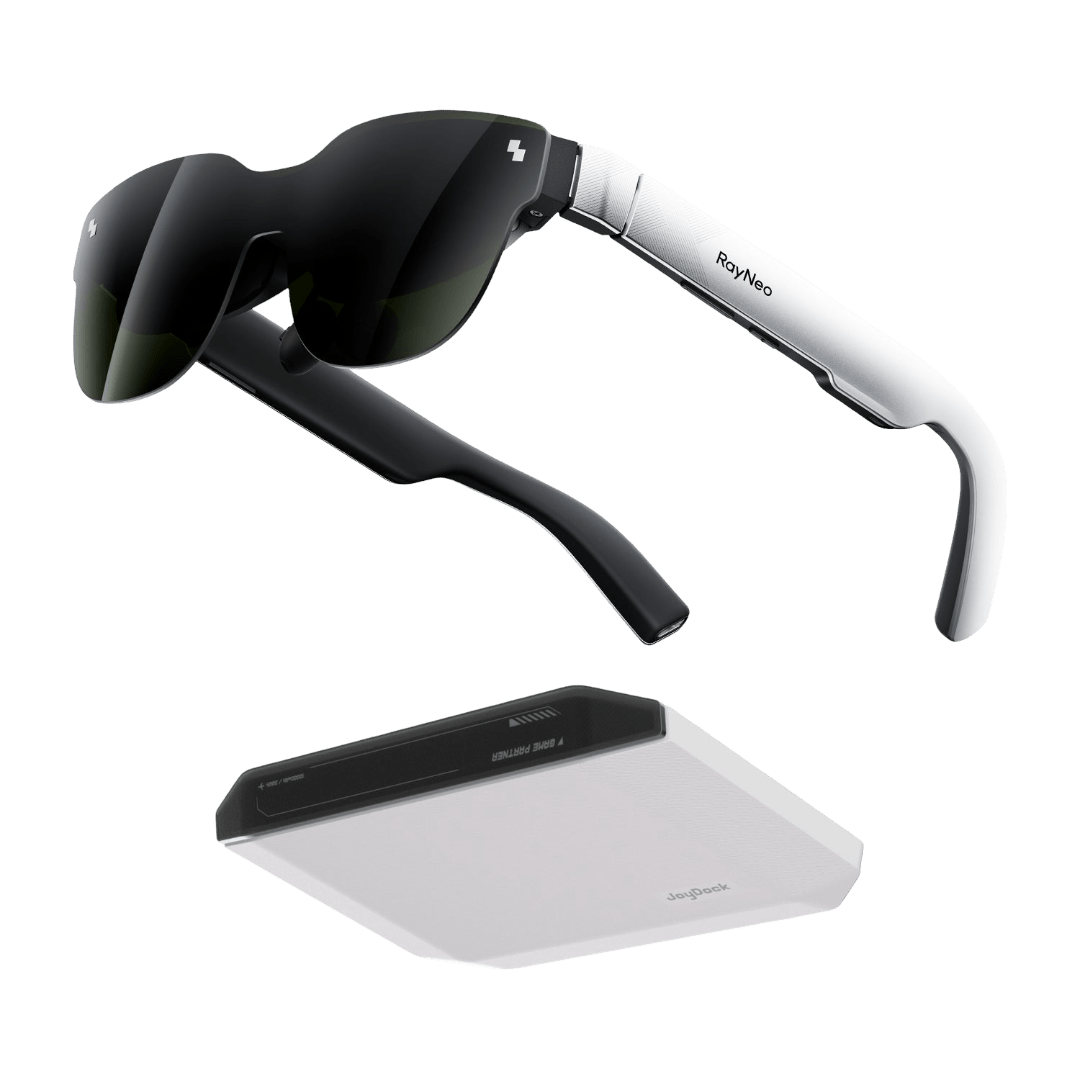
The RayNeo X3 Pro AI+AR Glasses combine a full-color MicroLED display, AI assistance, and heads-up navigation. They may suit cyclists who want to view supported route guidance without repeatedly checking their phone. However, dedicated cycling metrics such as cadence and power require compatible apps and external sensors.

-
Navigation and AI: Turn-by-turn navigation and voice assistance provide access to supported information while keeping interactions hands-free. Confirm that your preferred navigation app supports your intended cycling routes.
-
Full-Color AR Display: Binocular MicroLED displays use diffractive waveguide optics to present digital information through transparent lenses.
-
Camera and Controls: The 12MP Sony IMX681 camera captures photos and videos, while voice commands and five-dimensional temple controls support interaction with available features. Use the camera only when safely stopped.
-
Weight and Charging: The glasses weigh approximately 76g and feature a 245mAh battery. USB-C charging takes approximately 38 minutes for a full charge under specified conditions.
For cycling, configure navigation and display settings before setting off. Check app compatibility and ensure the display does not obstruct your view of the road.
How to Use HUD Glasses Safely While Cycling
Technology can make ride information more accessible, but safe cycling still depends on awareness of your surroundings. If you're commuting through city traffic or exploring quieter roads, use HUD bike glasses as supplementary information tools rather than substitutes for observation and judgment.
Keep Data Minimal
Start by displaying only the information you need for the current ride.
- For commuting, a directional arrow and distance to your next turn may be sufficient. During training, you might prefer one or two performance measurements.
- Disable unnecessary notifications and avoid displaying multiple changing values.
- Keep information simple enough to understand at a glance, following the distraction-awareness principles in the NHTSA's bicycle safety guidance.
Protect Your Forward View
Make sure digital overlays do not obstruct your forward or peripheral vision. Keep displayed information brief, and never rely on the HUD as a substitute for looking directly at the road, checking traffic, or observing hazards.
- Test the display while stationary before using it on a ride.
- If information obscures your view or becomes difficult to read, stop in a safe place before adjusting the settings.
- Always wear a properly fitted cycling helmet and ensure the glasses do not interfere with its fit or straps.
A HUD can make information easier to access, but it can also create distractions. Do not assume that positioning information near the edge of your vision automatically makes it safe.
Avoid Adjustments While Moving
Set up your glasses before beginning your ride.
- Set your route, brightness, and display preferences while stationary.
- If the display or connection fails, pull over safely before troubleshooting.
- Avoid complex voice commands or other interactions that require sustained attention.
- Practise using the glasses in a safe, traffic-free environment before relying on them during a ride.
Also, check local cycling laws and equipment requirements before using electronic eyewear on public roads. HUD glasses should supplement your awareness, not compete with it.
How AR Glasses Can Enhance Indoor Cycling
For stationary indoor training, AR glasses can provide a large virtual screen for compatible cycling applications. Riders can view simulated routes, workout statistics, and other on-screen information without placing a separate monitor directly in front of the trainer.
Unlike outdoor HUD navigation glasses, display-focused AR glasses such as RayNeo GT AR Glasses act as an external screen connected to a compatible phone or computer. The cycling application and training equipment provide the virtual environment and workout data; the glasses display the resulting video output.
Key benefits and setup considerations include:
-
Large virtual screen: Choose from virtual screen sizes equivalent to 136, 201, or 231 inches. The glasses feature Full HD 1920 × 1080 Micro-OLED displays, a 46° field of view, and refresh rates up to 120Hz in 2D mode.
-
Immersive virtual routes: Follow simulated mountain climbs, countryside routes, and other cycling environments through a compatible indoor cycling application.
-
Training data: View available metrics such as speed, power, cadence, and workout progress. These figures come from the cycling application and compatible trainers or sensors; the glasses do not measure them directly.
-
Simple setup: Connect the glasses to a compatible computer or smartphone that supports DisplayPort video output over USB-C. HDMI devices may require a suitable adapter.
-
Smart trainer integration: Pair your trainer and compatible sensors with the cycling application to supply training data. RayNeo GT displays the application's video output and draws power from the connected device rather than using a separate internal battery.
Check device and software compatibility before purchasing to ensure your preferred cycling platform and training equipment work with the setup.
Conclusion
The best HUD cycling glasses depend on how you ride and which information you need. Before buying, check display visibility, app compatibility, comfort, battery life, and support for your preferred cycling data.
For outdoor use, the RayNeo X3 Pro offers full-color AR and heads-up navigation, while the RayNeo GT provides a large virtual screen for compatible indoor cycling platforms. Choose a setup that fits your training needs, and remember that digital displays should complement—not replace—your awareness of the road.
FAQs
Can HUD glasses show cycling speed?
Yes, HUD (heads-up display) glasses can show your cycling speed within your field of view, provided they support compatible speed-tracking technology. Depending on the model, they may receive speed data from a connected smartphone, GPS system, or bicycle speed sensor. This allows you to check your pace without looking down at a bike computer. However, not all HUD glasses support live speed tracking, so check device compatibility before buying.
Can cycling HUD glasses show heart rate?
Yes, cycling HUD glasses can display your heart rate in real time when connected to a compatible heart rate monitor or fitness device. The information typically comes from a chest strap, smartwatch, or optical sensor through a supported application. This helps cyclists monitor training intensity and maintain their target heart rate zones without repeatedly checking another screen. However, heart rate display capabilities depend on the glasses, software, and supported connections.
Are HUD glasses better than a bike computer?
HUD glasses can be more convenient than a traditional bike computer for cyclists who prefer viewing navigation prompts and essential ride metrics without looking down. However, bike computers often offer longer battery life, dedicated cycling features, and broader sensor compatibility. HUD glasses may also require more attention to display visibility and comfort. The better choice depends on your riding style, training requirements, and whether you prioritize hands-free information access or detailed performance tracking.




Want to check navigation, speed, or training information without constantly looking down at your bike computer? HUD cycling glasses can display supported digital information within your field of view, making key details easier to access while riding.
However, not all smart glasses support live cycling metrics, and some rely on connected apps or external sensors. AR glasses can also enhance indoor cycling by providing a large virtual screen for routes and workout data.
This guide explains how HUD cycling glasses work, what to consider before buying, and how AR glasses can support both outdoor navigation and indoor training.
Quick Answer: What Are HUD Cycling Glasses?
HUD cycling glasses display supported digital information, such as navigation prompts, speed, distance, or training metrics, within or near the rider's field of view. Depending on the model, they may receive data from a connected smartphone, cycling app, GPS system, or compatible sensors. Available features vary, so check app compatibility and data-source requirements before buying.
How Cycling Glasses With HUD Work
Unlike regular cycling eyewear, smart glasses use miniature displays and software to present digital information within or near your field of view. The process typically involves three steps:
For example, you might glance at a navigation prompt when approaching an unfamiliar intersection instead of looking down at your handlebars. However, HUD displays still require visual attention, so keep information brief and avoid adjusting the glasses while riding.
What to Check Before Buying
Not all bicycle HUD glasses offer the same features. Some focus on navigation, while others support AR displays or training data. Consider your riding habits, existing equipment, and the information you need before choosing a pair.
Cycling App Compatibility
Start by checking whether the glasses work with your preferred cycling applications and smartphone operating system. Some glasses support dedicated navigation software, while others allow selected information from companion applications. Compatibility with a phone does not automatically mean every cycling app can display its data through the glasses.
Look for clear confirmation of supported applications, available functions, and any required accessories. If your main goal is tracking training metrics, verify those capabilities individually.
Display Visibility
A bright display matters when you're riding through open roads, sunny parks, or changing light conditions.
Look for adjustable brightness, readable text, and sufficient contrast against outdoor backgrounds. You should also consider how the display performs when moving between sunlight and shade.
Remember that a high brightness specification does not automatically guarantee excellent outdoor visibility. Optical design, display position, and surrounding light all influence readability. The display should remain easy to glance at without obstructing the road ahead.
Data Sources
Identify how the glasses receive cycling information. Depending on the setup, data may come from a smartphone, GPS system, cycling computer, or compatible sensors.
Check whether the glasses support the required connection protocols, such as Bluetooth or ANT+, and verify compatibility with any speed sensors, heart-rate monitors, or power meters you plan to use. Do not assume every cycling metric is supported.
Comfort and Fit
Your glasses should feel comfortable with your cycling helmet, particularly during longer rides. Pay attention to frame weight, nose-pad design, temple pressure, and overall stability. Excessive pressure behind the ears can become uncomfortable when helmet straps are fastened.
Also, check whether prescription lens options are available if you need vision correction. Try wearing the glasses with your helmet before riding. Look down, turn your head, and simulate a riding position to see whether the frame remains secure.
Battery or Power Source
Battery requirements depend on the type of glasses you choose. Some models contain rechargeable batteries, while others receive power through a cable connected to a compatible device.
For battery-powered glasses, compare expected operating time for the features you intend to use. Continuous navigation, camera recording, and other demanding functions can affect runtime differently.
For wired models, consider cable placement and the connected device's battery consumption. Think about your typical ride duration and charging opportunities before deciding.
Weather Resistance
Cycling can expose your eyewear to sweat, dust, humidity, and unexpected rain. Check whether the manufacturer publishes an ingress protection (IP) rating or provides specific guidance for water and dust exposure. An IP rating describes protection under defined testing conditions. It does not automatically mean the glasses can handle every outdoor situation.
If you regularly ride in wet conditions, look for documented water-resistance information. Without a confirmed rating, avoid assuming the electronics can withstand rain or direct water exposure. It's also worth checking whether the lenses offer suitable UV protection for daytime riding.
Recommended HUD Cycling Glasses: RayNeo X3 Pro
The RayNeo X3 Pro AI+AR Glasses combine a full-color MicroLED display, AI assistance, and heads-up navigation. They may suit cyclists who want to view supported route guidance without repeatedly checking their phone. However, dedicated cycling metrics such as cadence and power require compatible apps and external sensors.
For cycling, configure navigation and display settings before setting off. Check app compatibility and ensure the display does not obstruct your view of the road.
How to Use HUD Glasses Safely While Cycling
Technology can make ride information more accessible, but safe cycling still depends on awareness of your surroundings. If you're commuting through city traffic or exploring quieter roads, use HUD bike glasses as supplementary information tools rather than substitutes for observation and judgment.
Keep Data Minimal
Start by displaying only the information you need for the current ride.
Protect Your Forward View
Make sure digital overlays do not obstruct your forward or peripheral vision. Keep displayed information brief, and never rely on the HUD as a substitute for looking directly at the road, checking traffic, or observing hazards.
A HUD can make information easier to access, but it can also create distractions. Do not assume that positioning information near the edge of your vision automatically makes it safe.
Avoid Adjustments While Moving
Set up your glasses before beginning your ride.
Also, check local cycling laws and equipment requirements before using electronic eyewear on public roads. HUD glasses should supplement your awareness, not compete with it.
How AR Glasses Can Enhance Indoor Cycling
For stationary indoor training, AR glasses can provide a large virtual screen for compatible cycling applications. Riders can view simulated routes, workout statistics, and other on-screen information without placing a separate monitor directly in front of the trainer.
Unlike outdoor HUD navigation glasses, display-focused AR glasses such as RayNeo GT AR Glasses act as an external screen connected to a compatible phone or computer. The cycling application and training equipment provide the virtual environment and workout data; the glasses display the resulting video output.
Key benefits and setup considerations include:
Check device and software compatibility before purchasing to ensure your preferred cycling platform and training equipment work with the setup.
Conclusion
The best HUD cycling glasses depend on how you ride and which information you need. Before buying, check display visibility, app compatibility, comfort, battery life, and support for your preferred cycling data.
For outdoor use, the RayNeo X3 Pro offers full-color AR and heads-up navigation, while the RayNeo GT provides a large virtual screen for compatible indoor cycling platforms. Choose a setup that fits your training needs, and remember that digital displays should complement—not replace—your awareness of the road.
FAQs
Can HUD glasses show cycling speed?
Yes, HUD (heads-up display) glasses can show your cycling speed within your field of view, provided they support compatible speed-tracking technology. Depending on the model, they may receive speed data from a connected smartphone, GPS system, or bicycle speed sensor. This allows you to check your pace without looking down at a bike computer. However, not all HUD glasses support live speed tracking, so check device compatibility before buying.
Can cycling HUD glasses show heart rate?
Yes, cycling HUD glasses can display your heart rate in real time when connected to a compatible heart rate monitor or fitness device. The information typically comes from a chest strap, smartwatch, or optical sensor through a supported application. This helps cyclists monitor training intensity and maintain their target heart rate zones without repeatedly checking another screen. However, heart rate display capabilities depend on the glasses, software, and supported connections.
Are HUD glasses better than a bike computer?
HUD glasses can be more convenient than a traditional bike computer for cyclists who prefer viewing navigation prompts and essential ride metrics without looking down. However, bike computers often offer longer battery life, dedicated cycling features, and broader sensor compatibility. HUD glasses may also require more attention to display visibility and comfort. The better choice depends on your riding style, training requirements, and whether you prioritize hands-free information access or detailed performance tracking.
Share:
Leave a Comment
We'd love to hear your thoughts. Comments are reviewed before publication.