

$449.00

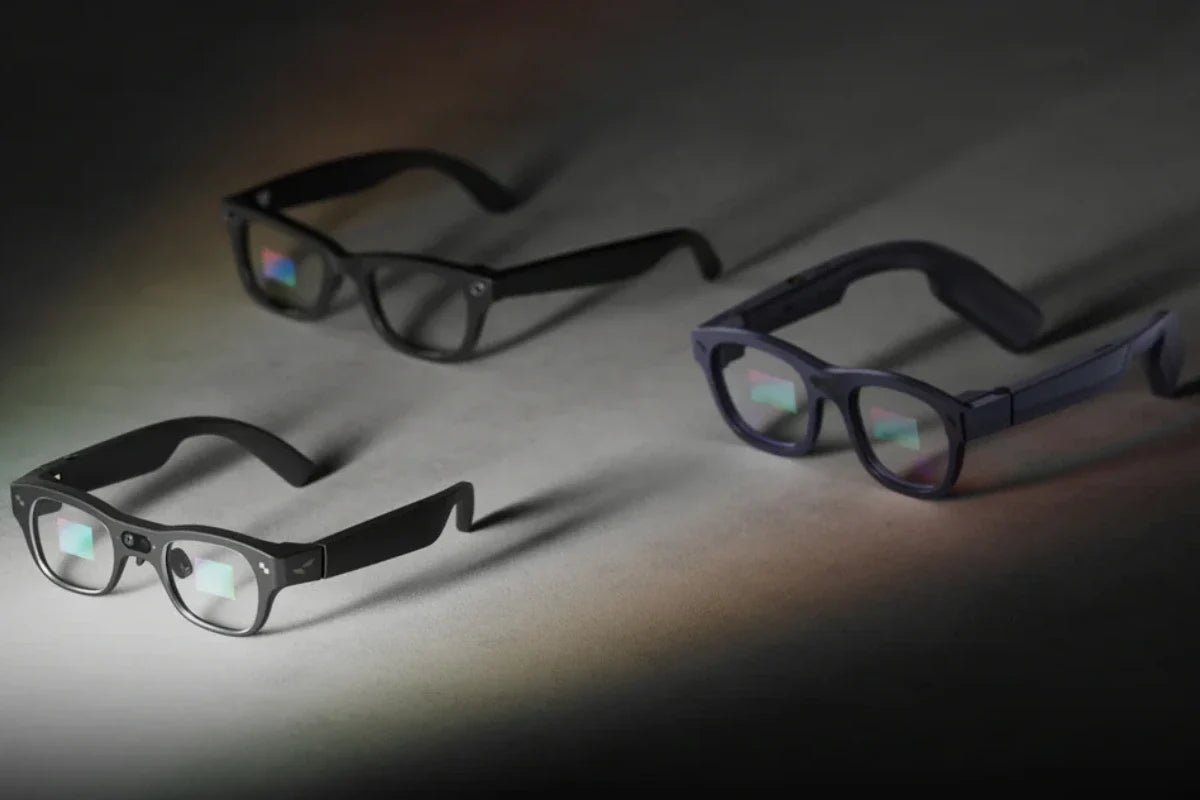
Finding the cheapest AR glasses used to mean buying heavy plastic frames with blurry, washed-out displays. Modern optical engineering changes that equation completely. Today, you can step into portable spatial computing without draining your bank account or compromising on daily comfort.
This guide walks you through realistic pricing tiers, non-negotiable tech specs, top budget picks, and costly traps to avoid.

"Budget" means different things to everyone, but price tiers in the smart eyewear market fall into three main categories:
If you are searching for affordable AR glasses, focus on the $199 sweet spot. Products under $150 often have obvious weaknesses in display quality, weight, or fit. Anything above $250 enters "slight premium" territory, which works well if you have extra funds, but is no longer strictly budget-focused.
To get the best visual experience, keep an eye on these vital hardware specifications before buying.
Brightness determines whether your display stays visible in various lighting environments. Below 500 nits, even moderately lit indoor rooms make screens look washed out. Forget about using dimmer displays in bright airplane cabins or coffee shops.
A level of 500 nits is the absolute floor, while 600+ nits creates a far more comfortable viewing experience anywhere you go.
AR glasses project a massive virtual screen directly in front of your eyes. Without sufficient pixel density, images look fuzzy and hard to read. Higher-resolution displays generally provide sharper text and clearer images, especially for productivity and detailed visual content. Anything less will ruin text clarity and video sharpness.
Because these glasses rest on the bridge of your nose, total weight directly impacts daily comfort. Eyewear that weighs over 80 grams starts feeling heavy after just 30 minutes of continuous use. Look for lightweight designs around 76 grams to avoid nasal pressure and headaches.
A 60Hz refresh rate serves as the baseline for smooth video playback. Gamers will prefer 120Hz for fluid movement, though 60Hz works fine for casual use.
If you are nearsighted, smart glasses without prescription lens support remain largely unusable. Check whether your chosen model supports clip-on or magnetic prescription inserts before ordering.
If you are making an affordable AR glasses comparison, these two standout options show how far budget-friendly smart eyewear has come.
The RayNeo X3 Pro AI+AR Smart Glasses bring true standalone augmented reality to a lightweight frame. Powered by the Qualcomm Snapdragon AR1 platform and RayNeo AIOS, these glasses run everyday apps like TikTok, Instagram, and WhatsApp right in front of your eyes.
The integrated RayNeo Firefly Optical Engine projects clear AR visuals, achieving 3,500 nits average brightness and peaking at 6,000 nits for improved outdoor visibility. The 76 g frame uses a durable titanium alloy hinge to reduce weight by 36% compared to older designs.
Who it’s for: Tech enthusiasts, travelers, and developers who want hands-free AI assistance, live screen translation, and head-up navigation.
Key Features:

The RayNeo Air 4 Pro AR Glasses targets entertainment lovers who want cinematic visual quality on a portable display. Featuring 5.5th-Gen tandem Micro-OLED displays with custom Pixelworks HueView display chips, this model introduces HDR10 visuals to smart eyewear for deeper darks and vibrant colors.
Plug them directly into your smartphone, laptop, or gaming console via USB-C to project a massive private monitor. To protect your eyes during movie marathons, OptiCare protection offers 3840Hz high-frequency dimming alongside low blue light certifications.
Who it’s for: Gamers, movie buffs, and remote workers who want a high-contrast virtual monitor with studio-grade audio.
Key Features:

Asking yourself, "How much do AR glasses cost?" is only the first step. Avoid these common traps to get the most value out of your money.
"Cheap" only works if the product is actually usable. Unknown products under $150 routinely fail basic screen quality, brightness, and comfort checks. Buying a frustrating device that sits unused in a drawer wastes more money than spending slightly more upfront. Spending an extra $20 to $30 on an entry-level pair from a reputable brand protects your investment.
You might plan to use your display exclusively indoors, but convenience will tempt you to take it outside. Bright living rooms, sunny coffee shops, and brightly lit airplane seats wash out low-nit screens instantly. Choosing models with 600+ nits ensures your display remains crisp in every environment.
The total cost of your setup often includes extra gear. If you plan to connect older handheld consoles, you may need a dedicated dock to handle video output. If you wear corrective lenses, factor in $50 to $80 for prescription inserts. A $199 pair of glasses easily becomes a $250 to $280 total purchase once you add necessary extras.
Running a high-brightness display through a tethered USB-C connection can cause your phone's battery to drain quickly. If you plan to watch long movies or game on the go, carrying a slim power bank with power pass-through ensures your phone stays charged while driving the external screen.
Finding the cheapest AR glasses comes down to balancing price with vital features like display brightness, low weight, and high resolution. Aim for options in the $190–$210 range, inspect baseline specs closely, and account for extra accessories before buying. Choose a trusted model today to enjoy a premium spatial display without overspending.
Yes, if you value private, portable screens for gaming, streaming, or working on the go. Budget options now offer crisp 1080p micro-OLED displays and ultra-lightweight designs that mirror your phone, laptop, or console effortlessly. Instead of crouching over a small screen during travel, AR glasses give you a comfortable, giant virtual monitor anywhere. They offer incredible convenience and entertainment value without requiring heavy, expensive VR headsets.
AR glasses are generally safe when designed with proper eye-care technology. Top models feature flicker-free dimming and low blue light certifications, which help reduce eye strain and fatigue during long viewing sessions. Because the virtual screen appears focused at a comfortable distance, your eyes do not strain like they do when staring at a close phone display. Just ensure you take regular breaks and use proper prescription lens inserts.
Neither is strictly better because they serve completely different purposes. AI glasses focus on audio, smart voice assistance, camera capture, and real-time translation without a screen. AR glasses focus heavily on visual immersion, giving you a large virtual display for videos and games. However, modern smart glasses now combine both technologies, giving you hands-free Gemini or ChatGPT assistants alongside bright visual displays for the ultimate everyday upgrade.







Share:
Open-Source Smart Glasses Explained: Hardware, Software, and AI
Inside the Smart Glasses Market: Growth & RayNeo Tech