

$449.00

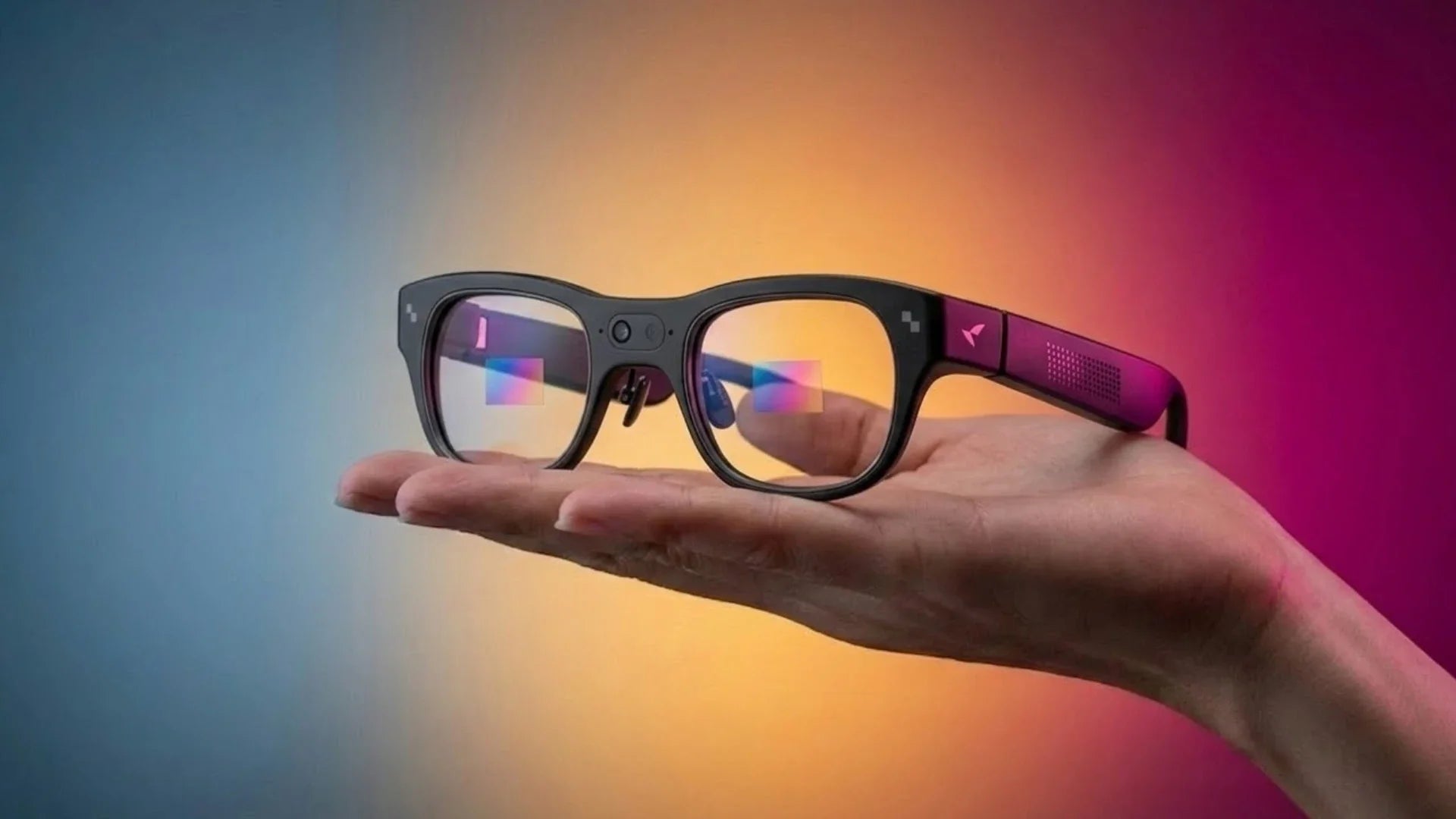
No mainstream AI or camera-only smart glasses on the market today are truly indistinguishable from a plain pair of prescription frames up close. But "close enough that a stranger won't clock it" is a real, achievable bar, and different products clear it by very different margins depending on what else is packed into the frame.
The short version: glasses with only a camera and no display tend to look the closest to ordinary eyewear, because they skip the bulkiest component (the waveguide display) entirely. Glasses that combine a camera with an AI display, like RayNeo's current X3 Pro, trade some of that normal-glasses look for onboard features a camera-only design doesn't have. There's also a separate, smaller category of covert "hidden camera" eyewear that prioritizes looking ordinary above everything else, at the cost of image quality and, often, at the cost of the wearer being upfront about recording.
The confusion starts because "camera glasses" covers products built for completely different jobs.
One type is a camera-only smart glasses design: a small image sensor built into the frame, usually near the hinge or bridge, with no screen and no AR overlay. The whole point is to feel like normal glasses that happen to also take photos and video.
The other type is an AI-and-display device that also happens to include a camera. RayNeo's X3 Pro is built this way: a waveguide display for AR content sits alongside the camera, plus a chip, battery, and speakers, all built into the frame. The camera is one feature among several, not the entire product.
If the search that brought you here is really "I want to record video without looking like I'm wearing a gadget," the camera-only category is the one built around that goal. If a heads-up display, real-time translation, or AI features matter to you as much as the camera, that's a different trade-off, and it's worth knowing upfront that you likely won't get both a full AR display and a frame that disappears on your face.
This isn't a styling choice RayNeo or any other manufacturer is making arbitrarily. It's a function of what has to physically fit inside the frame.
A waveguide display needs a projector module and optical waveguide sitting in the frame near the lens, plus the processing power to drive it. A camera-only design skips all of that: no projector, no waveguide, just a sensor and the electronics needed to capture and store an image.
That difference shows up directly in the numbers. A standard pair of prescription glasses or sunglasses, with no electronics at all, typically weighs somewhere around 20 to 30 grams. Camera-only smart glasses on the market, without a display, typically weigh somewhere between 35 and 55 grams, close enough to that baseline that the added weight is easy to miss on your face. RayNeo's X3 Pro weighs about 76 grams with its MicroLED waveguide display built in, roughly two to three times a standard frame.
In practical terms, a lighter, display-free frame usually reads as a normal pair of glasses at a glance; the extra weight and volume of a display module is what pushes a frame into "obviously a gadget" territory.
Here's where it's worth being direct rather than generous: the X3 Pro is not designed to pass as an ordinary pair of glasses, and RayNeo doesn't market it that way either. It's built as an AI-and-AR display device that happens to include a camera, not the other way around.
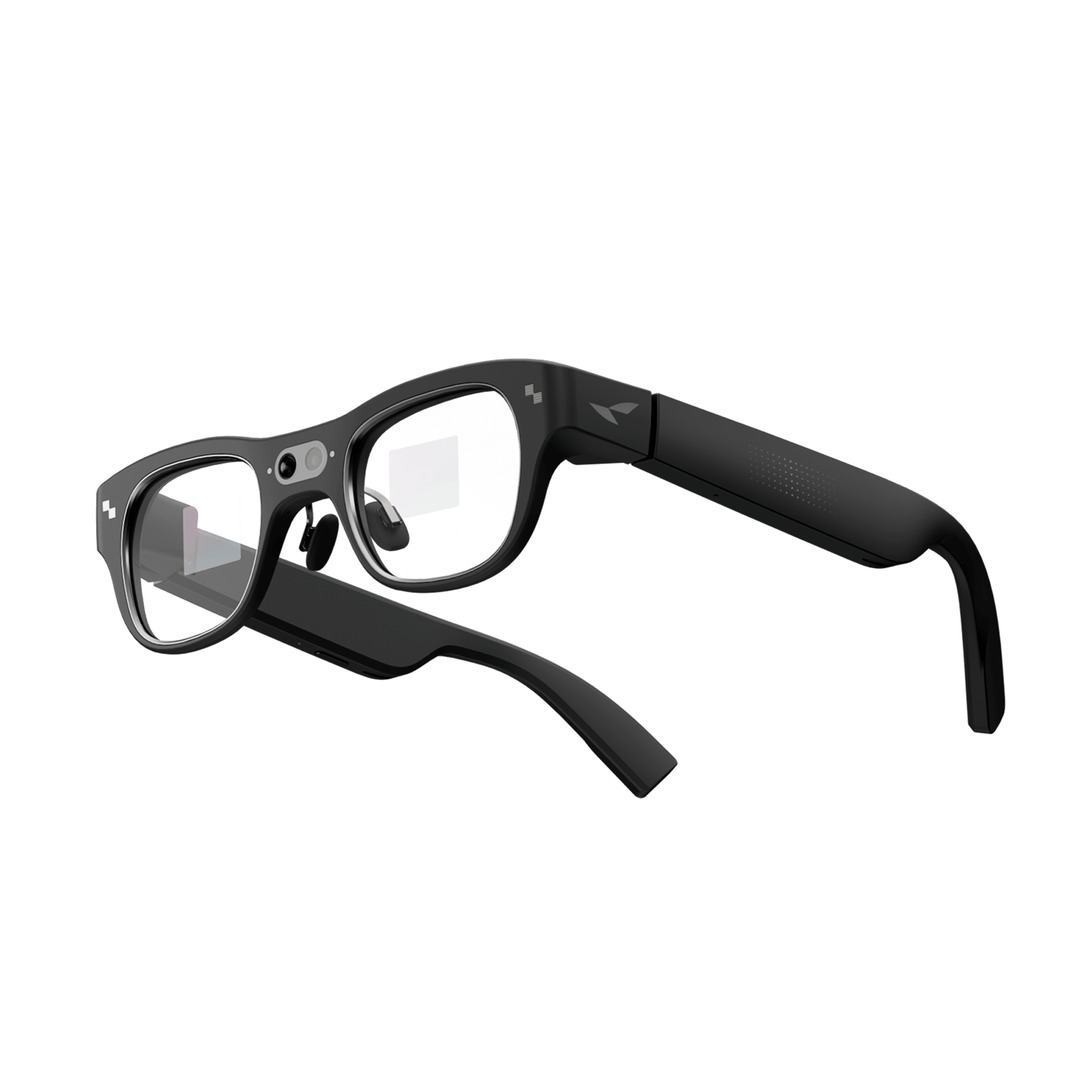
Independent reviewers describe the frame as thick and squarish, bulkier than a typical pair of glasses or sunglasses. Coverage from TechRadar, Tom's Guide, and Tom's Hardware points to thicker-than-normal temples that house the battery, speakers, and other electronics. Tom's Guide's own headline for its review bluntly captured that same trade-off, pairing praise for what the X3 Pro can do with a blunt verdict on how it looks.
Skarred Ghost's hands-on account paints a more forgiving picture of how the X3 Pro actually reads to strangers. After wearing the glasses through a full day at a tech conference, the reviewer wrote that no one gave him a second look or "weird stares," and that people around him seemed to register the glasses as an unusually bulky pair of everyday eyewear rather than a piece of recording tech. That's a genuinely encouraging real-world data point on the "will people clock this as a gadget" question, though it's one detailed account from one event, not a guarantee for every room you wear them in.
Comfort is a separate question from visual bulk, and the picture there is less forgiving. The same Skarred Ghost review that found bystanders unbothered also reported real discomfort at the point where the frame rests on the nose, enough that the reviewer needed to take breaks after a few hours of continuous wear, something he partly attributed to his own head shape rather than a universal flaw in the design. In other words, the X3 Pro can read as an ordinary, if large, pair of glasses to the people around you while still not feeling that way to the person wearing it for hours at a stretch.
A few other appearance-related details worth knowing before buying:

On the camera itself: the X3 Pro uses a 12MP main sensor (Sony IMX681) plus a second monochrome camera used only for spatial tracking, not photography. RayNeo's own recording-time figures don't fully agree with each other, ranging from roughly 9 minutes per clip cited on one RayNeo blog post to a 36-minute continuous-recording figure on RayNeo's official spec page, with an independent Notebookcheck test measuring closer to 30 minutes. Treat any single number as approximate rather than a guaranteed result. It's priced at $1,299 and currently in stock.
If a normal appearance is your top priority and you don't need a display, camera-only smart glasses are the category designed around that goal from the start. Several manufacturers, including legacy eyewear brands partnering with tech companies, build these on top of existing sunglasses and optical frame designs rather than engineering a new silhouette around display hardware.
That approach has real advantages: lighter weight (commonly in the 35 to 55 gram range), thinner temples, and frame shapes that map directly onto styles people already wear. The trade-off is equally real: no AR overlay, no heads-up navigation, no in-view translation text. You get a camera and, in most cases, audio features like calls and music, without anything projected into your field of view.
RayNeo doesn't currently sell a camera-only, no-display model. Its X3 Pro is the company's only active camera-equipped product, and it's built around the AI-and-display approach described above. If a slim, display-free profile is the deciding factor for you, that's a real limitation of RayNeo's current lineup worth knowing before you compare specs further.
There's also a smaller, distinct product category worth knowing about if "looks completely normal" is genuinely your only requirement: covert eyewear with a camera lens hidden in the bridge or temple, sometimes down to an opening around 1.5mm, small enough to be effectively invisible at conversation distance.
These products generally aren't built by the same companies making AI smart glasses, and they come with a different set of trade-offs. Image quality is typically lower (often 720p to 1080p at best, with no image stabilization or AI processing), there's usually no companion app, translation, or navigation feature, and the entire selling point is that the person you're recording has no way to know it's happening.
That last point matters beyond this one category, though, and it's easy to treat "looks like normal glasses" as an unqualified win. It isn't, at least not for everyone around you. The more a camera blends into an ordinary-looking frame, whether that's a fully covert design or just a camera-equipped pair of everyday glasses, the less obvious it is to bystanders that they might be on camera. For the wearer, that means fewer awkward questions and less self-consciousness about wearing visible tech. For everyone else in frame, it means less opportunity to notice and opt out, and recording someone without their knowledge or consent raises real privacy and legal questions that vary by state and country: some jurisdictions require consent from only one party in a conversation, others require it from everyone present.
A covert design removes the one visual cue (an obviously camera-shaped device) that might otherwise prompt a conversation about consent, which is precisely what separates it from AI smart glasses like the X3 Pro. RayNeo hasn't published whether the X3 Pro has a recording indicator light, and camera-only models vary by manufacturer on this same point, but the X3 Pro and its category are still visibly electronic devices even without one, not something engineered specifically to hide the fact that it's recording. Whatever product you're using, if you're planning to record around other people regularly, whether at a family dinner, a store, or a public event, being upfront with people nearby is worth doing regardless of how normal the glasses look or what the hardware does.
| AI + AR display glasses with camera (e.g., RayNeo X3 Pro) | Camera-only smart glasses, no display | Covert hidden-camera eyewear | |
|---|---|---|---|
| Typical weight | ~76g | ~35–55g | Varies, often close to standard eyewear weight |
| Frame profile | Thick, squarish, visibly electronic | Closer to standard sunglasses/optical frames | Designed to be visually indistinguishable from plain glasses |
| Onboard display | Yes (AR overlay, navigation, translation text) | No | No |
| AI features | Yes (assistant, translation, visual queries) | Varies by model, sometimes call/music/voice assistant only | Typically none |
| Camera lens visibility | Visible housing in the browline | Visible, small housing near hinge/bridge | Hidden opening, often near-invisible |
| Image quality expectations | 12MP, casual/social-sharing quality | Casual, social-sharing quality | Generally lower resolution, no stabilization |
| Best fit for | Users who want AI/display features and accept a bulkier look | Users who want a camera and a look close to ordinary eyewear | Not a general recommendation given the privacy and legal concerns involved |
A normal-looking silhouette matters most if you:
A display-equipped device like the X3 Pro is worth the bulkier look if you:
Neither of the above is the right call if you:
Can I buy glasses that record video and look exactly like normal glasses? Not with current AI or camera-only smart glasses; all of them are still identifiably electronic up close, even the lighter, display-free designs. Only covert hidden-camera eyewear is built to be visually indistinguishable from plain glasses, and that comes with lower image quality and real privacy and legal considerations, since the entire point is that people around you can't tell it's recording.
Does the RayNeo X3 Pro have a visible camera lens? Yes, its 12MP camera sits in a visible housing along the browline of the frame, similar to how most camera-equipped glasses expose the lens rather than hiding it.
Why does the RayNeo X3 Pro look bulkier than plain sunglasses? It carries a MicroLED waveguide display, chip, battery, and speakers inside the frame, in addition to the camera. That combination requires more physical space than a camera-only design, which is why it weighs about 76 grams and reads as visibly electronic to most reviewers.
Does RayNeo make a camera glasses model without a display? RayNeo's current camera-equipped model, the X3 Pro, pairs its camera with a display and AI features by design, so it can show navigation, translation, and framing overlays alongside what it records rather than only capturing footage. That combination is the point if you want those on-glass features; if a slim, camera-only profile without a display matters more to you, the camera-only category described above is the better fit to shop right now instead of waiting on RayNeo for that specific form factor.
Is there a light that shows when camera glasses are recording? It varies by product, and RayNeo hasn't confirmed this for the X3 Pro. Regardless of any indicator light, the consent rules described above still apply: most US states and many countries require at least one party's consent to record, and some require everyone present to agree, so a normal-looking frame doesn't change what your local law requires.
For current specs, pricing, and availability, see the X3 Pro product page, or use the comparison table above to weigh all three categories side by side.







Share:
Which Smart Glasses Support Transition Lenses for Indoor and Outdoor Use?
Smart Reading Glasses Explained: What Actually Helps You Read and See Better