


$429.00

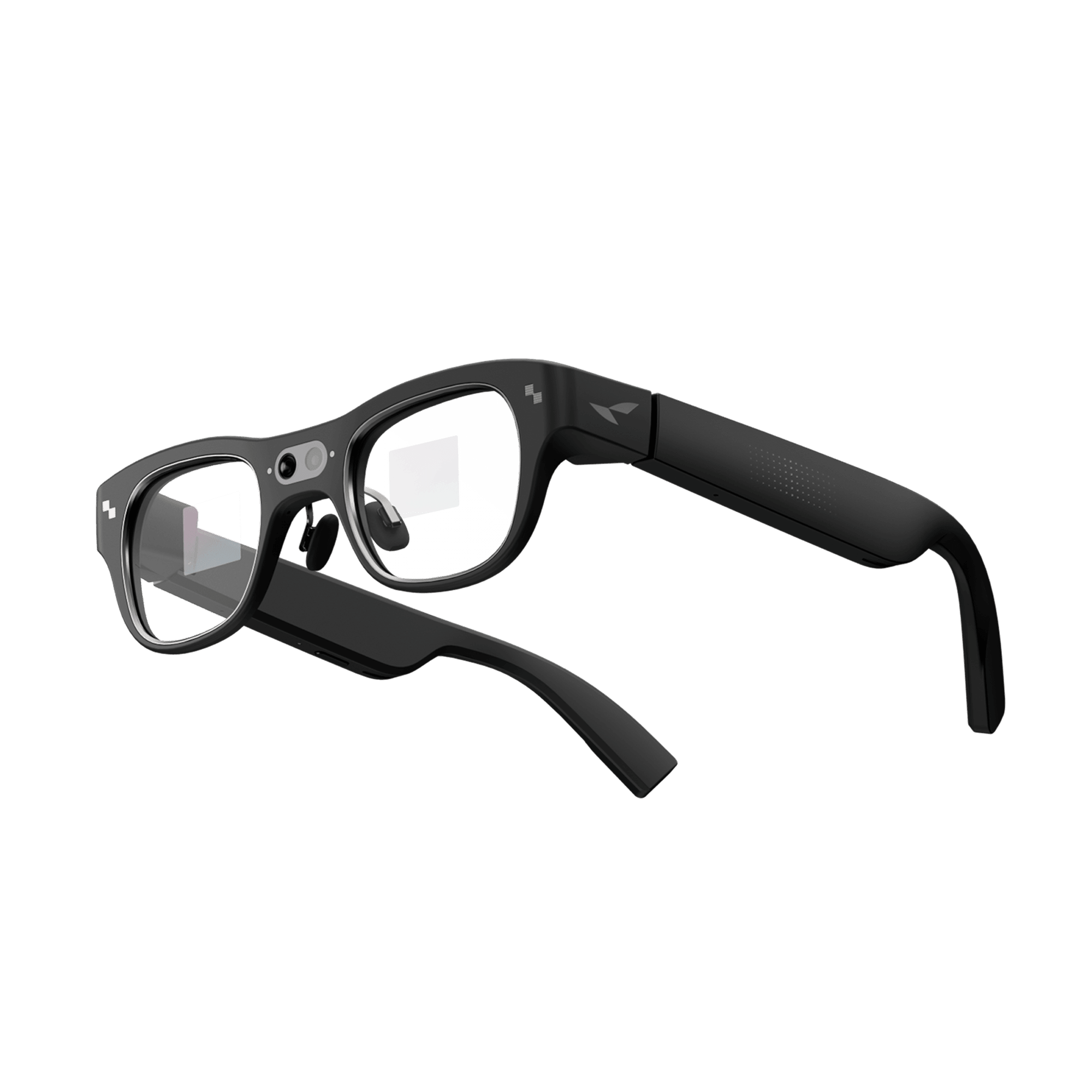
RayNeo's own product naming makes this harder to figure out than it should be: nothing about "Air series" versus "X series" tells you which models can actually record video, and the product pages don't spell it out clearly either.
Here's the one distinction that matters: only the RayNeo X3 Pro has a camera. It's built around a 12MP main sensor plus a second monochrome camera used for spatial tracking, and it's currently the only model in RayNeo's active lineup that can capture photo or video. Every model in the Air series (Air 2, Air 2s, Air 3s, Air 3s Pro, Air 4 Pro) is a display-only AR glasses line, built to project a private screen rather than to record anything. If your goal is hands-free video, the X3 Pro is the option that does that; the Air series was never designed for it.
RayNeo's previous camera-equipped model, the X2, is worth knowing about too, even though it's currently listed as sold out (more on what that status does and doesn't tell you further down). This guide breaks down what each model is built to do, not just what its name suggests.
Two different product categories get lumped together under "smart glasses," and the mix-up is where most of the confusion in RayNeo's lineup comes from.
Maybe you're planning a flight and want a private movie screen instead of squinting at a seatback display. That's the entire reason the Air series exists: a wearable monitor that mirrors your phone, laptop, or handheld gaming console, with no image sensor onboard to capture anything back. There's no camera to configure and nothing to record; the glasses just show you a screen.
Now compare that to wanting hands-free footage of a soccer game or a hiking trail. That requires an actual camera sensor built into the frame, which is what turns the X3 Pro, and previously the X2, into point-of-view cameras as well as AI assistants. That camera also enables visual AI queries, like asking the glasses what you're looking at, and in the X3 Pro's case, live translation through Gemini.
The two categories rarely overlap in practice. A frequent flyer who wants a bigger in-flight screen has no real use for a camera. A parent trying to catch a goal without fumbling for a phone has no use for a large virtual display. Match the category to what you're actually trying to do, rather than picking whichever one sounds more advanced.
| Model | Camera? | Camera Specs | Availability (as of Aug 2026) | Core Use Case |
|---|---|---|---|---|
| RayNeo X3 Pro | Yes | 12MP main camera (Sony IMX681) capturing 12MP photos and video up to 4K/3K, per RayNeo's official launch page. A separate RayNeo blog post lists top video resolution as 1440p instead, so RayNeo's own pages don't fully agree on this number; plus a second monochrome camera dedicated to spatial tracking (SLAM/6DoF), not photography | Available, $1,299 | AI-powered AR display + hands-free POV photo/video capture |
| RayNeo X2 | Yes | 16MP camera, video up to 1080p, with anti-shake stabilization for handheld-free filming | Sold Out | Previous-generation AI+AR glasses with camera |
| RayNeo Air 4 Pro | No | N/A | Available, from $299 | Newest, priciest Air model; large HDR10 virtual screen for movies, gaming, and productivity on the go |
| RayNeo Air 3s Pro | No | N/A | Available, from $279 | Mid-tier Air model; same display-only design as Air 4 Pro at a lower price point |
| RayNeo Air 3s | No | N/A | Available, $199 (regular $269) | Lowest-priced current Air model; entry point into the AR display experience |
| RayNeo Air 2s | No | N/A | Available, $159 (regular $299) | Previous-generation Air model, discounted; for buyers prioritizing price over the newest hardware |
| RayNeo Air 2 | No | N/A | Sold Out | Original Air model, now out of stock; kept here as a reference point for how the line started |
Prices and availability reflect RayNeo's official site at the time of writing and are subject to change; confirm current pricing and stock on the official product pages before purchasing.
As the table shows, the camera is not a feature that gets added on top of the Air series. It's a defining difference between two separate product lines. If a listing doesn't mention a camera, treat that as confirmation it doesn't have one, rather than assuming it's an omission.
The X3 Pro is RayNeo's flagship AI+AR glasses, and the camera is the biggest thing separating it from the Air series. Here's what it can and can't do:
Once you're past the camera itself, the rest of what matters is software and how it connects to your phone:
The X2 was RayNeo's previous camera-equipped model, now listed as sold out on RayNeo's official site, with no public word from RayNeo on whether it plans to restock the X2 or replace it with a successor. Treat "sold out" as a snapshot of current availability rather than a confirmed discontinuation. It's still useful context if you're researching RayNeo's lineup or considering a used unit. In practice, its specs translated into a specific way of shooting: a 16MP sensor for framing the shot, with an anti-shake system that smoothed out footage while walking or running instead of requiring you to hold a phone steady with your hands. A voice command triggered the camera, so capturing a moment didn't mean reaching for anything, and the built-in GPT-4V assistant could act as a translator or answer visual questions on the spot. If you're trying to identify a secondhand unit, the images below show the glasses, cable, and charging case as they shipped in original retail packaging.


If you're comparing specs against the current X3 Pro: the X3 Pro's 12MP sensor and 4K photo capability represent a step up in stated resolution over the X2's 16MP-but-1080p-video setup, though megapixel count alone doesn't fully describe image quality; sensor size, processing, and video bitrate all factor in. RayNeo hasn't published a formal side-by-side comparison of the two sensors, so treat this as a directional upgrade rather than a lab-tested resolution jump.
The Air series is easiest to understand by what it does, not by what it lacks. These are AR display glasses: a private, portable screen that connects to a phone, laptop, gaming console, or streaming device. Air 4 Pro, for example, is built around a large virtual screen with HDR10 support, aimed at travelers who want a big-screen movie or gaming experience without carrying a monitor.

Air 3s Pro, shown above, is a representative example of the Air line's design: a display-focused pair of glasses meant to be paired with an existing device, with no camera module built in.
For watching content, gaming, or working on a bigger virtual screen while traveling, an Air series model will likely serve you better than the X3 Pro. You'd otherwise be paying extra for a camera you won't use, along with the added weight and complexity that comes with it.
Match the decision to what you plan to do with the glasses, not to which one looks more advanced on a spec sheet.
If hands-free recording is the goal, the X3 Pro is the model built for it, currently the only one in RayNeo's lineup with a camera.
If what you want is a private, large screen for movies, shows, or gaming on the go, look at the Air series instead. A camera would add cost and weight without adding value here, since none of those use cases involve capturing anything.
Visual AI, meaning asking your glasses to identify or explain something you're looking at, also requires a camera, since the AI needs to see what you see. Only the X3 Pro supports that today.
Price often settles the question on its own. The Air series starts well below the X3 Pro's $1,299, so if budget matters more than camera features, an Air model is the more cost-effective route.
One thing neither line can answer yet is how it holds up in rain, heavy sweat, or dust. RayNeo has not published an official IP (ingress protection) rating for the X3 Pro or the Air series, so there's no certified number to compare. Treat durability in wet or dusty conditions as an open question rather than assuming any level of protection.
RayNeo isn't the only company making glasses with a built-in camera. This is a growing product category, with several brands competing on camera quality, form factor, and price. If you're comparing across brands rather than just within RayNeo's lineup, look specifically at: sensor resolution and video resolution, whether the device includes a display or is camera-only, battery life during active recording, weight and how it sits on your face for extended wear, and whether a companion phone is required to use core features. This guide compares models within RayNeo's own lineup, where pricing, specs, and availability are directly verifiable. If you're weighing options from other brands, apply the same criteria above and check each manufacturer's official pages directly, since specs and pricing across this category shift often.
Does RayNeo make glasses with a camera? Yes. The RayNeo X3 Pro is currently the only camera-equipped model RayNeo actively sells. The RayNeo X2 previously had a camera but is now sold out.
Do any RayNeo Air series glasses have a camera? No. Air 2, Air 2s, Air 3s, Air 3s Pro, and Air 4 Pro are all display-only AR glasses with no camera hardware.
What's the difference between AR display glasses and camera glasses? AR display glasses project a virtual screen for watching or working on content from a connected device; they don't capture anything. Camera glasses have an image sensor that lets you take photos or record video from the wearer's point of view, in addition to or instead of a display.
Can the X3 Pro's camera replace my phone's camera? It's built primarily for quick, hands-free point-of-view capture, not as a primary photography or videography tool. Image quality and low-light performance haven't been shown to match a modern flagship smartphone camera.
Is the RayNeo X2 still available to buy new? No, it's currently listed as sold out on RayNeo's official site, with no public word yet on a restock or successor model. Check the product page for the latest status before assuming it's gone for good.
Does the X3 Pro work with iPhone? Yes, it pairs with a companion app on both Android and iOS. RayNeo's own pages don't fully agree on the minimum OS version needed, so if you're on an older phone, confirm compatibility with RayNeo support before buying.
If the reason you're reading this is "I want glasses that can record video," the X3 Pro is currently RayNeo's only model that fits, and it's worth the trade-offs (higher price, added weight from the camera hardware) if you plan to use the point-of-view capture and visual AI features regularly. If a private screen for movies, gaming, or productivity is the real goal, skip the camera question entirely and look at the Air series, where you'll pay less for a device purpose-built for that job.







Share:
Which Glasses Have a Built-In Camera for Hands-Free Video Recording?
Camera Glasses You Can Trust: How Reliable Are Smart Glasses With a Built-In Camera?