

$429.00

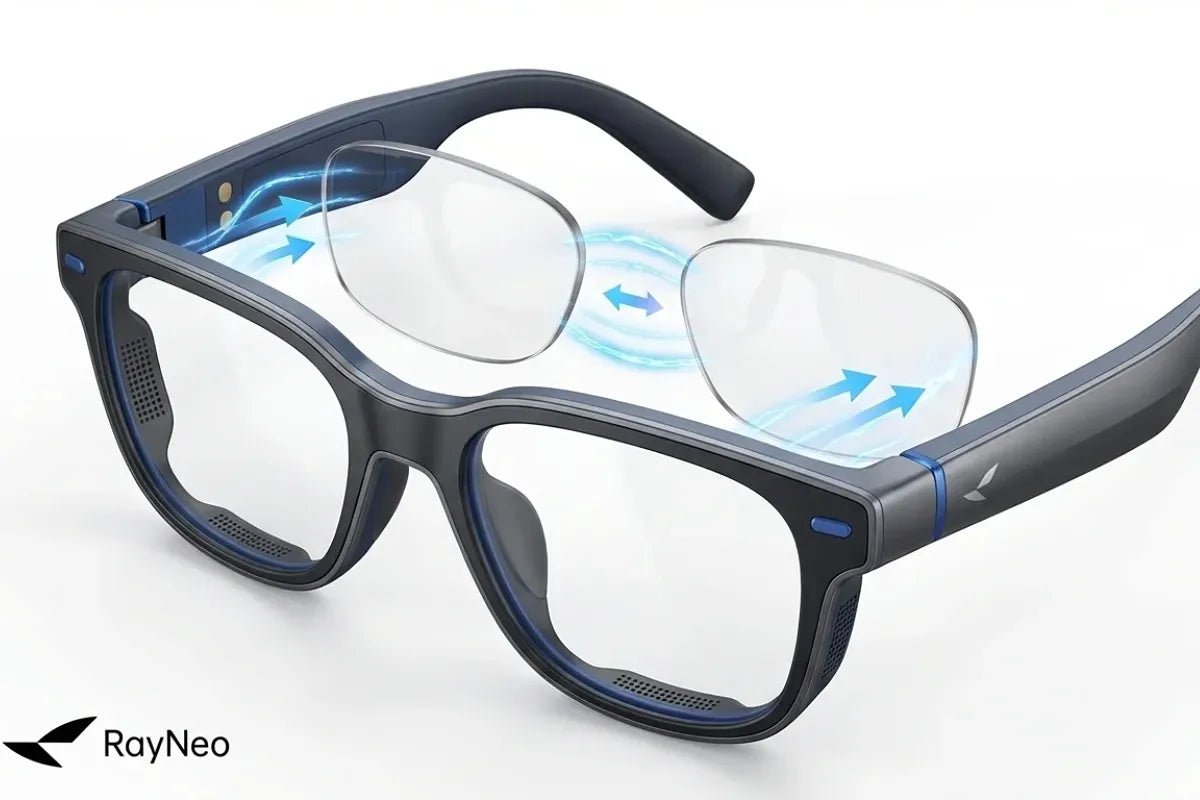
Prescription smart glasses make wearable displays more practical for people who already rely on corrective eyewear. Instead of choosing between a clear virtual screen and regular glasses, compatible models can work with custom prescription lenses or removable optical inserts.
That matters because refractive errors are common. The U.S. National Eye Institute reports that more than 150 million Americans have a refractive error, including nearsightedness, farsightedness, astigmatism, or presbyopia. For these users, display quality alone does not guarantee a sharp viewing experience. Optical correction still needs to match the wearer’s vision.
This guide explains how prescription support works, what specifications to check, and how to choose a setup for navigation, translation, AI assistance, work, travel, and everyday smart-glasses use.

Yes. Many smart glasses can support prescription vision correction, although the method varies by model.
Some use removable prescription inserts behind the front lenses. Others accept custom prescription lenses in the main frame. A few can be worn over regular glasses, though this may add bulk and reduce comfort.
The best option depends on prescription compatibility, lens alignment, and whether the frame keeps the virtual image centered.
If you already wear glasses, use a current prescription instead of relying on an old pair. Regular eye exams help confirm that your correction remains accurate.
Prescription smart glasses combine two optical functions. The smart-glasses system presents digital information, while the prescription lens corrects the wearer’s refractive error so that the content can be seen clearly.
Smart glasses with prescription support can include several product types, from audio-focused eyewear to AR display glasses that project a large virtual screen. Prescription support becomes especially important with display-based models because text, subtitles, menus, and fine image details can make blur more noticeable.
When comparing prescription smart glasses with display technology, it helps to separate vision correction from display performance.
A sharper Micro-OLED panel, higher contrast ratio, or faster refresh rate improves the electronic image. It does not correct myopia or astigmatism. Prescription optics correct how light focuses for the individual wearer.
Refractive errors occur when the eye does not focus light correctly on the retina. Eyeglass lenses compensate by bending light so vision appears clearer. The same basic principle applies when a prescription insert is placed in the optical path of an AR display. The National Eye Institute overview of refractive errors provides more detail on how refractive errors affect focus.
Prescription lenses for smart glasses generally use one of three approaches.
A prescription insert is a small secondary frame that holds corrective lenses inside the smart glasses. It usually clips or mounts behind the front optics.
This keeps the display hardware unchanged while allowing the prescription portion to be customized separately. If a prescription changes later, replacing the insert can also be simpler than replacing the entire device.
Some smart eyewear can be ordered with corrective lenses fitted directly into the main frame. This can create a more conventional glasses-like appearance and removes the extra layer of a clip-in insert.
Compatibility depends on the frame design and supported prescription range, so users with stronger or more complex prescriptions should verify lens support before buying.
Contact lenses can work well for people who already use them. Wearing ordinary glasses underneath display glasses is another possibility, but only when the frame provides enough clearance.
However, stacked frames can increase pressure around the nose and temples and may make display alignment harder. For frequent viewing, a purpose-built prescription solution is generally more streamlined.
If distant objects look blurry without glasses, a wearable virtual screen may also appear soft depending on its optical focal distance. Astigmatism can make text or edges look distorted, while other refractive errors create different focusing problems.
The National Eye Institute identifies myopia, hyperopia, astigmatism, and presbyopia as four common refractive errors. Eyeglasses are a standard correction method, but the lens solution needed for a specific smart-glasses display depends on its optical design.
Prescription support is especially useful if you plan to read navigation prompts, view live translations, check notifications, interact with AR apps, or use AI features throughout the day.
Choosing a compatible frame involves more than asking whether prescription lenses are available.
Confirm whether the glasses use an insert, direct prescription lenses, adjustable diopter controls, or another method. Do not assume one system can substitute for another.
When comparing smart glasses with prescription lens support, also check whether the insert is included or ordered separately and whether replacements are available if your prescription changes.
Use a current written prescription from an eye-care professional. Depending on your vision, it may include sphere, cylinder, axis, and other values needed to make the lenses.
Do not assume a generic diopter adjustment is enough if you have astigmatism or a more complex prescription. Also check whether the device calls for distance, near, intermediate, single-vision, or multifocal correction.
This distinction matters because AR displays have their own optical focal setup. The type of corrective lens needed for the virtual screen may therefore differ from the lenses you normally use for reading or other near-distance tasks. Compatibility can also vary by model. For example, users looking for RayNeo Air 4 Pro prescription lenses should verify the supported prescription solution for that specific model rather than assume the same lens setup works across different smart glasses.
Prescription accuracy matters, but physical alignment matters too. Nose-pad position, temple angle, and eye position can affect whether the virtual screen looks centered and evenly sharp.
Before assuming the prescription is wrong, adjust the frame carefully. If one eye remains blurry, check that the insert is seated correctly and verify the prescription.
After vision correction, consider how clearly the display presents text, navigation cues, translations, notifications, and other glanceable information. Brightness, contrast, field of view, and display transparency can all affect how easy the content is to read while still seeing the surrounding environment.
For everyday AR use, the goal is not simply to maximize screen size. A well-balanced display should keep useful information visible without unnecessarily blocking the real-world view.
Some smart glasses work mainly as external displays, while others include their own processor, storage, wireless connectivity, cameras, and operating system. Consider whether you want a companion display or a more self-contained device for AI assistance, navigation, translation, and apps.
Also check Wi-Fi, Bluetooth, phone compatibility, app support, and whether specific functions require an internet connection or companion device.
The exact process varies by brand and optical provider, but it usually follows the same pattern:
Avoid ordering from only the power printed on an old pair of glasses. The goal is not simply to make the display “stronger.” It is to match the correction to the wearer and the optical setup of the device.
For users who need vision correction but still want a full-color AR experience, the RayNeo X3 Pro AI+AR Glasses combine prescription support with a binocular display designed for everyday information, navigation, translation, and AI assistance. Custom prescription lenses can be ordered separately through RayNeo’s official prescription lens partner, making the X3 Pro a practical option for users who do not want to wear regular glasses underneath their smart glasses.
Beyond prescription support, the X3 Pro also combines AI assistance, real-time translation, and heads-up navigation, making it particularly suitable for travel, communication, and everyday hands-free AR use.

Even the correct prescription cannot compensate for poor alignment. Adjust the nose pads and temple angle until the complete image is visible and centered.
Use a comfortable brightness level indoors instead of automatically selecting maximum brightness. For extended use, take regular breaks and adjust the fit if you notice eye fatigue or pressure around the nose or temples.
If you continue to experience blurred vision, headaches, double vision, or persistent eye strain after adjusting the fit, have your prescription or eye health checked by an eye-care professional.
Finally, keep both the display optics and prescription insert clean. Fingerprints and smudges can reduce perceived contrast and make a correctly focused image look hazy.
The best prescription smart glasses should solve two problems at once: provide appropriate vision correction and deliver useful digital information in a form that fits everyday activities. Start with a current prescription, confirm how the glasses handle corrective lenses, and then compare display design, fit, AI features, controls, and comfort.
Possibly, but compatibility should be verified for the specific glasses and optical provider.
Do not assume that the prescription range supported by one pair of smart glasses applies to every model. Stronger prescriptions may also require high-index lenses to reduce thickness and weight.
For an -8.00D prescription, confirm the supported range with the prescription-lens provider before ordering.
Not necessarily. Reading glasses primarily correct near vision, while smart-glasses displays create a virtual image at an optical distance rather than placing a physical screen a few centimeters from your eyes.
Some smart-glasses displays present a virtual image at a set optical distance rather than placing a physical screen directly in front of the eyes. If your distance vision is clear and you only require near correction, you may not need the same prescription for the virtual display. Your eye-care professional or optical provider can help determine which correction is appropriate.
Custom prescription lenses can correct astigmatism when the insert and optical provider support the required cylinder and axis values.
Unlike simple spherical correction, astigmatism requires a lens that accounts for the specific shape and orientation of the refractive error. The National Eye Institute explains how astigmatism affects vision and how corrective lenses are used to manage it.
Yes. Contact lenses correct refractive errors directly at the eye and can allow smart glasses to be worn without a prescription insert.
If you already use contacts comfortably, this can be a simple option. Follow your normal contact-lens care routine and speak with an eye-care professional if extended screen use causes persistent dryness, discomfort, or blurry vision.







Share:
What Are the Best Smart Glasses in 2026? The Ultimate Buyer's Guide
What Are the Best Smart Glasses Right Now? The Ultimate 2026 Guide