

$429.00

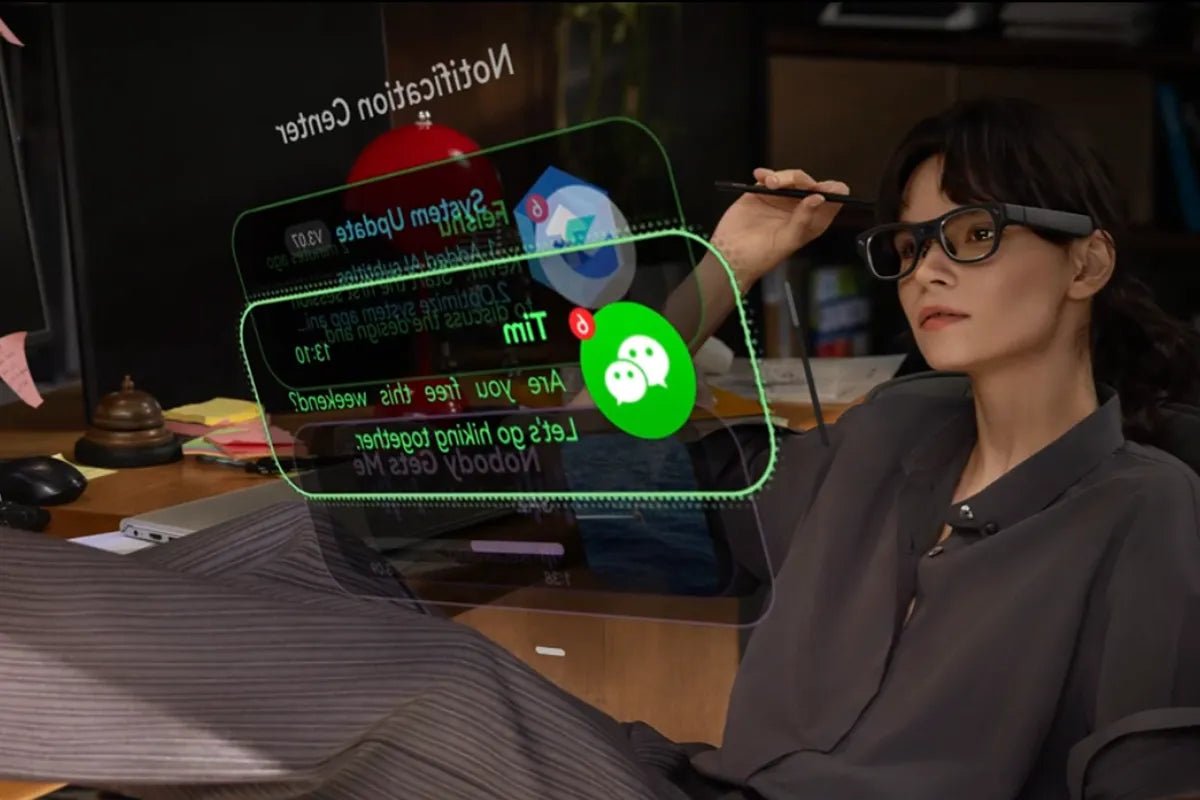
Modern life moves fast, and staying connected often feels like a constant struggle with your smartphone screen. A smart glasses notification display offers a simple way to view alerts without interrupting your day. Instead of constantly grabbing your phone, you see vital details right in your line of sight.
This guide explains how this wearable display technology works, why it helps, and what features matter most when picking the right pair.

Smart glasses with built-in displays change how you receive daily updates. Here is a quick look at how they simplify your digital routine:
Smart eyewear uses miniature projector optics to bring digital information to life. A tiny engine inside the frame beams images onto or through the lens. This creates a clear floating visual right inside your direct line of sight.
Most modern pairs use waveguide lenses or micro-projectors. These systems guide light beams directly toward your eyes while keeping the lenses almost clear. Surrounding people see normal specs, but you view a sharp, private heads-up screen. Display visibility depends on factors such as brightness, optics design, ambient lighting, and display settings.
Your smart glasses pair with your phone via Bluetooth to mirror essential alerts. You pick what pops up, so your visual field stays clean and uncluttered.
Checking your phone repeatedly breaks your concentration and interrupts personal connections. Wearable visual displays solve this issue by offering quick information bursts.
You never have to dig through pockets or open bags just to see who sent a message. A quick glance tells you if an alert needs fast action or if it can wait. This saves time, keeps your physical hands completely free, and stops you from getting sucked into endless social media feeds.
Shifting your digital alerts from a handheld screen to your eyewear alters your daily habits for the better.
Glancing down at a phone screen during a face-to-face chat can feel rude. Eyewear displays let you check time sensitivity silently. You can review your next calendar event or read an urgent work note without breaking your conversation flow.
Navigating a new city becomes effortless when directions sit right in front of you. You do not need to walk down busy streets holding a costly smartphone out in the open. Directional cues guide you seamlessly, keeping your eyes on surrounding traffic and footpaths.
Phones pull you into rabbit holes of apps and notifications. Smart eyewear acts as a helpful buffer. By showing only key alerts, you stay reachable while drastically cutting down overall phone screen time.
Both devices keep you connected, but they deliver digital information in vastly different ways.
| Feature | Smartphones | Smart Glasses |
| Notification Delivery | Vibrates in pocket or hand | Floating heads-up display |
| Interruption Level | High (pulls full visual focus) | Low (subtle, quick glances) |
| Physical Effort | Requires holding device | hands-free viewing |
| Privacy from Screen Peepers | Visible to nearby people | Private to the lens wearer |
Smartphones handle heavy typing, detailed reading, and photo viewing brilliantly. However, they demand your hands, your touch, and your full visual focus. Every vibration tempts you to unlock the phone and scroll endlessly.
Eyewear displays deliver rapid alerts directly to your sightline. You process data in a split second and return to your physical task immediately. It can provide a quicker way to check selected information without opening a phone.
Choosing the best smart glasses with display requires reviewing hardware specs, daily battery stamina, and visual performance.
Look for high brightness levels so text remains easy to read under bright direct sunlight. Crisp contrast and high transparency keep the digital display crisp without blocking your natural view of the world.
Lightweight frames prevent nose bridge ache and ear fatigue over long wear sessions. Make sure the battery lasts through your typical daily routine without needing constant recharges.
Choose glasses that sync easily with your smartphone ecosystem and support the apps you use every day. Some smart glasses integrate AI-powered features such as voice assistance, translation support, and information summaries, depending on the model and software ecosystem.
When choosing AI-enabled devices, factors such as reliability, transparency, and responsible AI practices can help users make more informed decisions, following principles outlined in the NIST AI Risk Management Framework.
Good companion apps let you filter which apps can send visual alerts. You should also check for physical privacy features, such as minimal outer light leakage, so strangers cannot read your floating text.

The RayNeo iO AI Glasses bring AI assistance into everyday eyewear with an ultra-transparent smart glasses notification display that keeps important information visible without constantly taking out your phone. Users can view schedules, weather updates, directions, emails, reminders, and AI suggestions directly in their field of view through the lens while maintaining a natural glasses experience.
Designed for professionals, travellers, and creators, RayNeo iO supports real-time translation, AI voice summaries, and an AI teleprompter for meetings, presentations, and multilingual communication.
Key Features:
Upgrading to a smart glasses notification display helps you stay informed without staring down at a screen. You catch important alerts, navigate easily, and manage busy days while keeping your hands totally free. Lightweight designs like the RayNeo iO AI Glasses show how comfortable and stylish smart eyewear can be. Step into hands-free living and enjoy a balanced digital lifestyle today.
Yes, several AI-powered smart glasses feature built-in visual displays. Advanced models use ultra-compact MicroLED tech and transparent waveguide optics embedded directly into the lenses. This subtle setup projects floating text, live AI translations, and smart prompts right into your field of view without blocking your natural surroundings. It lets you interact with AI tools discreetly while keeping your hands completely free.
Yes, display-equipped smart glasses overlay real-time navigation directions directly in your sightline. Using heads-up display technology, tiny projectors beam turn-by-turn arrows, street names, and distance cues onto your lenses. You can follow live walking or driving routes seamlessly without constantly holding up a smartphone. It can help users access navigation information without repeatedly checking a smartphone.
Yes, smart glasses notification displays are designed to provide a more personal viewing experience. They utilize directional optical waveguides that channel light directly into the wearer's eyes, minimizing light leakage to the outside world. Nearby people usually just see standard eyewear lenses. Your messages, caller IDs, and personal alerts stay floating privately in your direct line of sight, safely protected from curious onlookers.







Share:
AR Glasses or a Portable Monitor for Travel Work? Here's How to Actually Decide
Stay Connected and Keep Phone in Pocket with Smart Glasses