

$429.00

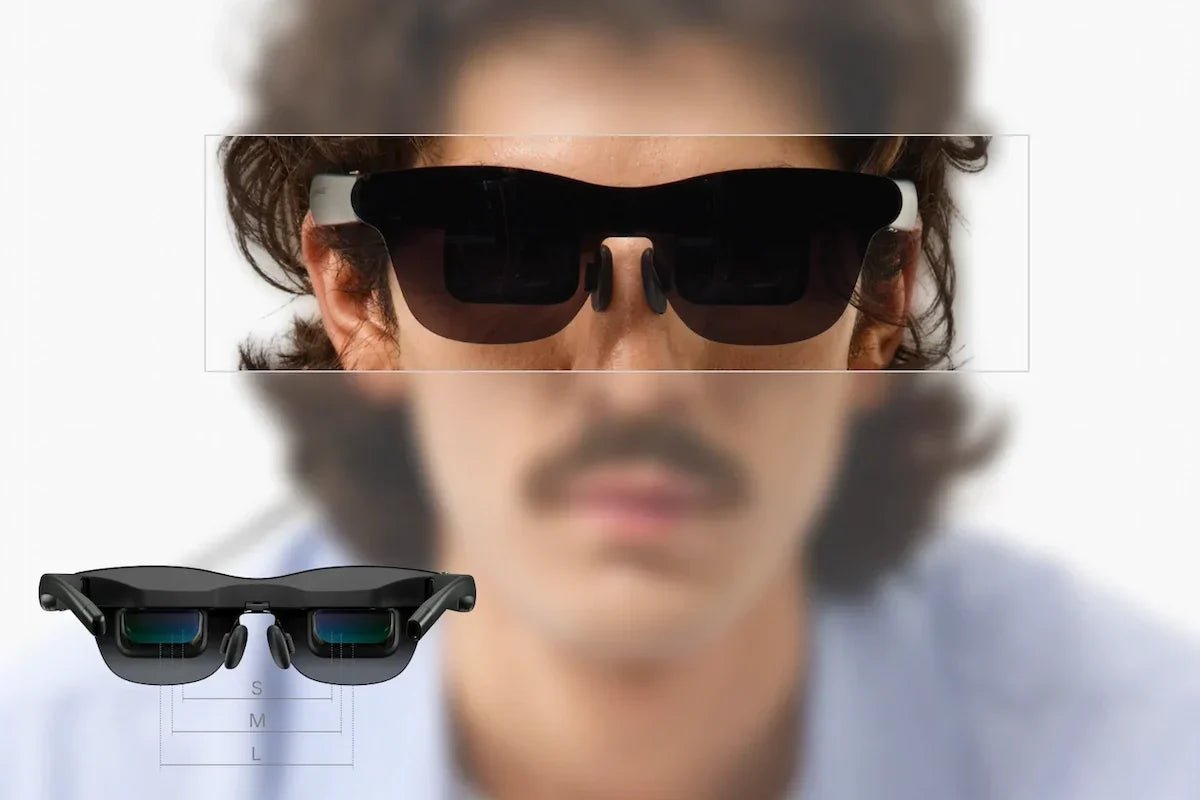
RayNeo GT Max is an AR display glasses model built for watching and gaming on a large virtual screen rather than for everyday AI assistance. It runs a 59-degree field of view, projects a virtual screen across three fixed presets topping out at 307 inches, and switches between two brightness modes depending on how the screen is anchored to your view. This article walks through every number on its spec sheet and explains what each one actually changes about the experience of wearing it.
All figures below come from RayNeo’s GT Max product page, current as of early October 2026. Pricing, promotions, and stock can shift, so double-check that page before you buy.
| Spec | RayNeo GT Max |
|---|---|
| Price | $429 list; $399 shown as the current checkout price under a launch offer, as shown on October 2, 2026 (promotional pricing, not a permanent price) |
| Weight | 78g |
| IPD size options | S (under 64mm) / M (64–67mm) / L (over 67mm), selected at purchase |
| Field of view (FOV) | 59° |
| Virtual screen sizes | 227” / 267” / 307” (default 267”) |
| Display panel | 0.6” SeeYa Micro-OLED, 1920x1080 |
| Pixels per degree (PPD) | 38 (RayNeo’s officially published figure) |
| Refresh rate | 120Hz (2D) / 60Hz (3D) |
| Brightness | 336 nits (Pinned mode) / 1,200 nits (non-Pinned) |
| Contrast ratio | 200,000:1 |
| Color coverage | 98% DCI-P3, 145% sRGB, ΔE<2 |
| Optical engine | Peacock Optical Engine 3.0 Max (Tandem Micro-OLED) |
| Chip | Vision 4000 + Zone 360 3DoF |
| Display modes | Standard / Movie / Eye Protection / Office |
| Spatial modes | Pinned / Steady / Follow |
| Audio | B&O-tuned quad speakers, spatial audio, Whisper Mode 2.0 |
| Eye care | OptiCare 3840Hz PWM dimming, TÜV SÜD certified |
| 3D support | Native 3D + AI 2D-to-3D video conversion (supported under RayNeo’s current conditions: iPhone 15/16/17 series over a direct USB-C connection, or an Android phone from 2022 or later with USB-C DisplayPort output and a Snapdragon 8 Gen 2/3/Elite/Elite Gen 5 or a newer supported Snapdragon flagship chip, using the RayNeo XR app; non-Snapdragon phones are currently unsupported; confirm on RayNeo’s GT series support page) |
| Dolby Vision | Requires separately sold Pocket TV Pro |
| Prescription lenses | Supported via Lensology |
| Warranty / returns | 30-day returns, 1-year warranty, 12% trade-in credit |
Field of view measures how much of your vision the virtual screen fills, not the screen’s physical size. GT Max’s 59-degree FOV is wide enough that the projected image occupies a noticeable chunk of your central and near-peripheral vision, closer to sitting in a mid-to-front theater row than watching a screen across a room.
That matters most for video and games, where a wider FOV makes the picture feel like it surrounds more of what you’re looking at instead of sitting as a framed rectangle off to one side. It matters less for reading text or working in a spreadsheet, where the field of view itself doesn’t change how sharp individual characters look. That part comes down to pixels per degree, covered further down.
GT Max doesn’t project a single fixed screen size. It steps through three presets: 227 inches, 267 inches, and 307 inches, with 267 inches as the default. These are diagonal measurements of the perceived screen, the same way a TV’s screen size is advertised, not a measurement of anything physical in front of your eyes.
Think of the three presets as fixed seats in a theater rather than a zoom slider you dial to an arbitrary number. Switching between them changes how much of your field of view the content fills: the 307-inch setting pushes the image toward the edges of what GT Max’s 59-degree FOV can cover, while 227 inches leaves more breathing room and can feel steadier during fast motion or when you’re moving your head.

RayNeo markets GT Max alongside a lighter sibling, RayNeo GT, which tops out at a 231-inch screen on a narrower 46-degree FOV. This article focuses on what GT Max’s own numbers mean rather than running a side-by-side with GT; a full spec comparison between the two is covered separately if that’s the decision you’re trying to make.
GT Max uses a 0.6-inch SeeYa Micro-OLED panel at 1920x1080 resolution and the Peacock Optical Engine 3.0 Max. RayNeo labels the display Tandem Micro-OLED. Full HD describes its pixel resolution; the virtual screen size describes apparent scale. These specifications do not establish a measured panel-lifetime advantage.
Resolution alone doesn’t tell you how sharp the image looks once it’s spread across a 59-degree field of view. That’s where pixels per degree comes in.
Pixels per degree (PPD) measures how many pixels are packed into each degree of your field of view, and it’s a better predictor of perceived sharpness than resolution by itself. RayNeo’s product page lists GT Max’s PPD at 38, which is the published figure to use rather than a value derived from dividing resolution by FOV.
At 38 PPD, text and fine UI elements are readable but not laser-crisp up close; you’ll notice individual pixels more than you would on a narrower-FOV display using the same panel. Video and games tend to hide this better than static text does, since motion and color make per-pixel edges less noticeable. If your main use case is long reading sessions or detail-heavy spreadsheet work, weigh 38 PPD against your tolerance for slightly softer text; if you’re mainly watching movies or playing games, it’s unlikely to be the limiting factor in how good the picture looks.
GT Max is rated for up to 120Hz in 2D and 60Hz in 3D. Refresh rate is the display’s update capacity, not the frame rate of every source. Motion also depends on the connected device’s output settings and the content’s frame rate; a 120Hz display does not automatically turn low-frame-rate video into 120fps content.
Choose the display mode and source output that suit the content. The published 2D and 3D rates do not by themselves establish an alternating-eye rendering mechanism or guarantee a particular gaming frame rate.
GT Max’s brightness spec isn’t a single number: it’s 336 nits in Pinned mode and up to 1,200 nits in non-Pinned modes (Steady and Follow). RayNeo’s product page lists both figures without explaining why Pinned mode’s ceiling sits so much lower than Steady and Follow’s; what’s confirmed is the numbers themselves and which mode each one belongs to, not the reasoning behind the gap.
Pinned mode anchors the virtual screen to a fixed angular position rather than letting it follow your head, and RayNeo positions it for focused, cinema-like viewing where you’re sitting still. Steady and Follow modes are built for less static situations instead, Steady for travel and commuting where some natural motion is expected, Follow for casual viewing where the screen tracks your head as you turn it.
For reference:
| Brightness reference | Nits |
|---|---|
| GT Max, Pinned mode | 336 |
| GT Max, Non-Pinned mode (Steady/Follow) | up to 1,200 |
These are mode-specific ratings, not an outdoor-readability test. Ambient light, the background visible through the optics, fit, and any compatible lens shade affect visibility. Select brightness for the current setting rather than using a phone-screen nits threshold to judge the glasses.
On top of the two base modes, GT Max offers 12 brightness levels plus 3 gain levels for finer manual adjustment within whichever spatial mode you’re using.
GT Max’s panel delivers a 200,000:1 contrast ratio, 98% DCI-P3 and 145% sRGB color gamut coverage, and a ΔE under 2 for color accuracy. In practical terms:
The 145% sRGB figure describes range, not precision: it means the panel can physically display a wider span of colors than the older sRGB standard defines, not that colors are rendered more accurately than sRGB calls for. Accuracy is what ΔE under 2 covers separately.

GT Max also supports AI HDR, which uses real-time processing to convert standard dynamic range (SDR) content toward an HDR-like look on the fly. That’s a separate feature from Dolby Vision, which GT Max only supports when paired with the separately sold Pocket TV Pro and actual Dolby Vision source content; GT Max alone, without Pocket TV Pro, doesn’t decode Dolby Vision streams.
GT Max’s Zone 360 chip handles 3DoF (three degrees of freedom) head tracking, meaning it reads the pitch, yaw, and roll of your head rather than your position in a room, behind three spatial modes, each with a distinct behavior described in RayNeo’s own materials. The separate Vision 4000 display chip is what drives the AI HDR feature mentioned earlier, converting standard dynamic range content in real time. Both chips are onboard the glasses themselves, so GT Max’s display and tracking stay with the hardware even though the glasses rely on a connected host device for video source and power.

Which mode to use depends on what you’re doing. Pinned suits sitting still for a movie or game where you want the screen to behave like a fixed display. Steady suits travel scenarios (a flight, a train, a commute) where you’re seated but some natural motion is unavoidable. Follow suits casual, everyday viewing where your posture or head position keeps shifting and you want the screen to keep tracking with you.
Separate from the three spatial modes above, GT Max offers four display modes that each push the same Peacock Optical Engine 3.0 Max panel toward a different color and brightness balance:
Use the four presets as starting points for different content, then adjust your setup to what looks comfortable. Their names describe intended uses, not quantified improvements in sharpness or viewing comfort.
GT Max ships in three hardware variants, S, M, and L, matched to your interpupillary distance (IPD): the distance between the centers of your pupils that determines whether a display’s optics line up correctly with your eyes. S fits under 64mm, M fits 64 to 67mm, and L fits over 67mm. You select your size at checkout based on a measured IPD, and that choice determines which hardware ships to you; the optics aren’t mechanically adjustable after purchase, so IPD sizing is a purchase-time decision rather than a dial on the frame.
RayNeo’s IPD measurement tool lets you check your own number before ordering. Getting this right matters more than it might seem: a mismatched IPD can make the image harder to focus on or feel slightly off-center, even if every other spec is exactly as advertised.

GT Max weighs 78g. For extended viewing, fit and pressure at the nose and temples matter alongside total weight. Try the correct IPD size and adjust the nose pads before judging comfort; the weight specification alone does not predict how long you can wear the glasses comfortably.
That weight houses the Peacock Optical Engine 3.0 Max, the Tandem Micro-OLED optical stack behind the field of view and resolution covered above.

GT Max uses four Bang & Olufsen-tuned open-ear speakers with spatial audio and head-tracked audio that shifts sound positioning as you move your head, aimed at matching what you hear to what you’re looking at on screen. A long press on the volume rocker cycles between three audio profiles: Standard, Whisper Mode 2.0, and Spatial Surround.
Because the speakers are open-ear rather than sealed, sound is audible to people standing within roughly 1.5 meters of you; Whisper Mode 2.0 is designed to reduce that leakage, though it doesn’t eliminate it entirely at close range. If privacy in shared spaces (an office, a train, a shared living room) is a priority, RayNeo sells a separate Sound Tube accessory ($19) designed to direct sound closer to your ears and cut down further on what nearby people can hear.

GT Max uses OptiCare 3840Hz PWM (pulse-width modulation) dimming, certified by TÜV SÜD for low blue light and flicker-free operation. PWM dimming controls brightness by rapidly switching the display on and off rather than continuously varying voltage; at low frequencies, some people notice flicker or eye strain over long sessions. At 3840Hz, the switching happens fast enough that it’s well above what most people can consciously perceive, which is the engineering goal behind the certification.

GT Max plays native 3D content across its device compatibility list the same way it handles any other video. It also includes an AI-powered 2D-to-3D conversion feature that turns standard 2D video into a stereoscopic 3D image on the fly, subject to RayNeo’s current support conditions. Those conditions, per RayNeo’s GT series support page, cover iPhone 15, 16, and 17 series devices connected directly over USB-C, along with Android phones released in 2022 or later that output DisplayPort video and run a Snapdragon 8 Gen 2, 8 Gen 3, Snapdragon 8 Elite, 8 Elite Gen 5, or a newer supported Snapdragon flagship chip. Conversion runs in the RayNeo XR app, and non-Snapdragon phones are currently unsupported. If you’re on an older iPhone, an unsupported Android phone, or a different device entirely, supported native 3D content can still play through the glasses’ 3D mode; the 2D-to-3D conversion step is the one gated by that list. Confirm current support on RayNeo’s support page before planning a specific device around the feature.
GT Max connects over USB-C using DisplayPort Alt Mode, which lets a single cable carry both video and power from a compatible source device. Devices without DisplayPort over USB-C need additional hardware to connect.
| Device category | Examples | What you need |
|---|---|---|
| Direct USB-C (DisplayPort Alt Mode) | iPhone 15, 16, and 17 series; recent Android phones with USB-C DisplayPort Alt Mode; iPad models with USB-C DisplayPort support; Mac models with USB-C ports that support DisplayPort Alt Mode; USB-C handheld gaming devices (including Steam Deck, per the direct USB-C video-output category) | No adapter needed when the host supplies DisplayPort video and power over USB-C; one cable carries both |
| Lightning-based | iPhone 14 and earlier, iPad 4th through 9th generation | Apple Lightning Digital AV Adapter plus RayNeo’s HDMI Adapter, with a separate USB-C PD power source for the HDMI Adapter; follow the adapter’s power instructions |
| HDMI-only | PS4, PS5, Xbox, desktop PC | RayNeo’s HDMI Adapter, sold separately for $64 |
A couple of nuances worth knowing on the Mac and handheld side. “Mac models with USB-C” doesn’t automatically mean every USB-C Mac works: USB-C ports differ in whether they carry DisplayPort video, and the practical compatibility check is confirming your specific Mac’s USB-C port supports DisplayPort Alt Mode rather than a model year alone. Steam Deck is a USB-C video-output host at the port level and sits in the direct USB-C video category; RayNeo’s own page doesn’t list every USB-C handheld by name, so unlisted devices aren’t inherently HDMI-only.
iPhone 16e, 17e, and Air models aren’t listed in GT Max’s direct USB-C category despite being newer iPhones.
Nintendo Switch compatibility is a case where RayNeo’s own materials don’t fully agree with each other: the GT Max product page groups Switch with the HDMI-adapter category in one spot, while separately noting “Switch (1st generation) / Switch 2 *Back Clip Needed” in its interface specs, and RayNeo’s JoyDock accessory page lists compatibility with the Air series rather than GT Max specifically. If connecting to a Switch is part of your plan, it’s worth checking the current JoyDock and HDMI Adapter listings directly before assuming either path is confirmed for GT Max.
GT Max is listed at $429, with a $399 checkout price shown on RayNeo’s product page as a launch offer when we checked on October 2, 2026. Treat $399 as the current promotional checkout price under that offer rather than a permanent list price, and confirm the current figure on the product page before buying. The three IPD-based SKUs sit at that same tier. RayNeo backs the purchase with:
Prescription lens support runs through RayNeo’s optical partner, Lensology, arranged as a separate order placed after you buy GT Max rather than something you configure at RayNeo checkout; exact turnaround and pricing depend on your prescription.

Does GT Max need a phone or computer to work?
Does the 59-degree FOV mean GT Max covers my entire peripheral vision?
Can I use GT Max’s 307-inch screen size with any content?
If I buy GT Max without Pocket TV Pro, what do I actually lose?
GT Max’s spec sheet centers on a handful of numbers worth remembering: 59-degree FOV, a 227”/267”/307” virtual screen range, 38 PPD, dual brightness modes at 336 and 1,200 nits, and three IPD sizes to fit your eyes correctly. Check your IPD at ipd.rayneo.com and confirm current pricing and device compatibility on the RayNeo GT Max product page before you buy.







Share:
RayNeo iO Microphone Array and Bone Conduction Sensor Explained: How Voice Capture Works Without a Speaker
RayNeo GT vs GT Max: Every Spec Difference in One Table