

$429.00

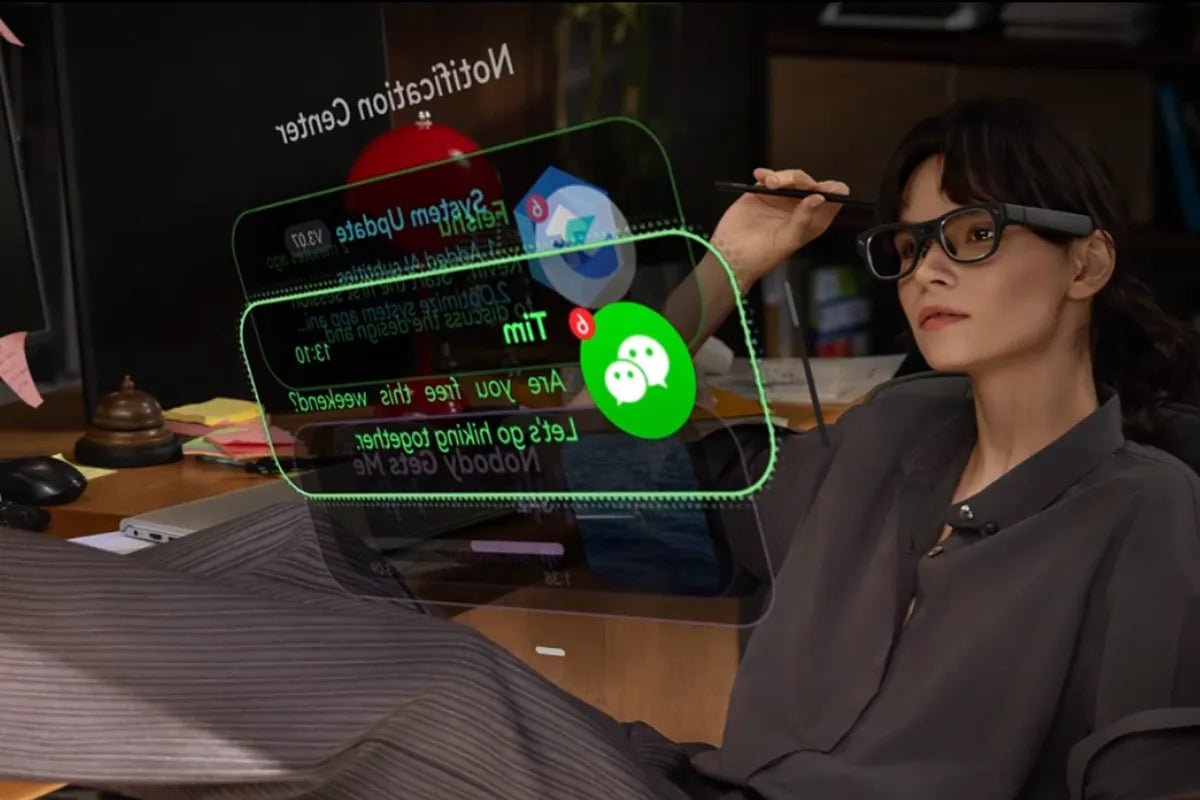
Smart glasses with teleprompter features offer a new way to deliver presentations and record content while maintaining natural eye contact. By integrating transparent displays into wearable devices, they allow users to view scripts, notes, or prompts directly within their field of vision without relying on traditional camera-mounted teleprompter equipment.
This guide explains how teleprompter glasses work, compares them with conventional solutions, explores key factors to consider before choosing a device, and highlights their potential applications for presentations, content creation, and professional communication.

Smart glasses with teleprompter features are eyeglasses equipped with a small see-through display that scrolls your script inside your field of view while you look straight at your audience or camera. The text is visible only to you. Because the prompter travels on your face rather than on a stand, you can move around the stage, present without a lectern, and record to camera with nothing between you and the lens.
Teleprompter glasses have evolved from traditional studio teleprompters into lightweight wearable optical systems. While traditional setups use reflective glass to place text near the camera lens, modern glasses miniaturize this concept by using optical components like waveguides and MicroLED projection to display text directly in the user's field of view.
Traditional teleprompters rely on a beamsplitter, a partially reflective piece of glass placed at a 45-degree angle in front of the camera lens. A monitor positioned below displays the script, and the glass reflects the text toward the presenter while allowing the camera to record through the transparent surface without capturing the reflected text.
This creates the effect of floating text aligned with the camera lens, allowing the speaker to read the script while looking directly at the camera.
Teleprompter glasses achieve a similar viewing effect through a different optical approach. A MicroLED light engine inside the frame generates the text image, while a waveguide layer built into the lens directs the light into the user's eye.
The process works through three key components:
By combining these technologies, teleprompter glasses create a wearable display that places script information directly in the speaker's line of sight without blocking natural vision.
Traditional teleprompters and teleprompter glasses are built around the same goal: helping speakers read scripts while maintaining natural eye contact. The difference lies in how the text is delivered. Traditional systems rely on a separate reflective setup placed in front of a camera, while teleprompter glasses integrate the display technology directly into a wearable device.
| Factor | Traditional teleprompter | Teleprompter glasses |
| Discretion | Visible rig in the room | Looks like a pair of glasses |
| Mobility | Fixed to a camera or stand | Walk the stage, move between rooms |
| Eye contact | Excellent, but only from one spot | Excellent from anywhere you stand |
| Setup time | Mount, monitor, cables, power | Put them on, open the script |
| Versatility | Prompting only | Prompting plus navigation, translation, notes, capture |
| Best for | Studio shoots, fixed-camera work | Stages, meetings, solo filming, field work |
Overall, traditional teleprompters remain effective for controlled studio environments where the camera position stays fixed. Teleprompter glasses offer a more flexible approach by bringing the prompting experience into a wearable format, making them better suited for situations that require movement, portability, and hands-free operation.
AI glasses with teleprompter technology are no longer limited to TV anchors and broadcast studios. By placing scripts and key information directly in the user's field of view, they help a wide range of professionals deliver presentations, record content, and communicate more naturally while maintaining eye contact.
Choosing the right teleprompter glasses depends on more than just display technology. Five factors determine whether they can deliver a smooth prompting experience in real-world situations, from stage presentations to solo video recording.
Display visibility is the first factor to consider. Stage lighting, outdoor environments, and bright rooms can make a dim display difficult to read, reducing the usefulness of a teleprompter.
Look for key features including:
Smooth scrolling is essential for maintaining a natural speaking rhythm. If the text moves too quickly or slowly, it can interrupt delivery and make eye contact feel unnatural.
Before buying, check how the glasses control script movement:
Teleprompter glasses need to remain comfortable throughout a full presentation, recording session, or meeting. A balanced frame design is often more important than weight alone.
Consider:
A comfortable fit helps users focus on their delivery instead of adjusting the glasses.
Teleprompter glasses rely on software to manage scripts, controls, and additional smart features. Before purchasing, check how easily the glasses connect with your devices and how scripts are transferred.
Important factors include:
Battery life directly affects reliability during presentations and recording sessions. A display, camera, wireless connection, and AI features can all increase power consumption.
When evaluating battery performance, consider:
The best teleprompter smart glasses are not necessarily those with the longest battery life, but those that provide enough power for your actual workflow.
When choosing smart glasses for presentations, it is important to distinguish between a true wearable teleprompter and a portable AR display. RayNeo offers two different approaches: one is designed to place scripts directly in your field of view, while the other works as a private virtual screen for preparation and productivity.
RayNeo X3 Pro AI+AR Smart Glasses are designed for users who need a teleprompter experience while maintaining natural eye contact with the audience. Unlike traditional setups that require a camera-mounted screen, the built-in teleprompter function displays scripts directly through the glasses' full-colour MicroLED display system.
Key features for presentation use include:
With its combination of wearable prompting, AI tools, and AR features, RayNeo X3 Pro is better suited for keynote speakers, educators, presenters, and creators who need hands-free script support during live situations.

RayNeo Air 4 Pro AR Glasses serve a different purpose. They are not designed as standalone teleprompter glasses, but as a portable AR display that can support presentation preparation, script review, and second-screen workflows.
Key features include:
Because RayNeo Air 4 Pro mirrors content from a connected device, it works best for rehearsing presentations, reviewing notes, or extending your workspace rather than delivering a live presentation while walking around.

Smart glasses with teleprompter capabilities provide a more flexible approach to presenting, recording, and communicating by combining visual assistance with hands-free operation. Compared with traditional teleprompter setups, they offer greater mobility and convenience for users who need to access information while staying engaged with their audience. When selecting a device, factors such as display quality, comfort, software support, and battery performance should be considered to ensure it matches specific presentation needs and usage scenarios.
Yes. A pair with a see-through display can scroll your script inside your field of view while you look straight at your audience or camera. Only you see the text. You control the pace with touch, voice, or a phone remote, and the script is loaded through the companion app before you start. It replaces a lectern, a stand, or a beamsplitter rig, and it lets you walk while you speak.
Look for glasses with a built-in prompter tool rather than a bolt-on app, since native software properly controls scroll speed and text size. RayNeo X3 Pro includes a teleprompter among its built-in tools on RayNeo AI OS, alongside camera, navigation, and translation, and displays the script on full-colour MicroLED screens in both eyes. Check the app compatibility list for your phone before buying, and load your script in advance.
Far less than a rig. The text lives inside the lens and faces your eye, so the room sees eyewear rather than a screen. In a dark auditorium, a faint glow can be visible up close, which is worth knowing if you present in low light. The bigger giveaway is behaviour, not hardware: rehearse the pacing so your eyes stay on the audience instead of drifting to the corner.







Share:
Smart Glasses with Translation: A Complete Guide to Features, Benefits, and Buying Tips
The Best Smart Glasses for Translation: AR Subtitles vs Voice-Over