

$429.00

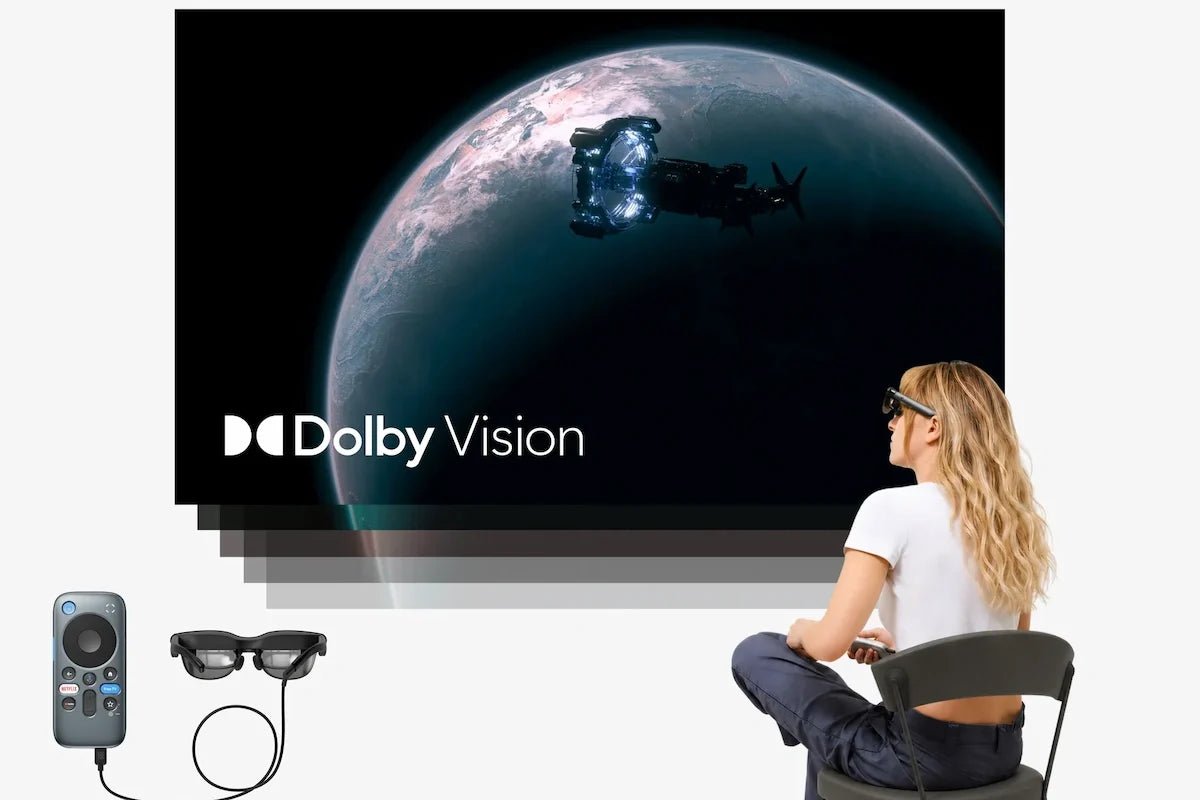
Setting up a spatial cinema at home gives you a massive personal theater experience without taking up physical space in your living room. This guide explores how our current lineup of RayNeo AR glasses and accessories works together to build the ideal setup. Instead of relying on traditional televisions or projectors, this combination delivers a massive virtual screen strictly for the person wearing the headset. It is a completely private viewing environment tailored for solo sessions, long flights, or watching in a shared space without disturbing others.
To build this setup, you need an AR display, a device to stream your media and supply power, and the right connection cable or adapter.
Our GT series glasses use high-definition micro-displays to project a massive screen right in front of you. To keep the glasses lightweight and comfortable for long movie marathons, they do not house an internal battery. Instead, they draw power directly from your connected phone or media player.
The RayNeo GT Max is our premium choice for this setup, available for $399. It features 0.6-inch Micro-OLED panels delivering a 1080p picture per eye. You can switch between three expansive virtual screen sizes: 227 inches, a default 267 inches, and 307 inches. The display reaches up to 1200 nits of brightness when you aren't using the Pinned spatial mode.
Weighing 78 grams, the GT Max comes in three specific interpupillary distance sizes (Small, Medium, and Large) so you can match the optics perfectly to your eye spacing.

If you prefer an even lighter profile, the RayNeo GT is available for $299. It slims down to just 68 grams and offers a tailored viewing experience with virtual screen options of 136, 201 (default), and 231 inches. It also maintains that peak 1200 nits of brightness outside of Pinned mode. To achieve this streamlined build, the GT uses a fixed 64mm IPD structure, relying on the nose pads for alignment rather than offering distinct hardware sizes.
Spatial cinema lets you decide exactly where your screen sits in the real world. Our GT series utilizes a Zone 360 3DoF Chip to give you complete control over the display's placement.
You can pick from three spatial modes based on how you want to watch. Follow mode keeps the screen centered wherever you look, ideal for everyday viewing. Steady mode anchors the screen with gentle movement to absorb natural bumps while commuting or traveling. Pinned mode locks the screen completely in place in your environment, allowing you to lie flat in bed while the display hovers securely above you.
Great movies rely on great sound. The RayNeo GT series builds four open-ear speakers right into the arms, tuned by Bang & Olufsen to deliver rich, directional audio. These feature Head-Tracked Spatial Audio, meaning if you turn your head away from the virtual screen, the sound stays anchored to the visual action for a highly realistic acoustic environment.
While these speakers are open-ear, we included a Whisper Mode 2.0 setting to help manage sound leakage when you are around other people. By long-pressing the volume rocker, you can lower the audio profile. This makes it difficult for someone sitting about 1.5 meters away on a couch or an airplane seat to make out what you are listening to.
Your headset relies on a host device to process the video feed and supply power, which will naturally consume your host device's battery during a long movie.
For a straightforward home theater setup, most users plug the glasses directly into a smartphone or laptop using the included USB-C cable to stream from their favorite apps. This direct link requires a device supporting USB-C DisplayPort Alt Mode. It works seamlessly with modern media sources like the iPhone 15, 16, and 17 series, Android flagships from the Galaxy S8 through S25, MacBook models from 2015 onwards, and USB-C handheld gaming PCs.
If you plan to use an older Apple device with a Lightning port to stream your movies, you will need an Apple Digital AV Adapter (sold separately). Note that the iPhone 16e, 17e, and Air models do not support video output directly via USB-C, and we don't currently offer a confirmed adapter solution for these specific phones.
If your home entertainment setup includes traditional devices with HDMI outputs, like a standard PC, PS4, or PS5, you can use our dedicated RayNeo HDMI Adapter ($64) to bridge the connection. For Nintendo Switch users, our JoyDock ($89) handles the integration; depending on your Switch generation, an additional Back Clip accessory may also be required, so check the JoyDock product page for current compatibility.
Using your phone to power a two-hour movie will tie up your device and drain its battery. For a dedicated home theater experience, adding a standalone portable media player is highly recommended.
The RayNeo Pocket TV Pro, available for $199, is an all-in-one content hub running the Google TV interface. It features its own 6500mAh battery that provides up to 5.5 hours of continuous playback. This setup frees up your smartphone and prevents incoming calls from interrupting your movie.

When you pair the GT series glasses with the Pocket TV Pro, you unlock the highest tier of visual fidelity. We describe this specific combination as the world's first Dolby Vision AR glasses system. While the Pocket TV Pro is not required to simply use the glasses, combining the two is the only way to enable Dolby Vision support, provided the streaming content itself is encoded in Dolby Vision.

Building your personal spatial cinema setup transforms how you enjoy media, letting you carry a theater-sized screen in a small protective case. Whether you prioritize the expansive customized fit of the GT Max or the streamlined portability of the GT, you get a premium private viewing experience anywhere. You can explore the exact specifications and current offers for both models directly on our product pages.
Can I watch 3D movies on this home setup? Yes, the GT and GT Max hardware natively supports 3D movie playback for compatible media files. They also include a feature for real-time 2D-to-3D video conversion, but please note this conversion feature is only available when connecting with an iPhone 15, 16, or 17 series device.
Can I charge my phone while watching a movie? Because the GT and GT Max use a direct USB-C connection to draw power and video from your phone, that port is occupied during use. If you want to keep your phone charged during a long movie marathon, using a dedicated player like the Pocket TV Pro, which features dual USB-C ports for simultaneous charging and viewing, is a practical alternative.
Is it comfortable to wear the headset with prescription glasses for a full movie? We don't recommend wearing the AR headset over your daily frames for a two-hour movie, as this can become bulky. Instead, we've partnered with Lensology to offer custom prescription inserts that clip directly into place inside the display. These inserts start at £95 (priced in British Pounds) and ensure you have a clear, comfortable viewing experience while you relax on the couch.







Share:
Which Camera Smart Glasses Are Most Socially Acceptable in Public?
Finding the Best Augmented Reality Hardware for Gaming