

$429.00

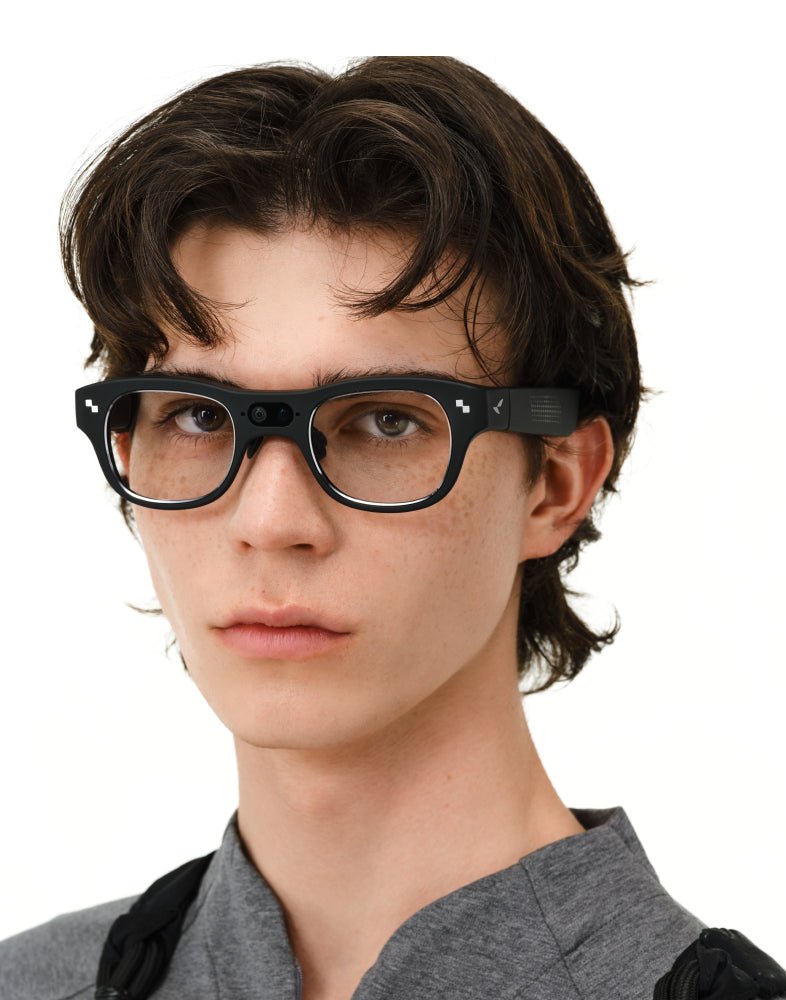
What makes a pair of smart glasses look good and actually hold up for daily wear comes down to a handful of concrete things:
None of that splits neatly along a men's-versus-women's line, but it's worth walking through each factor specifically, since that's what actually decides whether a given model works for you.
RayNeo's current lineup, the Air 2s, Air 3s Pro, Air 4 Pro, and X3 Pro, handles these factors differently enough that the right pick depends on what "daily use" means for you: long sessions at a desk or on a couch, or wearing something out and about that also needs to look ordinary at a glance and hold its own against the glasses or sunglasses you already reach for.
Eyewear sizing guides commonly group frames into rough size bands, men's frames often cited in the upper-40s to mid-50s millimeters for lens width and mid-130s to 150mm for temple length, though exact cutoffs vary by brand and collection rather than following one fixed standard. None of RayNeo's product pages publish lens width or bridge width measurements for any of its four models, so those general industry numbers are a reference point, not a spec you can check against a RayNeo listing directly.
Interpupillary distance (IPD), the distance between your pupils, is the more useful number here because RayNeo does publish something concrete for one model. A 2012 study by Fesharaki et al., cited on eyewear-measurement company Optogrid's blog, found an average IPD of 63.6mm (±3.9mm) in men and 61.1mm (±3.5mm) in women, a difference of about 2.5mm. That's a real but modest gap, and the ranges overlap heavily. Optogrid's own dataset of nearly 15,000 measurements puts the overall adult average at 61.2mm, with 90% of adults falling somewhere between 51.5mm and 71.1mm.
Practically, that means men trend slightly wider on average, but "slightly wider" is the operative phrase, not a reason to assume a completely different fit category. The RayNeo Air 3s Pro is the one model with a documented eyebox figure to check against that range: RayNeo lists a 14×7mm eyebox and says it covers roughly 93% of interpupillary distances without extra adjustment. The Air 2s, Air 4 Pro, and X3 Pro don't publish a comparable number, so if your IPD runs toward the wider end of that 51.5-71.1mm range, the Air 3s Pro's spec is the closest thing to a documented answer among RayNeo's four current models.
This is a question professional buyers of any gender tend to ask, not one specific to men, but it comes up often enough in searches for "smart glasses for men" that it's worth answering directly.
The Air 2s, Air 3s Pro, and Air 4 Pro use a birdbath-style optical system to project their display, which requires enough contrast against ambient light to look sharp. That's why the lenses are noticeably tinted rather than clear. Combined with a single-piece, sport-sunglass-style frame, the Air series reads more like sunglasses at a desk than like ordinary prescription eyewear, whether the display is on or off.
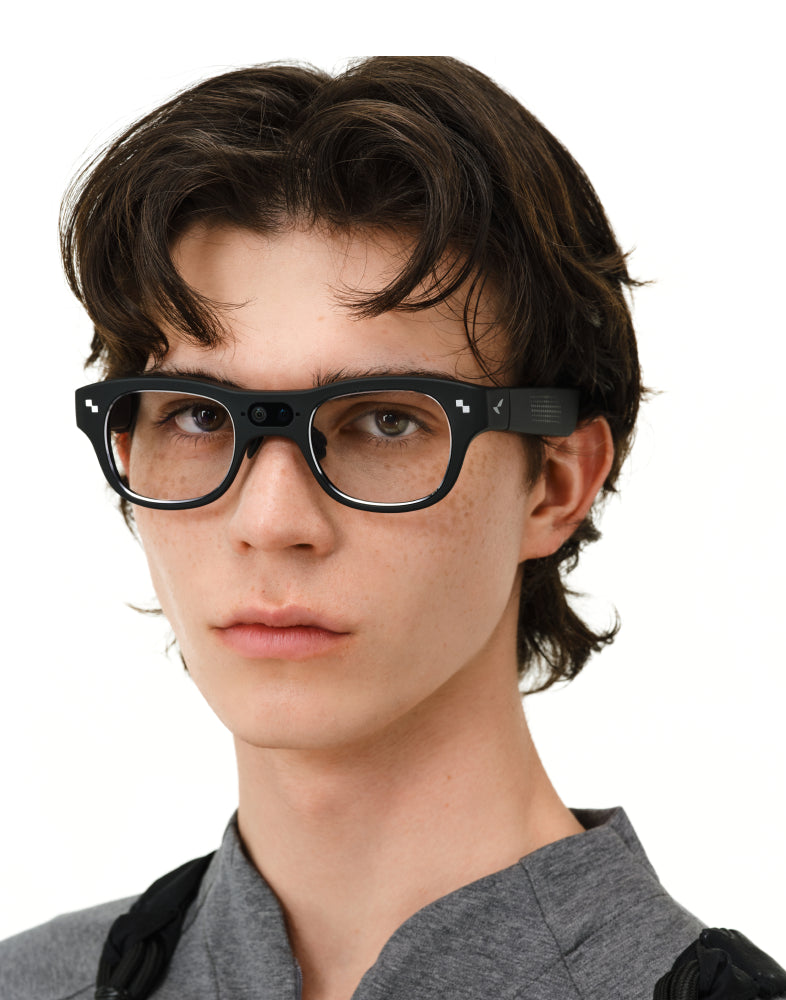
The X3 Pro is different: clear lenses, a single black frame, and (per its own product page) no color options at checkout. A December 2025 review from Skarred Ghost tested exactly this scenario. The author wore the device, turned off, on the floor of a tech conference, hoping it would spark conversation. Nobody stopped to ask about it, and nobody gave him a strange look. Powered down, it read as an ordinary pair of black glasses.
That changes once you turn it on. The same reviewer described the display becoming noticeably visible to people around you as the room gets darker, since the screen's brightness stands out against a dim background. That's a trade-off, not a flat "yes it's discreet": the X3 Pro can pass as ordinary eyewear while it's idle, but the moment you're actually using a feature that lights up the display, like a live translation overlay in a meeting, that's precisely when it becomes more noticeable, not less. If blending in during active use, not just while it's off, is the requirement, that's worth knowing before buying.
At a glance:
RayNeo lists all four current models, Air 2s, Air 3s Pro, Air 4 Pro, and X3 Pro, at the same official weight: 76 grams. That's noticeably heavier than a typical pair of plastic sunglasses (usually 20 to 30 grams), so expect more presence on your face regardless of which model you choose.
Nose pad adjustability varies by model:
That range of adjustment matters because fit varies a lot from face to face, which is why the Air 4 Pro ships with a large nose pad option in the box rather than a single fixed size. A Gizmodo review of the Air 4 Pro shows why that option is there: the reviewer, who has a larger nose bridge, found the standard pads uncomfortable at first (the stock plastic felt cheap to him), then switched to the included large pads and said the fit improved noticeably. He still noticed some fit-related blurriness at the display's edge over long sessions, a reminder that nose pad size affects more than comfort, it can affect what you actually see. That's one reviewer's experience, not a verdict on the Air 4 Pro overall, and it's exactly the scenario the large pads in the box are meant to solve. If your nose bridge runs larger, start with those.
On prescription support, each model handles it differently:
None of that makes any model a one-to-one swap for the glasses you wear today, since each still adds display or camera hardware on top of the correction, not instead of it.
The Air series and the X3 Pro also split in one more practical way: what happens on a bright day. The Air 2s, Air 3s Pro, and Air 4 Pro's tinted lenses, the same tint that gives their display enough contrast to read outdoors, function reasonably well as sun protection too, so if you already reach for sunglasses on a bright commute, that tint isn't wasted the way it can feel indoors. The X3 Pro's clear lenses don't offer that built-in coverage, so on a sunny day you'd still want a separate pair of sunglasses or a tinted prescription option through RayNeo's regional lens partners.
Combined with the prescription options above, no current RayNeo model fully replaces both your daily prescription glasses and your sunglasses in a single pair you'd wear morning to night without swapping. Each model layers on top of one or the other, not both at once, so if your day already alternates between the two, expect that habit to continue alongside whichever RayNeo model you pick.
This is the detail that gets skipped most often, and it matters more than most spec sheets suggest.
RayNeo doesn't publish a separate battery capacity for the Air 2s, Air 3s Pro, or Air 4 Pro. That's because all three connect over a wired USB-C cable to a phone, PC, or game console and draw power through that connection rather than running on their own internal battery you'd need to charge separately. In practice, that means Air-series "battery life" isn't really a battery question at all: the glasses last as long as your session and your host device's power do.
The X3 Pro is the one model that needs its own charge. RayNeo's official figures put its battery at 245mAh. On a full charge, that translates to:
Independent reviews, including Tom's Hardware's, note that real-world battery life is worth planning around if you're using the camera or translation features heavily. If your plan is all-day standalone wear with regular use of those features, build in a mid-day top-off rather than expecting a full day on one charge the way you would with a phone.
The Air 2s, Air 3s Pro, and Air 4 Pro all require a wired USB-C connection, no Bluetooth, no standalone mode. If you're planning to connect one to an Android phone rather than a laptop or console, it's worth confirming your specific phone's USB-C port supports video output (technically called DisplayPort Alt Mode) before buying. Not every Android phone's USB-C port carries this capability, even though the cable and port look identical to one that does, and RayNeo's own pages don't list this out phone by phone, so checking your phone's own specs (or RayNeo's compatibility guide) ahead of time avoids an avoidable surprise.
The X3 Pro connects wirelessly over Bluetooth 5.3 and Wi-Fi 6, so it doesn't need a cable. It still benefits from having a phone nearby, RayNeo's own product page describes a phone as useful for setup, connectivity, hotspot access, and companion features, but you're not tethered to it the way you are with the Air series.
| RayNeo Air 2s | RayNeo Air 3s Pro | RayNeo Air 4 Pro | RayNeo X3 Pro | |
|---|---|---|---|---|
| Frame style | Tinted, single-piece sport-style frame | Tinted, single-piece sport-style frame | Tinted, single-piece sport-style frame | Clear lenses, single black finish |
| Visible camera lens | No | No | No | Yes |
| Weight | 76g | 76g | 76g | 76g |
| Documented IPD/eyebox coverage | Not published | 14×7mm eyebox, ~93% of IPDs (RayNeo's figure) | Not published | Not published |
| Sun protection outdoors | Built-in via tint | Built-in via tint | Built-in via tint | None; needs separate sunglasses or tinted lens |
| Prescription support | Lensology clip-on | Lensology insert, nearsighted correction | Lensology insert, magnetic frame up to -10.00D | Regional lens partners, nearsighted correction |
| Connection | Wired USB-C only | Wired USB-C only | Wired USB-C only | Bluetooth 5.3 + Wi-Fi 6 |
| Battery | Powered through the USB-C connection; no separate battery listed | Powered through the USB-C connection; no separate battery listed | Powered through the USB-C connection; no separate battery listed | 245mAh; up to 5h recording / 3h music / 36 min video |
| Best for | Lightest entry point for AR video/gaming | Brighter display, documented eyebox fit | Best display and audio (HDR10, Bang & Olufsen tuning) | Camera, calls, translation, untethered wear |
| Price (sale / list) | $159 / $299 | $299 (price can fluctuate with promo codes at checkout) | $254.15 / $299 | $1,099 / $1,299 |
Prices and promotions reflect RayNeo's official product pages as of August 2026 and can change or end without notice. Confirm current pricing at checkout on rayneo.com.
Does RayNeo make a frame specifically marketed to men? RayNeo's four current models rely on nose pad and temple adjustability, not a dedicated men's-versus-women's frame line, to fit a range of faces. So there's no frame marketed specifically to men, and the practical decision point isn't gender, it's which model's adjustment range and IPD coverage (see the Air 3s Pro's published eyebox figure above) best matches your own face.
How long does the X3 Pro actually last if I'm wearing it most of the workday? Plan on a mid-day top-off rather than a full day on one charge, especially if you're using the camera or translation features. RayNeo's own numbers (245mAh, up to 5 hours of recording or 36 minutes of continuous video) describe single functions individually, so treat them as a guide to which features drain the battery fastest rather than a combined all-day estimate.
Will an Android phone work with the Air series over USB-C? Only if your phone's USB-C port supports DisplayPort Alt Mode for video output. That's a phone hardware detail that varies by model, not something guaranteed by having a USB-C port at all, so it's worth confirming with your specific phone's specs before buying an Air model expecting it to run off your phone rather than a laptop or console.
If I already wear prescription glasses, which RayNeo model is easiest to switch to? There isn't a clear easiest option; each model routes prescription correction through RayNeo's Lensology partnership differently, and none replace your current glasses outright since correction sits on top of the AR or camera hardware rather than instead of it. The Air 2s uses clip-on lenses, the Air 3s Pro and X3 Pro support nearsighted correction only, and the Air 4 Pro pairs with a magnetic prescription frame rated up to -10.00D, the widest documented range in the lineup, with exact box contents worth confirming on RayNeo's product page since they can vary by region.
Do any of these work as sunglasses too? The Air 2s, Air 3s Pro, and Air 4 Pro all use dark-tinted lenses that function reasonably well as sun protection outdoors, since that tint exists to give the display enough contrast in daylight anyway. The X3 Pro's lenses are clear, so it doesn't double as sunglasses; you'd want a separate pair or a tinted prescription option through RayNeo's lens partners for bright outdoor use.
What's the return policy if the fit or look isn't right once they arrive? RayNeo backs orders with a 30-day return window from confirmed delivery, and the X3 Pro's product page additionally spells out a 30-day price-match guarantee. For a simple change-of-mind return, return shipping is on the buyer. Terms can vary by region, so it's worth confirming the exact conditions for your country on RayNeo's support page before ordering a model you haven't tried on in person.
There's no RayNeo frame built specifically for men, and there doesn't need to be: the adjustment range built into each model, plus the Air 3s Pro's documented eyebox coverage, is what actually decides fit, not a gendered frame line. The real split in this lineup runs along two practical lines instead: tinted, sunglass-style optics that double as sun protection and look the same whether the screen is on or off (Air 2s, Air 3s Pro, Air 4 Pro), and a clear-lensed frame that reads as ordinary glasses at rest and adds a camera plus untethered AI features once you turn it on (X3 Pro).
Match that split to your own nose bridge and IPD, whether a USB-C cable fits your routine or you'd rather go wireless, and whether you want to keep your current prescription or sunglasses in the mix alongside the glasses. Handled that way, each of the four models is a solid daily-use option for a specific kind of day, not a compromise.
RayNeo Air 2s, Air 3s Pro, Air 4 Pro, and X3 Pro product pages carry the current pricing, adjustment specs, and prescription details, worth a direct check before ordering since promotions shift.







Share:
Best Hands-Free Smart Glasses for Calls, Photos & Voice Assistant (2026)
Best Hands-Free Smart Glasses for Calls, Photos & Voice Assistant (2026)