

$429.00

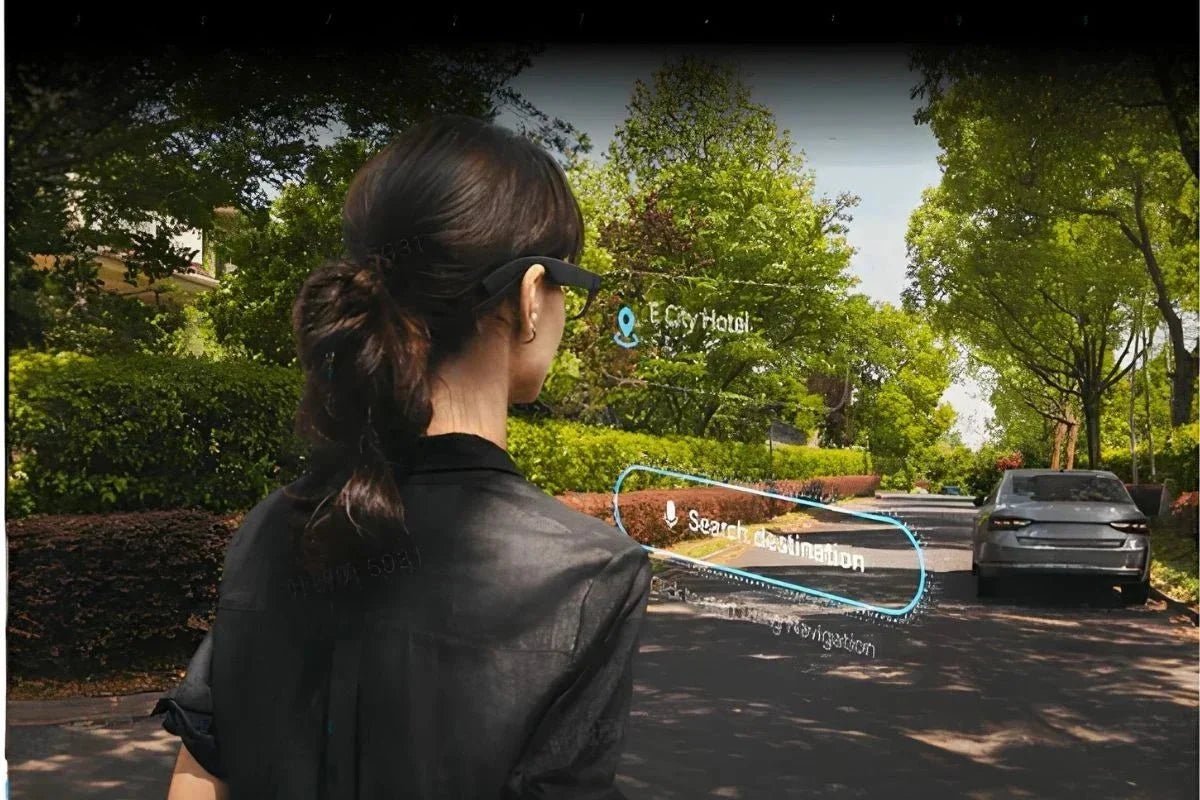
Smart glasses are changing how we interact with information by bringing AI, audio, and visual features closer without requiring you to reach for your phone. But the right pair depends on more than advanced technology.
In this article, we’ll guide you through what to know before buying and show you the best smart glasses from RayNeo for different needs.

Smart glasses are regular eyewear enhanced with built-in technology, such as speakers, microphones, and cameras. Some models also have AI assistance and a transparent display that sits within your field of view. These features allow you to make calls, take photos and videos, and view maps and text without constantly checking your phone.
Smart glasses connect to your smartphone via Bluetooth or Wi-Fi and can be controlled with voice commands, frame taps, or gestures. Once a command is given, the AI can process it and respond with useful information, such as answering questions, translating languages, or describing what you are looking at. The combination of connectivity, sensors, and AI makes smart glasses more interactive than traditional eyewear.
The right pair depends on how you plan to use it. Think about your preferences, budget, and daily routine to make it easier to decide what are the best smart glasses for your needs. Here are the key factors to look at before you buy:
A display can change your experience by putting information directly in your field of view instead of delivering it only through audio. If you want navigation, notifications, or visual overlays, look for the best smart glasses with heads up display or waveguide technology. On the other hand, smart glasses without a display rely on open-ear speakers, microphones, and voice assistants to deliver information. With or without a display, both types are good as long as they suit your needs.
Searching for the best smart glasses 2026 doesn’t mean paying for every available feature. The prices of smart glasses in 2026 range from $150 to $800, depending on the features. Smart glasses with audio and AI (no display or camera) cost between $150 and $250, while AR and heads-up display (HUD) glasses cost between $300 and $800. Set your budget based on the features you are most likely to use.
The reason you’re buying smart glasses is an important factor, too. Different interests require different types of smart glasses. For example, smart glasses that don't have a display but focus on audio can be useful for commuters who care more about making calls and listening to open-ear audio. Meanwhile, smart glasses with a transparent display are more useful for travelers who need visual information.
Since smart glasses can stay on your face for hours, comfort should be just as important as the technology inside. Look for a lightweight frame that fits your nose well and suits your style. Lens options are important, too, especially if you need prescription lenses. A comfortable, easy-to-wear design will fit more naturally into your commute, workday, and social plans.
Yes, many smart glasses are compatible with prescription lenses, but the method varies by model. Some use custom magnetic prescription inserts like those in RayNeo X3 Pro AI+AR Smart Glasses, while others have prescription-ready frames or lens replacements. Generally, you’ll need a valid prescription from your optometrist, including your PD (pupillary distance), before ordering to ensure the lenses are made to fit your eyes properly.
With so many options on the market, RayNeo should be your first choice when buying AI smart glasses. As one of the top 5 smart glasses brands, RayNeo offers three standout models, which you can see below:
The RayNeo iO AI Glasses are designed to feel lightweight at just 34g and comfortable during extended wear, making them easier to use throughout the day without adding much weight to your face. As the best everyday smart glasses, they offer a practical balance of comfort, hands-free AI, and visual assistance for daily activities.
Who it’s for: A good fit for professionals and creators who want lightweight smart glasses with hands-free AI assistance, real-time information access, and seamless everyday productivity.
Key features:
The RayNeo X3 Pro AI+AR Smart Glasses use Google Gemini AI to provide hands-free assistance, helping you get answers, interact with digital information, and access AI-powered assistance hands-free. With their advanced AI and AR capabilities, they can appeal to users seeking the best smart glasses for men who prefer a more tech-focused option for work, travel, and everyday productivity.
Who it’s for: A strong choice for travelers, professionals, and tech enthusiasts who want AI assistance combined with AR features.
Key features:

The RayNeo Air 4 Pro AR Glasses use an HDR10 Micro-OLED display to create a 201-inch virtual screen with over 10 billion colors and a 200,000:1 contrast ratio. This works with the Vision 4000 chip and 120Hz refresh rate to produce smoother, more vivid visuals for movies and gaming.
Who it’s for: A great option for movie lovers, gamers, and anyone who wants a portable, private screen for entertainment.
Key features:

Smart glasses now serve different purposes, from lightweight AI assistance to interactive AR and immersive entertainment. This variety means the best smart glasses are not necessarily the ones with the most features, but the ones built around the experience you actually want. RayNeo’s iO, X3 Pro, and Air 4 Pro each represent a different approach to everyday assistance, AR interaction, and large-screen viewing, you can choose the one that best fits your routine and priorities.
Some smart glasses can connect to the internet through Wi-Fi or a paired smartphone, allowing them to access online services and AI tools. However, this does not always mean you can browse websites like you would on a phone. What you can access depends on the model, software, connectivity, and available apps.
People nearby may hear sound from smart glasses, especially when the volume is turned up. Most models use open-ear speakers, which let you hear audio without covering your ears. However, sound leakage varies by speaker design, volume, and surroundings. Privacy-focused features, such as directional audio or whisper modes, can help reduce it.
Yes, many smart glasses have built-in microphones for hands-free functions such as phone calls, voice commands, and AI assistance. Some models use multiple microphones or specialized microphone systems to improve voice pickup. Depending on the device, these microphones can also support features such as live translation, transcription, and voice-based AI interactions.







Share:
AR Glasses Construction: Benefits, Uses, and Buying Guide
Smart Glasses with Display: Features and Top RayNeo Picks