
Table of Contents
As smart glasses gain popularity globally, IDC statistics show that shipments reached 4.065 million units in the first half of 2025. This is a year-over-year increase of over 60%. Shipments are expected to exceed 40 million units by 2029, signalling that this category is becoming a mainstream gateway for interaction. Understanding 3DoF and 6DoF is essential. It helps you clarify exactly what smart glasses can do for you and which scenarios best fit your daily life and work.
What are DoF AR glasses?
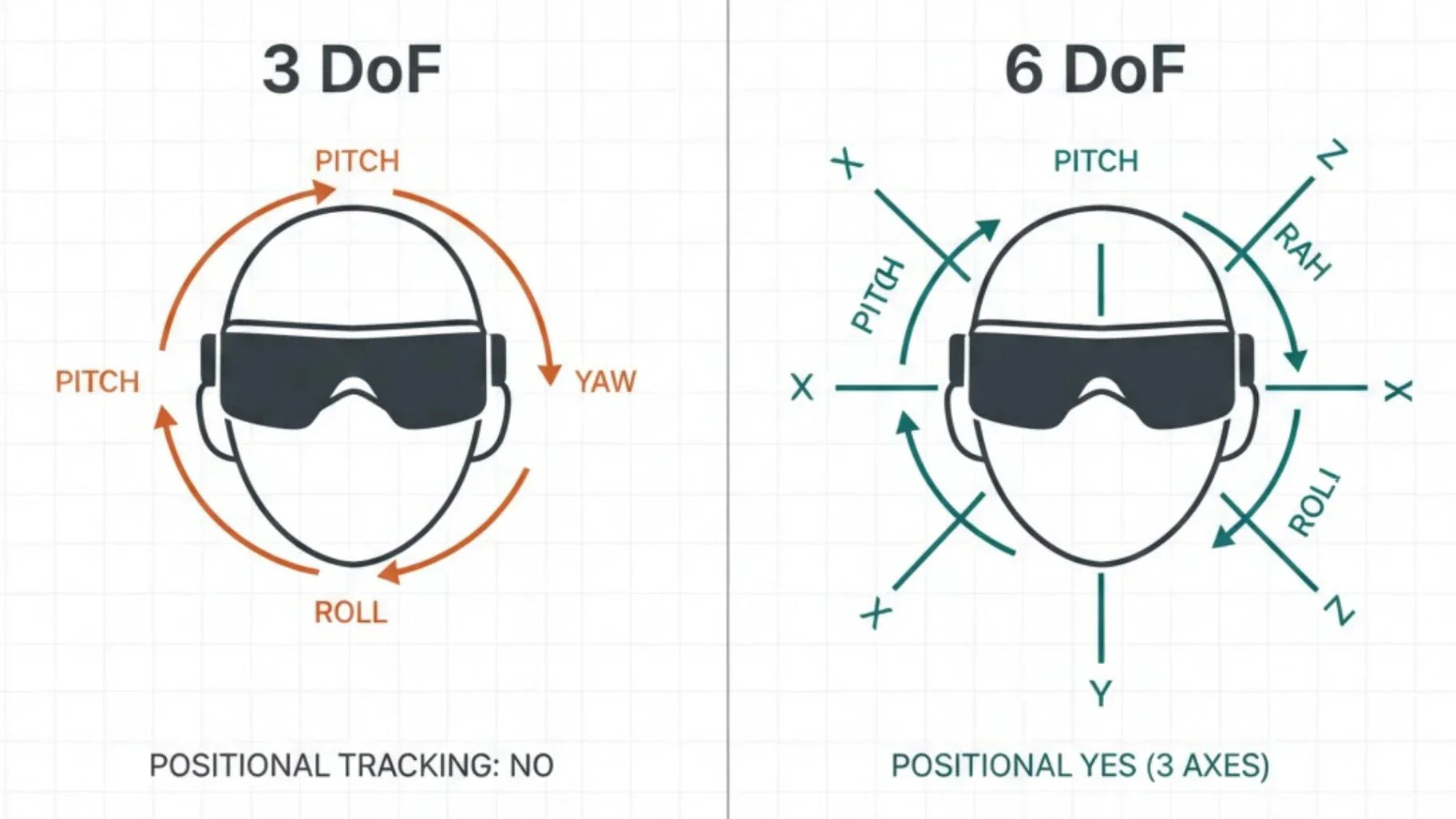
Google and other developer documents define DoF as the independent dimensions of a rigid body's motion in three-dimensional space. There are six in total: three rotations around different axes and three translations along different directions. In head-mounted displays and AR glasses, manufacturers categorize devices into two main types based on their tracking capabilities: 3DoF, which only tracks rotation, and 6DoF, which tracks both rotation and changes in position.
For smart glasses users, DoF is essentially the boundary of whether you can move freely in space after putting on the glasses. 3DoF AR glasses accurately track your head rotation, allowing you to look around a giant screen from a fixed seat. 6DoF AR glasses capture your forward steps, side-to-side dodges, and leaning movements to see details. This allows virtual content to be pinned stably within the real physical space.

What Is 3DoF and How It Works
Many people first encounter smart glasses through 3DoF big-screen models. This format focuses on tracking head rotation. In terms of hardware, it is essentially a portable display with added spatial awareness. The main advantages are that it is lightweight, consumes little power, and is budget-friendly.
Rotational Tracking Across Three Axes
Technically, 3DoF means the system can sense three degrees of rotational freedom: tilting your head up and down, turning left and right, and leaning side to side. In 3DoF AR glasses, the rendering engine updates the image in real time based on your head movements. This keeps the virtual screen aligned with your line of sight. It creates a spatial feeling similar to looking around a theater screen. For watching immersive videos, using a remote desktop, or hovering app interfaces, this level of tracking is more than enough.
Core Sensors and Hardware Requirements
The hardware needed for 3DoF is relatively simple. The core component is the Inertial Measurement Unit (IMU). This combines sensors like gyroscopes, accelerometers, and magnetometers. Fusion algorithms then use this data to calculate the head rotation angle. Since high-precision spatial displacement is not required, 3DoF glasses are generally lightweight and simple in structure. They have modest demands for processing power and battery capacity. This makes them comfortable enough for long-term daily wear, commuting, and travel.
Typical Use Cases for 3DoF Systems
At the application level, 3DoF is perfect for scenarios where the user is relatively stable and primarily focused on viewing and light interaction. Training platforms like VirtualSpeech use 3DoF headsets for seated classrooms, basic safety training, and immersive video courses. This content relies on changing perspectives rather than moving around. In the smart glasses world, 3DoF is best as a high-quality mobile display. You can connect it to a laptop or console to bring a giant screen right before your eyes, or watch an entire season of a show while lying on the couch.
What Is 6DoF and How It Works
When you want to walk into virtual content or have virtual objects stay pinned to real-world desks, walls, or equipment, you hit the limits of 3DoF. At this point, the 6DoF system—which adds displacement tracking to rotation—becomes the true gateway to spatial computing.
Combined Rotational and Positional Tracking
From a kinematics perspective, 6DoF includes three rotations and three translations. This means that on top of tilting, turning, and leaning, the system also senses movement forward/backward, left/right, and up/down. Platforms like VirtualSpeech use a helpful analogy: 3DoF is like sitting in a chair and looking around, while 6DoF lets you actually stand up, walk toward an object, and move behind it to inspect it from different angles. In AR glasses, this means virtual windows, navigation arrows, and spatial whiteboards stay anchored to your coffee table, next to your monitor, or on a piece of factory equipment. They do not drift with your body as a UI panel stuck to your face.
Inside-Out and Outside-In Tracking Approaches
To achieve this level of spatial understanding, 6DoF systems typically use more complex tracking architectures. This engineering approach forms the backbone of the best AR glasses for augmented reality experiences, where mainstream devices rely on inside-out tracking using on-device cameras and depth sensors. The hardware observes the environment, builds a 3D model of the room and objects, and combines this with IMU data for fused positioning. Earlier high-end systems used outside-in solutions with external cameras or base stations.
These fixed devices in the room capture the position of the headset and controllers. While highly accurate, they are complex to set up and mostly used in labs or specialized training centers.
Typical Use Cases for 6DoF Systems
The value of 6DoF is most obvious in activities that require physical movement. The RayNeo X3 Pro is a pair of 6DoF AR glasses designed for these spatial interaction needs. It features a binocular Micro-LED full-color waveguide optical engine. It hits a peak brightness of 6,000 nits and an average brightness of about 3,500 nits. This ensures images stay clear and readable even in bright sunlight or high-light offices.
Inside, it runs on the Qualcomm Snapdragon AR1 Gen 1 chip, paired with 4GB of RAM and 32GB of storage. This provides plenty of power for local spatial computing and AI inference. Dual front-facing cameras and RayNeo's proprietary Falcon Imaging technology handle 6DoF head tracking and environmental understanding. This allows navigation cues, operating steps, and remote annotations to stay firmly attached to the surface of on-site equipment. For users bringing AR glasses into their workflow, this spatial intelligence is far more impactful than any marketing buzzword.

Key Differences Between 3DoF and 6DoF
From definition to implementation, the gap between 3DoF and 6DoF is significant. Here is how these two degrees of freedom differ in terms of movement range, interaction methods, and hardware costs.
Degrees of Freedom and Movement Capabilities
3DoF devices only track rotation, allowing you to look up or down and scan your surroundings. 6DoF devices track both rotation and translation. They can sense if you take a step forward or shift slightly to the right. In actual use, 3DoF feels more like a virtual screen fixed in front of your head. Your view can change, but the screen does not change position relative to your head. 6DoF allows you to approach, walk around, or move away from virtual objects as if they were real. The virtual objects seem to live in the room rather than being tied to your face.
The table below summarizes the differences between the two in core dimensions:
|
Feature |
3DoF |
6DoF |
|
Tracking Degrees of Freedom |
Tracks only rotation, such as tilting up/down, turning left/right, and leaning side to side. |
Tracks both rotation and displacement in forward/backward, left/right, and up/down directions. |
|
Impact of Body Movement |
When you move, the image position remains relatively fixed to your head. |
When you move, the image position remains stably attached to the real physical space. |
|
Environmental Understanding |
Primarily based on head orientation; does not build a full spatial geometry. |
Builds spatial maps and surface data through vision and sensors. |
|
Typical Experience |
Like sitting in a fixed spot looking at a large screen that moves with your gaze. |
Like walking around and interacting with virtual objects in a room. |
|
Suitable Content Types |
Video viewing, remote screens, lightweight notifications, and information dashboards. |
Spatial collaboration, hands-on training, indoor navigation, spatial creation, and computing. |
Interaction Models and Spatial Awareness
Interaction models are the second key differentiator between these two systems. 3DoF systems generally use gaze-tracking paired with controller buttons or simple gestures. The virtual interface typically floats near your field of vision. The interaction logic is similar to a traditional flat screen, just moved from a desk to right before your eyes. 6DoF allows the system to know the exact position of your head and hands in space. This supports actions like walking up to a virtual button to tap it, dragging models through the air, or spreading a 3D flowchart across a real desk.
In enterprise and education projects, this difference directly changes how courses and apps are designed. 3DoF is better for observation-based explanations and wide-angle videos. 6DoF training can move entire tasks like fire drills, assembly lines, or surgical procedures into virtual space. This allows students to complete tasks through physical movement. Applying this to AR glasses, 6DoF spatial glasses like the RayNeo X3 Pro are perfect for factories, warehouses, and field services. They provide frontline workers with spatial guidance and remote collaboration where they can interact with whatever they see.
Hardware Complexity, Power Consumption, and Cost
Higher dimensions of tracking mean more complex hardware and a higher power budget. 3DoF systems rely solely on an IMU to function. They have limited needs for external sensors and processing power. This allows the device to be extremely thin and light. It also makes it easier for the battery to last through multiple uses throughout the day. 6DoF systems require camera arrays, depth sensors, higher-spec processors, and more complex local algorithms.
Which One Do You Need for Your Use Case
Understanding technical differences is only the first step. It is more important to place 3DoF vs. 6DoF back into your own life and work scenarios. You need to see which degree of freedom actually matches your daily tasks. Simply put, you should honestly answer three questions: Do you mainly want a great screen anywhere? Do you want to interact with digital content in space? Do you value portability or immersion more?
Media Viewing and Lightweight AR Experiences
If your most common needs are watching movies, playing games, or handling documents while traveling, 3DoF AR glasses are usually the smarter choice. Your goal is essentially to have a great screen anywhere. Learning platforms like VirtualSpeech have noted that for content focused on viewing, extra spatial tracking does not significantly improve learning. Instead, it adds hardware costs and makes the device harder to use.
Gaming, Training, and Spatial Computing Scenarios
When you want to actually walk around virtual objects in a game or recreate full operating procedures in a training scenario, the value of 6DoF becomes very clear. Training providers like Canopy Creative and AutoVRse emphasize that if training goals involve spatial decisions, equipment operation, or safety movements, 6DoF systems significantly improve memory retention and decision-making speed. This conclusion also applies to AR glasses. Remote experts can draw arrows before your eyes, and virtual notes can float over machines. Virtual numbers can overlay parts. These only align correctly with the real world when the system understands your body position in space.

Balancing Immersion, Portability, and Comfort
The most difficult choice is for the third type of user. These users want to experience spatial interaction but cannot accept heavy headsets with short battery life. They want to wear their glasses comfortably during daily commutes or business trips. This requires finding a personal balance between immersion, portability, and comfort.
For individual users, a more realistic strategy is to start with lightweight 3DoF media glasses to build a usage habit. Once your work or creative needs require spatial interaction, you can upgrade to 6DoF spatial glasses like the RayNeo X3 Pro. This allows the hardware capabilities to advance alongside your specific needs.
Conclusion
From a technical standpoint, 3DoF and 6DoF simply differ in degrees of freedom. However, within the smart glasses category, they represent two entirely different visions for life. One is the ability to have a top-tier private screen anywhere, freeing work and entertainment from the desk. The other is turning the physical world into a spatial interface where information can be overlaid, calculated, and shared.
We welcome more developers, creators, and professional users to unleash the potential of 6DoF spatial computing with the RayNeo X3 Pro. Together, we can bring navigation, creation, training, and collaboration directly into our physical reality.
FAQ
What is the fundamental difference between 3DoF and 6DoF?
3DoF only tracks head rotation—including yaw, pitch, and roll—allowing you to look around within a virtual environment. 6DoF builds on this by adding translation: moving forward/backward, left/right, and up/down. This enables the device to sense your movement through space, allowing you to walk up to or move around virtual objects.
Is 3DoF sufficient for watching videos and light AR?
For media consumption, 360-degree videos, and lightweight information overlays, 3DoF is typically more than enough. You only need to turn your head to adjust your view rather than physically move through the virtual environment. Smart glasses like the RayNeo Air 4 Pro are specifically designed for media viewing and light interaction, prioritizing HDR10 display, spatial audio, and wearing comfort.
Does 6DoF significantly increase device cost and complexity?
Industry analysis generally agrees that implementing 6DoF requires more sensors, more complex algorithms, and higher processing power, which drives up overall cost and power consumption. For scenarios requiring spatial interaction and immersive training, this investment is a necessary expense. For pure content consumption devices, however, it’s a matter of weighing whether the added capability is worth the trade-off.
Which scenarios are better suited for investing in 6DoF capabilities?
Games requiring physical movement, high-dexterity training, spatial visualization, and complex AR applications are better suited for 6DoF. Research shows that in these settings, 6DoF significantly enhances spatial awareness, skill retention, and immersion while reducing visual discomfort. If you want to place virtual workstations, navigation cues, or 3D models within a real-world space, AR glasses with 6DoF spatial awareness are a much better fit for your needs.
Share:
Are Prescription Smart Glasses Over $350 Worth It?
Smart Movie Glasses Tested: Can They Beat the Big Screen?