

$429.00

Reading dense academic papers, complex PDFs, and lengthy documents on a standard laptop screen can quickly lead to eye strain and neck fatigue. For researchers and students spending hours dissecting text, moving that content to a comfortable virtual display offers a major ergonomic upgrade.
For those exploring our current RayNeo AR glasses lineup for document review, finding the right fit depends on maximizing text clarity. The sharpest AR glasses for reading rely on a combination of high resolution, optimal Pixels Per Degree (PPD), and adjustable virtual screen sizes.
When a display sits directly in front of your eyes, crisp text rendering is the absolute most critical factor to prevent visual fatigue. Let's evaluate what makes an AR headset suitable for text-heavy tasks and highlight the top choices for a superior reading experience.
When evaluating smart glasses for document reading, traditional resolution numbers like 1080p only tell part of the story. The more critical metric is Pixels Per Degree, which measures how dense the pixels are within your field of view.
A higher PPD means smoother edges on letters and less visible pixelation. This is especially important when reviewing small font sizes or two-column formatting commonly found in academic PDFs.
Field of View (FOV) determines how large the virtual screen appears in your vision. A wider FOV allows for a massive virtual display, making it easier to view multiple documents side by side or read large charts without scrolling.
However, a larger screen stretches the available pixels over a wider area. Finding the right balance between a massive workspace for multitasking and a concentrated display for razor-sharp text is key to building the ideal study setup.
The RayNeo GT Max, available for $399, is engineered for immersive, large-scale viewing. It features a 0.6-inch SeeYa Micro-OLED panel with a Full HD 1920x1080 resolution, delivering crisp text across a massive virtual canvas.

With a 59-degree FOV, it projects a virtual screen in three preset sizes: 227, 267, or 307 inches. This expansive workspace is perfect for researchers who need to cross-reference multiple PDFs or view detailed diagrams without feeling constrained by physical monitor borders.
To maintain clarity across this large FOV, the GT Max delivers a solid 38 PPD. This ensures that complex equations and fine print remain highly legible without forcing you to zoom in constantly.

The GT Max features OptiCare 3840Hz high-frequency dimming and holds a TÜV SÜD certification, minimizing screen flicker and low blue light emissions. It also offers multiple display profiles tailored to different tasks, including dedicated Office and Eye Protection modes.
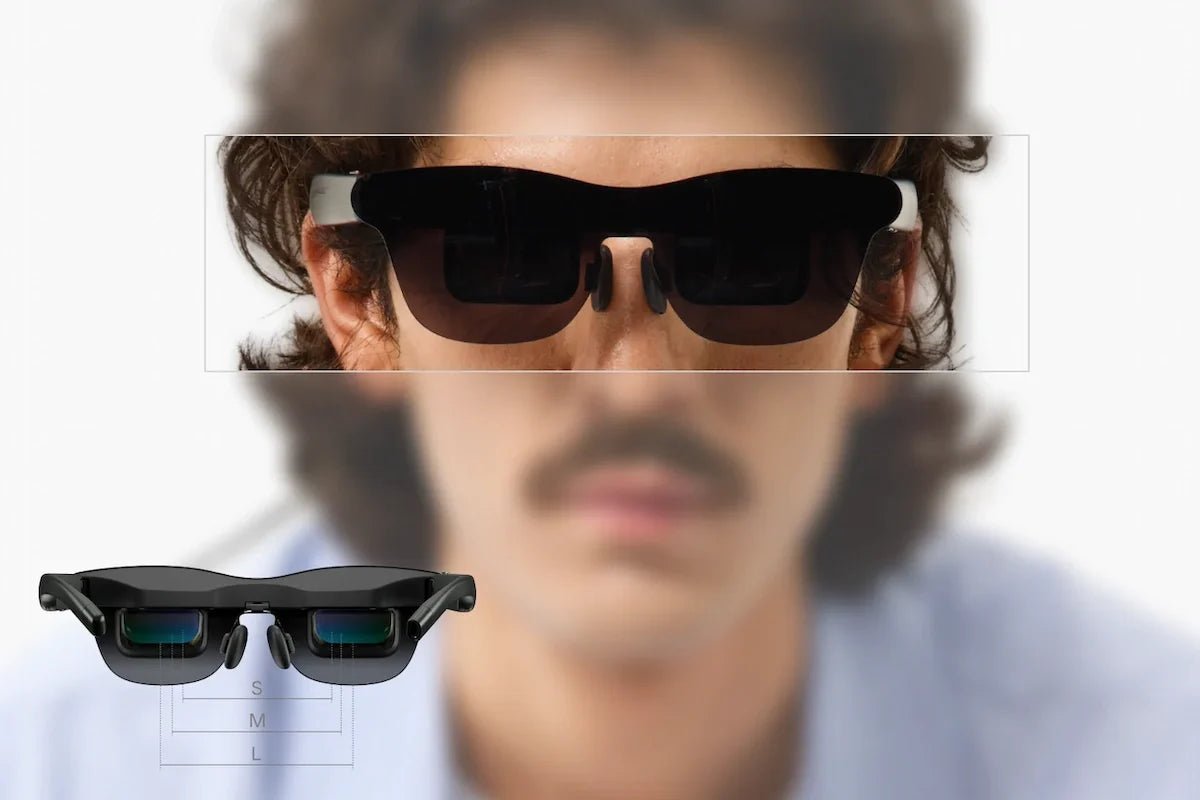
To ensure the clearest possible image, the glasses offer three different sizes (Small, Medium, and Large) to perfectly match your Interpupillary Distance (IPD). Proper IPD alignment, combined with a well-balanced 78-gram frame, keeps the edges of your documents sharp and prevents visual distortion over long periods of wear.
For those who prioritize absolute text sharpness and a lighter form factor, the RayNeo GT is available for $299. It shares the same Full HD Micro-OLED panel as the Max model but projects it across a slightly narrower 46-degree FOV.

By concentrating the 1080p resolution into a more compact area, this model achieves an exceptional 49 PPD. In practical terms, this density makes small serif fonts and dense academic text look incredibly crisp, closely mimicking the clarity of a high-end physical monitor.
The virtual screen size defaults to 201 inches, with options to adjust to 136 or 231 inches. This size is more than sufficient for focusing on a single, highly detailed document at a time.
This model trims the weight down to just 68 grams, making it the lightest in the GT series. The streamlined design makes it comfortable for continuous reading, and it is optimized for users with an IPD around 64mm.
Reading a 50-page paper takes time. The GT and GT Max draw power directly from your connected device, allowing us to keep the glasses lightweight for comfortable all-day wear. Because they lack an internal battery, reviewing PDFs for hours will gradually consume your host device's charge, so starting with a full battery on your laptop or tablet is recommended.
When it comes to accessing documents, most researchers rely on laptops or tablets. The glasses offer a seamless plug-and-play connection with MacBooks released from 2015 onwards and iPads from the 10th generation and newer.
For Windows laptops, you can mirror your PDF reader directly as long as the computer's USB-C port supports DisplayPort Alt Mode video output. You can also connect to compatible smartphones, including the iPhone 15, 16, and 17 series.
We do not currently offer a confirmed adapter for the iPhone 16e, 17e, and Air models, as their USB-C ports lack DisplayPort Alt Mode video output. Please verify your specific device's capabilities before purchasing.
Whether you are working in a brightly lit university library or at a dim desk late at night, getting the screen luminance right prevents eye strain. The GT series peaks at 1200 nits in non-Pinned modes, such as the Follow setting where the document stays centered in your view, making it easy to read under harsh fluorescent lights.
For late-night desk work, Pinned mode is often more comfortable. In this setting, the brightness shifts to a steady 336 nits and the virtual screen remains fixed in a specific spot in your room.
This allows you to place your reference PDF hovering above your physical desk while you type notes on your laptop, blending the digital text naturally with your physical workspace.
| Feature | RayNeo GT Max | RayNeo GT |
|---|---|---|
| Price | $399 | $299 |
| Resolution | 1920x1080 (Full HD) | 1920x1080 (Full HD) |
| Field of View (FOV) | 59° | 46° |
| Pixels Per Degree (PPD) | 38 PPD | 49 PPD |
| Weight | 78g | 68g |
| IPD Support | S (<64mm), M (64-67mm), L (>67mm) | Fixed 64mm |
Can I read comfortably if I need prescription glasses? Yes, we partner with Lensology to provide custom prescription lenses that clip straight into your AR glasses (starting at £95). This ensures your text remains razor-sharp without the discomfort of stacking the device over your everyday frames during long reading sessions.
Can I listen to focus music without disturbing others in a quiet library? The Bang & Olufsen tuned quad speakers on the GT series feature a Whisper Mode 2.0. Because the design uses open-ear speakers, audio can sometimes be heard at very close distances. However, this mode significantly reduces sound leakage, helping you listen to white noise or lo-fi study beats while minimizing the chance of bothering the person studying next to you.
How do I cast PDFs from a PC or older tablet without a compatible USB-C port? Direct connection requires a DisplayPort Alt Mode compatible USB-C port. If your primary reading device is an older Lightning-equipped iPad, you will need an Apple Digital AV Adapter (sold separately). To display documents from an HDMI source like a desktop PC, you can use the RayNeo HDMI Adapter ($64).
Choosing the right AR glasses for academic reading comes down to balancing your preferred screen size with absolute text clarity.
If you need a massive virtual workspace to spread out multiple PDFs and reference materials side by side, the RayNeo GT Max delivers the expansive view and adjustable fit required for heavy research.
If your priority is the sharpest possible text rendering for single-document focus, and your IPD aligns with the standard 64mm, the ultra-lightweight RayNeo GT provides an incredible 49 PPD reading experience.
Explore our product pages to see which model best fits your workflow and upgrade your study setup today.







Share:
Hear Enemies Behind You: How Head-Tracking Spatial Audio Elevates Shooter and Racing Games
What Are the Best Affordable Smart Glasses That Are Still Worth Buying?