


$429.00


The RayNeo Air 4 Pro’s product page lists three specs that drive most of its picture quality claims: support for the HDR10 standard, real-time SDR-to-HDR enhancement, and a 200,000:1 contrast ratio. HDR10 is about color and brightness range for HDR-mastered content. SDR-to-HDR enhancement is a processing feature for standard content. Contrast ratio is about how dark the darkest part of the image gets next to the brightest. All three come from RayNeo’s Air 4 Pro product page.
RayNeo also describes Air 4 Pro as the “World’s first HDR10 Display in AR Glasses,” a claim from RayNeo’s own marketing copy that this guide doesn’t independently verify.
| Spec | RayNeo Air 4 Pro |
|---|---|
| Display panel | SeeYa Micro-OLED with birdbath optics |
| HDR | HDR10, plus real-time SDR-to-HDR enhancement (Vision 4000 chip) |
| Contrast ratio | 200,000:1 |
| Brightness | Up to 1,200 nits |
| Audio | Quad speakers with Bang & Olufsen tuning |
| Resolution | Full HD |
| Field of view (FOV) | 46° |
| Weight | 76g |
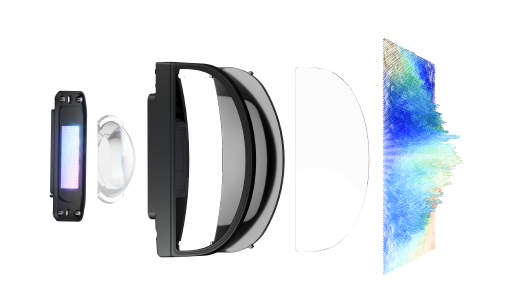
HDR10 is a widely used video standard, found on 4K Blu-rays and much streaming HDR content, that carries extra information about how bright highlights should get and how much color detail to preserve in very light or very dark parts of a scene.
For Air 4 Pro, content mastered in HDR10, such as a movie or show with an HDR badge on a streaming service, can show brighter highlights and darker shadows in the same frame. RayNeo’s product page states the panel can reproduce more than a billion colors and ties its “deep contrast” language to HueView 2.0 screen technology, RayNeo’s own branded name for its color tuning.
HDR10 playback depends on the content and on your source device supporting HDR output over the connection.
Not everything you watch is HDR-mastered. RayNeo’s Air 4 Pro page lists real-time SDR-to-HDR enhancement through the Vision 4000 chip, so standard-dynamic-range video can be enhanced on the fly, alongside genuine HDR10 playback. The two features coexist: HDR10 for HDR-mastered content, enhancement for everything else. How the enhancement looks varies with the content, so judge it on what you actually watch.
HDR highlights benefit from brightness headroom. RayNeo’s page lists Air 4 Pro at “up to 1,200 nits” but doesn’t state whether that figure is measured at the panel or after the light passes through the birdbath optics. RayNeo’s Air 3s Pro page lists the same 1,200-nit number and labels it “to-eye.” Whether Air 4 Pro’s figure refers to the same measurement point isn’t stated, so treat it as RayNeo’s rated value and don’t assume how it translates to real outdoor use. RayNeo doesn’t publish a direct-sunlight legibility result for Air 4 Pro; ambient light affects visibility on any AR display, and you’ll see the best HDR contrast indoors or in shade.
Contrast ratio compares the brightest white a display can produce to the darkest black it can produce. RayNeo’s product page doesn’t state how the 200,000:1 figure was measured, so treat it as RayNeo’s own published figure rather than a number verified under a specific test standard.
Air 4 Pro uses a Micro-OLED panel, where each pixel generates its own light rather than relying on a backlight. A pixel that’s supposed to be black can turn off, which is why OLED-based displays tend to post high contrast numbers. In AR glasses, a pixel that’s off lets the real world behind the lens show through instead of appearing as gray haze, so dark scenes such as letterbox bars can look less distracting. Real-world blacks still depend on ambient light and the optics.
RayNeo’s GT and GT Max models share some specs with Air 4 Pro and differ on others:
| Spec | RayNeo Air 4 Pro | RayNeo GT / GT Max |
|---|---|---|
| Contrast ratio | 200,000:1 | 200,000:1 (same figure) |
| Brightness | Up to 1,200 nits | Up to 1,200 nits in Non-Pinned mode; 336 nits in Pinned mode |
| HDR | HDR10 and real-time SDR-to-HDR enhancement | “AI HDR” |
Pinned mode, where the virtual screen keeps a fixed orientation instead of following your head movement, is the mode listed at 336 nits, so the 1,200-nit figure applies to a particular display mode on GT and GT Max. GT and GT Max also carry their own Vision 4000 and Zone360 chips. Compare the models on the modes, screen sizes, and features you’ll actually use rather than on a single HDR label.
HDR10 and contrast affect color range and black levels. They don’t cover:
Does RayNeo Air 4 Pro support Dolby Vision?
Is 200,000:1 a good contrast ratio for AR glasses?
Do I need special cables or a specific phone to use Air 4 Pro’s HDR10 support?
Streaming apps also enforce copy protection (HDCP) on licensed video, and that protection can block external-display output if the handshake with your phone, cable, or adapter fails. This is a general issue with USB-C and HDMI external-display setups, not specific to Air 4 Pro. If a particular app matters to you, test its output with your own device and connection.
Does Air 4 Pro’s resolution limit how good HDR10 content looks?
HDR10, SDR-to-HDR enhancement, and 200,000:1 contrast answer different questions about Air 4 Pro’s picture: HDR10 covers HDR-mastered content, the enhancement covers standard content, and the contrast figure describes how dark blacks can get. The 1,200-nit figure is RayNeo’s rated brightness, and the measurement point isn’t labeled. The Micro-OLED panel’s ability to switch pixels off is the structural reason for the high contrast figure. Current specs are on the RayNeo Air 4 Pro product page.







Share:
RayNeo Wired vs. Wireless Glasses: What the Cable Actually Means
RayNeo Air 3s Pro Display Resolution Explained: 1920x1080 (2D) and 3840x1080 (3D)