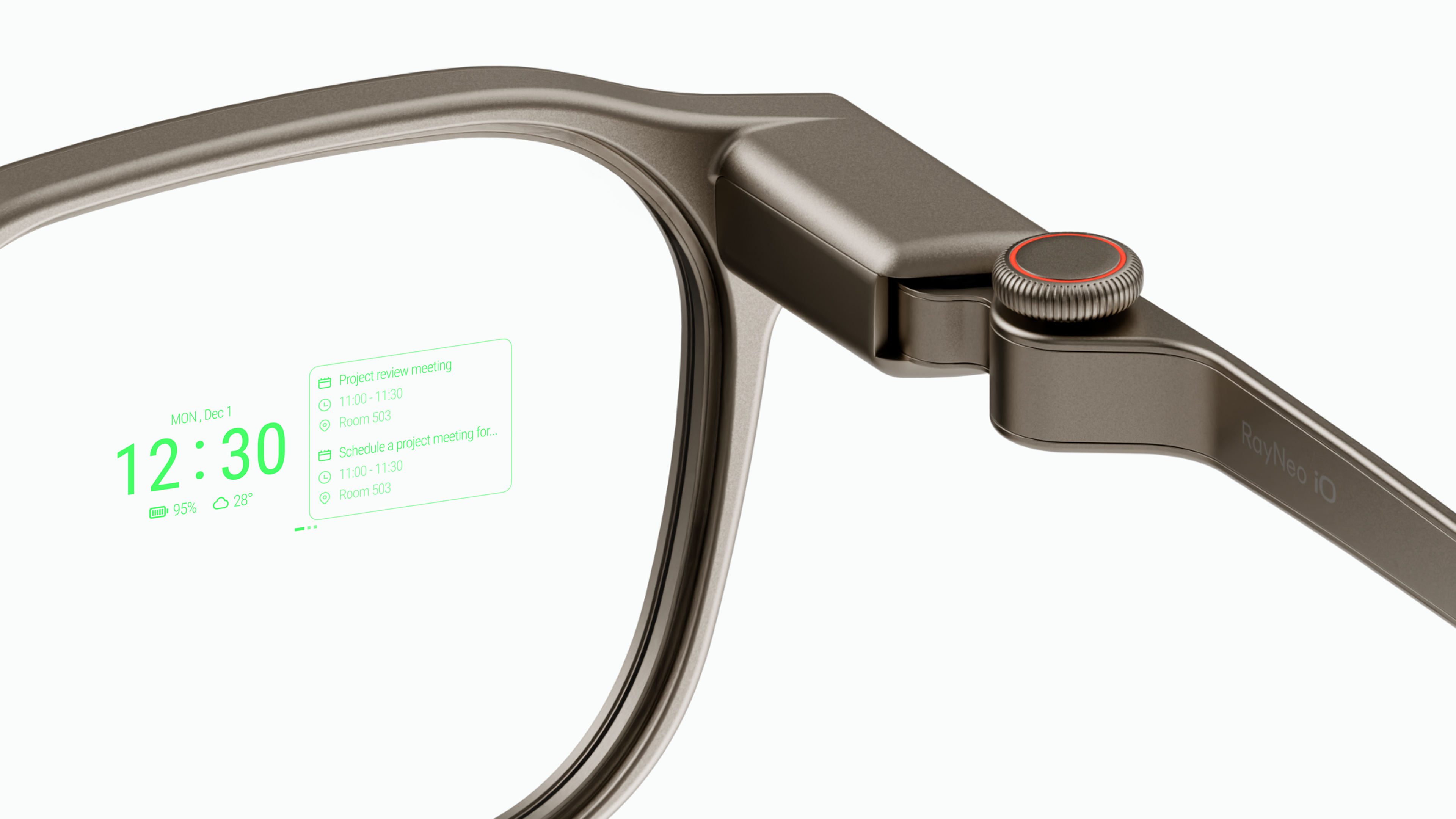
A heads-up display, or HUD, in a pair of glasses projects simple text and icons onto the lens so information shows up in your line of sight instead of on a phone you have to look down at. RayNeo iO is built around exactly this kind of display: a monochrome green HUD that shows schedules, live captions, translated speech, and AI answers directly in front of the wearer’s eyes.
The more useful question isn’t whether the technology exists. It’s whether glancing at a HUD actually beats pulling out a phone for the things people do all day. For a specific set of tasks, mostly short, glanceable information rather than photos or video, it does.
What Shows Up on iO’s HUD (And What Doesn’t)
A HUD in glasses is not a miniature phone screen floating in front of your eyes. On iO, the display is monochrome green, built from a binocular MicroLED engine and a diffractive waveguide lens, RayNeo’s term for optics that project through the lens itself to both eyes rather than onto a separate opaque screen. RayNeo rates the lens at 97% active display transparency, the company’s figure for how much of the world behind it still shows through while the display is in use.
The field of view is 23.5°, which RayNeo describes as roughly equivalent to viewing a 33-inch screen from about two meters away. RayNeo positions the display as placing information directly in your field of view rather than taking it over, and it’s built for short bursts of text, icons, and simple graphics rather than full-color video or photos.
From across a table, that combination still reads as an ordinary pair of glasses rather than a screen. iO has no built-in camera, so nothing shown on its display comes from images the glasses capture. What appears comes from voice input picked up by iO’s microphone array, from connected apps, or from its built-in AI assistants. Audio the microphones pick up also feeds separate features, like Lifelog’s all-day audio capture, but that’s a different data path from what shows on the lens.
That’s a different job from a full-color AR display paired with a camera (RayNeo’s X3 Pro) or a virtual-screen display built for movies and games (RayNeo’s GT series, covered further down). A HUD’s role is narrower: put a small amount of important information exactly where your eyes already are, for a few seconds at a time.
The Five Things People Actually Use a HUD For
Checking Your Schedule and Notifications Without Reaching for Your Phone
iO’s Personal Dashboard shows schedule items, weather, and notifications directly in the HUD. In practice, that turns a calendar reminder or an incoming text into a quick glance instead of a buzz that sends you reaching for a pocket.
For someone walking into back-to-back meetings, or someone who wants to see “3pm dentist” without unlocking a phone in front of a client, that’s the core appeal of a dashboard-style HUD.
Live Captions and Translation During a Real Conversation
iO’s Live Captions & Translation feature displays captions or translated speech on the lens as someone talks, covering 55 languages and 109 accents according to RayNeo. RayNeo’s product materials cite a translation speed of about 1.2 seconds and name Timekettle as its translation partner.
In real terms, this means two people who don’t share a language can have something closer to an actual back-and-forth conversation. The listener reads the translation while still watching the speaker’s face, instead of passing a phone back and forth or looking down at a translation app.
The same captioning also works for face-to-face conversations in a single language, which is part of why RayNeo’s product page features a deaf creative director’s account of using iO for everyday communication.

An Invisible Teleprompter for Presentations
iO’s teleprompter feature scrolls a prepared script in the HUD, synced to the speaker’s own pace through voice tracking rather than a fixed timer. For someone giving a talk, a toast, or a sales pitch, that means the script moves with them if they pause or speed up.
Nobody in the room sees a screen, a laptop, or cue cards, because the only thing visible from the outside is a pair of glasses. It’s a narrower use case than the dashboard or captions, useful specifically when prepared language needs to come out while still making eye contact with a room.
AI Answers Shown Where You’re Already Looking
Ask iO a question by voice (“Hey, RayNeo”) and the AI’s answer appears in the HUD instead of on a phone screen. iO runs RayNeo AI paired with Gemini 3.1 Flash Lite at no extra cost. Access to additional models, RayNeo’s product materials list Claude Sonnet 5, GPT 5.5, DeepSeek V4 Pro, Kimi K2.7, and Qwen 3.7 Max, requires a VIP subscription at $9.99 a month.
Day to day, this mostly replaces the moment of pulling out a phone to ask a quick question mid-conversation, without breaking eye contact with whoever you’re talking to.
One-Tap Recording With Automatic Meeting Notes
iO supports one-tap recording with automatic meeting minutes. RayNeo’s product page describes pressing the Smart Crown to instantly highlight key moments as a meeting happens, with iO’s four-microphone array capturing the audio those minutes are built from.
This turns a meeting into something you don’t have to take notes during, since the recap gets built from the recording rather than from whatever got jotted down live. iO’s spec sheet lists audio input only (4-mic array and bone conduction sensor), with no speaker, so notes and recordings get reviewed as text on the lens rather than played back as audio through the glasses themselves.

Why iO’s HUD Specifically Holds Up for This Kind of Use
A few numbers explain why iO’s HUD works for glance-and-go information rather than feeling like a gimmick. RayNeo rates eye-level brightness at 1,300 nits, a figure it positions for outdoor use.
At 33 grams, RayNeo describes iO’s design as comfortable for all-day wear, well under devices built around heavier optics or added battery mass.
Battery life follows the same logic of short, frequent glances rather than continuous viewing. RayNeo states up to 2 days of typical use from the 240mAh battery, though continuous translation runs down to about 6.2 hours and continuous recording to about 18 hours.
What a HUD Can’t Do
A monochrome HUD isn’t a substitute for a phone or a monitor. iO has no built-in camera, so it can’t visually identify objects or take photos the way a camera-equipped device can. Its spec sheet also lists no speaker, so it isn’t built for playing back audio on its own. The bone conduction sensor built into iO is part of its audio input, not an output; RayNeo describes it as helping to “isolate your voice with precision,” not as a way to hear anything through the glasses.
The display renders text, icons, and simple graphics rather than full-color video, so it isn’t the right tool for watching a show or scrolling through photos, and it isn’t meant to replace a laptop screen for editing documents. Those jobs sit with other categories of AI and AR glasses, not with a HUD.
Where GT Series Fits (A Different Job, Not a HUD)
RayNeo’s GT Max and GT sit in a different category entirely: full-color virtual screens built for watching movies and playing games rather than glancing at text. GT Max’s virtual display comes in three sizes, a 267-inch cinema display along with 227-inch and 307-inch options; GT’s display also comes in three sizes, a 201-inch screen (RayNeo’s equivalent-viewing figure at a distance of 6 meters) along with 136-inch and 231-inch options, at a fixed 64mm IPD.
If the goal is a big private screen for a flight or a console session, GT Max is the better starting point. If the goal is checking a schedule or reading a live translation without a screen taking over the whole field of view, that’s the HUD use case iO is built for. The two aren’t interchangeable, and neither one is meant to cover both jobs.
RayNeo iO at a Glance
iO ships in Dune (gold) and Polar Night (grey), with 30-day free returns, a 1-year limited warranty, and 12% off when trading in an eligible device toward a purchase.
FAQ
What is a HUD in smart glasses?
The term comes from heads-up displays used in aircraft cockpits and car windshields, where pilots and drivers glance at data without looking down at instruments. In smart glasses, a HUD projects text, icons, or simple graphics onto a lens for the same reason. RayNeo iO’s version is monochrome green rather than full color.
Can I read a HUD display outdoors in daylight?
RayNeo rates iO’s display at 1,300 nits of eye-level brightness, a figure the company positions for outdoor use.
How is a HUD different from RayNeo’s other displays?
iO’s HUD renders monochrome text and icons for information at a glance. X3 Pro uses a full-color AR display paired with a camera for seeing and interacting with your surroundings, and GT Max and GT use a full-color Micro-OLED virtual screen built for movies and games. Each is built for a different kind of task.
Does the iO HUD work with Android phones?
iO connects to a phone over Bluetooth 5.4, and RayNeo’s product page lists MFi Certification, Apple’s accessory certification program, as part of that connection. Android support is not spelled out separately on the product page. Bluetooth 5.4 itself is a cross-platform standard, but until RayNeo publishes Android-specific details, treat Android support as unconfirmed rather than assumed.
The Bottom Line
A HUD earns its place in daily life by handling small, frequent glances, not by replacing a phone. Checking a schedule, reading a live translation mid-conversation, following a teleprompter script, seeing an AI’s answer, or reviewing meeting notes are all short interactions where looking down at a phone would break the moment.
RayNeo iO is built specifically around that pattern, with a display rated for daylight use, an active transparency figure meant to keep it from looking like a screen, and a design light enough to wear the way people already wear glasses. For anyone whose day is full of exactly these small glanceable moments, that’s a real advantage over pulling out a phone for each one. For anyone who wants a private screen for video or games instead, GT Max is the RayNeo model built for that.





A heads-up display, or HUD, in a pair of glasses projects simple text and icons onto the lens so information shows up in your line of sight instead of on a phone you have to look down at. RayNeo iO is built around exactly this kind of display: a monochrome green HUD that shows schedules, live captions, translated speech, and AI answers directly in front of the wearer’s eyes.
The more useful question isn’t whether the technology exists. It’s whether glancing at a HUD actually beats pulling out a phone for the things people do all day. For a specific set of tasks, mostly short, glanceable information rather than photos or video, it does.
What Shows Up on iO’s HUD (And What Doesn’t)
A HUD in glasses is not a miniature phone screen floating in front of your eyes. On iO, the display is monochrome green, built from a binocular MicroLED engine and a diffractive waveguide lens, RayNeo’s term for optics that project through the lens itself to both eyes rather than onto a separate opaque screen. RayNeo rates the lens at 97% active display transparency, the company’s figure for how much of the world behind it still shows through while the display is in use.
The field of view is 23.5°, which RayNeo describes as roughly equivalent to viewing a 33-inch screen from about two meters away. RayNeo positions the display as placing information directly in your field of view rather than taking it over, and it’s built for short bursts of text, icons, and simple graphics rather than full-color video or photos.
From across a table, that combination still reads as an ordinary pair of glasses rather than a screen. iO has no built-in camera, so nothing shown on its display comes from images the glasses capture. What appears comes from voice input picked up by iO’s microphone array, from connected apps, or from its built-in AI assistants. Audio the microphones pick up also feeds separate features, like Lifelog’s all-day audio capture, but that’s a different data path from what shows on the lens.
That’s a different job from a full-color AR display paired with a camera (RayNeo’s X3 Pro) or a virtual-screen display built for movies and games (RayNeo’s GT series, covered further down). A HUD’s role is narrower: put a small amount of important information exactly where your eyes already are, for a few seconds at a time.
The Five Things People Actually Use a HUD For
Checking Your Schedule and Notifications Without Reaching for Your Phone
iO’s Personal Dashboard shows schedule items, weather, and notifications directly in the HUD. In practice, that turns a calendar reminder or an incoming text into a quick glance instead of a buzz that sends you reaching for a pocket.
For someone walking into back-to-back meetings, or someone who wants to see “3pm dentist” without unlocking a phone in front of a client, that’s the core appeal of a dashboard-style HUD.
Live Captions and Translation During a Real Conversation
iO’s Live Captions & Translation feature displays captions or translated speech on the lens as someone talks, covering 55 languages and 109 accents according to RayNeo. RayNeo’s product materials cite a translation speed of about 1.2 seconds and name Timekettle as its translation partner.
In real terms, this means two people who don’t share a language can have something closer to an actual back-and-forth conversation. The listener reads the translation while still watching the speaker’s face, instead of passing a phone back and forth or looking down at a translation app.
The same captioning also works for face-to-face conversations in a single language, which is part of why RayNeo’s product page features a deaf creative director’s account of using iO for everyday communication.
An Invisible Teleprompter for Presentations
iO’s teleprompter feature scrolls a prepared script in the HUD, synced to the speaker’s own pace through voice tracking rather than a fixed timer. For someone giving a talk, a toast, or a sales pitch, that means the script moves with them if they pause or speed up.
Nobody in the room sees a screen, a laptop, or cue cards, because the only thing visible from the outside is a pair of glasses. It’s a narrower use case than the dashboard or captions, useful specifically when prepared language needs to come out while still making eye contact with a room.
AI Answers Shown Where You’re Already Looking
Ask iO a question by voice (“Hey, RayNeo”) and the AI’s answer appears in the HUD instead of on a phone screen. iO runs RayNeo AI paired with Gemini 3.1 Flash Lite at no extra cost. Access to additional models, RayNeo’s product materials list Claude Sonnet 5, GPT 5.5, DeepSeek V4 Pro, Kimi K2.7, and Qwen 3.7 Max, requires a VIP subscription at $9.99 a month.
Day to day, this mostly replaces the moment of pulling out a phone to ask a quick question mid-conversation, without breaking eye contact with whoever you’re talking to.
One-Tap Recording With Automatic Meeting Notes
iO supports one-tap recording with automatic meeting minutes. RayNeo’s product page describes pressing the Smart Crown to instantly highlight key moments as a meeting happens, with iO’s four-microphone array capturing the audio those minutes are built from.
This turns a meeting into something you don’t have to take notes during, since the recap gets built from the recording rather than from whatever got jotted down live. iO’s spec sheet lists audio input only (4-mic array and bone conduction sensor), with no speaker, so notes and recordings get reviewed as text on the lens rather than played back as audio through the glasses themselves.
Why iO’s HUD Specifically Holds Up for This Kind of Use
A few numbers explain why iO’s HUD works for glance-and-go information rather than feeling like a gimmick. RayNeo rates eye-level brightness at 1,300 nits, a figure it positions for outdoor use.
At 33 grams, RayNeo describes iO’s design as comfortable for all-day wear, well under devices built around heavier optics or added battery mass.
Battery life follows the same logic of short, frequent glances rather than continuous viewing. RayNeo states up to 2 days of typical use from the 240mAh battery, though continuous translation runs down to about 6.2 hours and continuous recording to about 18 hours.
What a HUD Can’t Do
A monochrome HUD isn’t a substitute for a phone or a monitor. iO has no built-in camera, so it can’t visually identify objects or take photos the way a camera-equipped device can. Its spec sheet also lists no speaker, so it isn’t built for playing back audio on its own. The bone conduction sensor built into iO is part of its audio input, not an output; RayNeo describes it as helping to “isolate your voice with precision,” not as a way to hear anything through the glasses.
The display renders text, icons, and simple graphics rather than full-color video, so it isn’t the right tool for watching a show or scrolling through photos, and it isn’t meant to replace a laptop screen for editing documents. Those jobs sit with other categories of AI and AR glasses, not with a HUD.
Where GT Series Fits (A Different Job, Not a HUD)
RayNeo’s GT Max and GT sit in a different category entirely: full-color virtual screens built for watching movies and playing games rather than glancing at text. GT Max’s virtual display comes in three sizes, a 267-inch cinema display along with 227-inch and 307-inch options; GT’s display also comes in three sizes, a 201-inch screen (RayNeo’s equivalent-viewing figure at a distance of 6 meters) along with 136-inch and 231-inch options, at a fixed 64mm IPD.
If the goal is a big private screen for a flight or a console session, GT Max is the better starting point. If the goal is checking a schedule or reading a live translation without a screen taking over the whole field of view, that’s the HUD use case iO is built for. The two aren’t interchangeable, and neither one is meant to cover both jobs.
RayNeo iO at a Glance
iO ships in Dune (gold) and Polar Night (grey), with 30-day free returns, a 1-year limited warranty, and 12% off when trading in an eligible device toward a purchase.
FAQ
What is a HUD in smart glasses?
Can I read a HUD display outdoors in daylight?
How is a HUD different from RayNeo’s other displays?
Does the iO HUD work with Android phones?
The Bottom Line
A HUD earns its place in daily life by handling small, frequent glances, not by replacing a phone. Checking a schedule, reading a live translation mid-conversation, following a teleprompter script, seeing an AI’s answer, or reviewing meeting notes are all short interactions where looking down at a phone would break the moment.
RayNeo iO is built specifically around that pattern, with a display rated for daylight use, an active transparency figure meant to keep it from looking like a screen, and a design light enough to wear the way people already wear glasses. For anyone whose day is full of exactly these small glanceable moments, that’s a real advantage over pulling out a phone for each one. For anyone who wants a private screen for video or games instead, GT Max is the RayNeo model built for that.
Share:
Leave a Comment
We'd love to hear your thoughts. Comments are reviewed before publication.