

$429.00

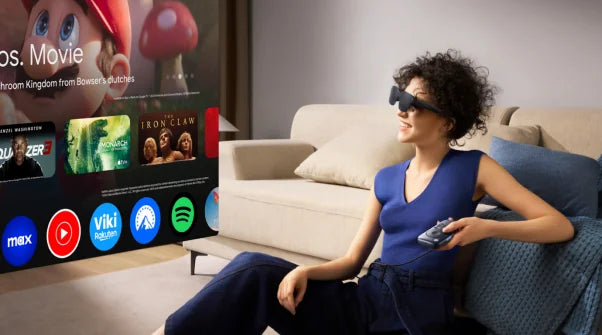

The question "Which AR glasses work well with a MacBook?" reflects the growing interest among Mac users in extending their computing environment beyond the physical screen constraints of laptops. MacBook users, particularly those working with creative applications, data analysis, or multitasking-heavy workflows, increasingly seek ways to expand their visual workspace while maintaining the ecosystem integration and design quality Apple users expect. AR glasses offer a compelling solution, transforming any location into a multi-screen workspace and enabling new interaction paradigms that complement Mac workflows.
Understanding how AR glasses work with MacBook systems requires examining both the technical compatibility requirements—connection protocols, display mirroring capabilities, input methods—and the practical workflow scenarios where expanded visual space delivers genuine productivity benefits. The integration extends beyond simple screen extension to include considerations of macOS-specific features, application compatibility, and the seamless experience Mac users expect from their technology ecosystem.
Mac users' expectations for device integration set high standards. Years of Apple's ecosystem refinement have created user expectations around plug-and-play simplicity, consistent visual quality, and reliable performance across varied usage contexts. AR glasses serving Mac users must meet these expectations while providing genuine functional benefits justifying the investment in new technology and the learning curve associated with incorporating displays into daily workflows.
AR glasses connecting to MacBook systems rely on standard connectivity protocols macOS supports natively. USB-C connections with DisplayPort Alt Mode enable video output through the same port used for charging. Modern MacBooks with Thunderbolt 3 or 4 ports support this protocol directly, allowing plug-and-play operation without additional adapters.
Wireless connectivity offers flexible arrangements through AirPlay protocol built into macOS. Bluetooth handles control input and audio transmission. The display configuration options include mirror mode for presentations and extended desktop mode for productivity, treating AR glasses as additional display space for multitasking workflows.
Resolution and refresh rate capabilities determine display quality. macOS automatically negotiates display capabilities, adjusting output to match device specifications. Higher resolution provides more screen real estate while adequate refresh rates ensure smooth animations matching the fluid experience Mac users expect.
The most valuable AR glasses application for MacBook users involves creating multi-screen workspace without physical monitor constraints. AR glasses enable virtual display expansion, allowing users to position windows in extended visual field while maintaining focus on primary tasks on MacBook screen.
Creative professionals particularly benefit. Video editors view timeline on MacBook while monitoring preview through AR glasses. Designers reference mockups while working on designs. Developers keep documentation visible while focusing on code. Virtual display positioning provides advantages over fixed physical monitors, allowing adjustment matching current task requirements.
MacBook users frequently present to colleagues or clients. AR glasses enable presenters to view notes, slides, or supporting materials privately while presenting, similar to teleprompter functionality. The private display proves valuable during screen sharing—presenters reference detailed notes through AR glasses while sharing only presentation materials to participants.
Product demonstrations benefit from maintaining eye contact with audiences while viewing product information or demonstration scripts through AR glasses. This capability enables more polished presentations without awkward reference to printed notes.
AR glasses enhance remote work by providing persistent display space for collaboration tools—video conferencing, team chat, project management—while preserving MacBook screen for actual work. Users keep collaboration interfaces in peripheral vision, maintaining team awareness without constant disruption.
Screen sharing becomes more manageable when participants view shared content through AR glasses while referencing their own materials on MacBook screen, enabling more productive remote meetings.
MacBook portability enables work across varied locations, but screen constraints become acute away from office setups. AR glasses provide consistent multi-screen capability regardless of location. Travel scenarios particularly benefit—long flights enable proper multi-window workflows despite space constraints. Client site work allows presenting deliverables while consulting reference materials without bringing external monitors.
When examining practical AR glasses implementations for MacBook users, RayNeo products demonstrate how display technology integrates with macOS ecosystems. The Air 4 Pro and X3 Pro both provide connectivity options supporting MacBook integration, though with different optimization priorities matching distinct usage scenarios.
The Air 4 Pro targets content consumption and entertainment scenarios Mac users engage with—watching media during travel, reviewing video content, or consuming long-form material. The 135-inch equivalent display provides substantial screen real estate exceeding any portable physical display.
USB-C connection enables straightforward plug-and-play operation where MacBooks recognize the Air 4 Pro as external display automatically, requiring no driver installation. DisplayPort Alt Mode support ensures compatibility across recent MacBook Pro and MacBook Air models.
Display specifications deliver quality for extended viewing. Micro-OLED technology provides 1920x1080 resolution in 2D mode with sufficient pixel density for comfortable text reading. The 120Hz refresh rate ensures smooth scrolling matching MacBook screen responsiveness. HDR10 support enables viewing HDR content from macOS applications and streaming services.
The Bang & Olufsen co-engineered audio complements visual display for complete media experiences. Mac users receive synchronized audio through integrated speakers without requiring separate headphones. Whisper mode and surround mode optimize sound for different contexts.
The 76-gram weight enables comfortable extended wear during long sessions typical of MacBook usage patterns.
Air 4 Pro MacBook Integration Specifications:
| Feature | MacBook Compatibility Details |
|---|---|
| Connection | USB-C with DisplayPort Alt Mode |
| macOS Support | Native plug-and-play, no drivers required |
| Display Resolution | 1920x1080 (2D) / 3840x1080 (3D) |
| Refresh Rate | 120Hz for smooth macOS animations |
| HDR Support | HDR10 for compatible macOS content |
| Audio Integration | Integrated speakers, no external audio needed |
| Weight | 76g for extended comfortable wear |
| Use Cases | Content viewing, media consumption, presentations |
| Screen Size Equivalent | 135-inch virtual display |
The X3 Pro extends capabilities beyond passive viewing to interactive features supporting productivity workflows. The 43-inch display size proves appropriate for reference materials, documentation, and communication tools accompanying primary work on MacBook screen.
Connectivity supports MacBook integration through multiple protocols. USB-C provides wired display when users prioritize minimal latency—valuable during presentations or screen sharing. WiFi 6 enables wireless operation when mobility takes priority.
The translation capability supporting 14 languages proves valuable for international business. Mac users reviewing foreign language documents or participating in international calls benefit from real-time translation without separate tools.
MicroLED display technology delivers 6000 nits peak brightness, ensuring visibility across varied lighting conditions—bright outdoor patios, dim conference rooms, or airline cabins. The 245mAh battery provides 4 hours typical use with charging during use through USB-C. The 38-minute fast charging supports quick top-ups during breaks.
The 76-gram weight prevents fatigue during extended sessions. Prescription lens support accommodates Mac users requiring vision correction.
X3 Pro MacBook Integration Specifications:
| Feature | MacBook Compatibility Details |
|---|---|
| Connection | USB-C wired + WiFi 6 wireless options |
| Display Type | MicroLED with 6000 nits peak brightness |
| Screen Size | 43-inch floating display |
| Resolution | 640x480 per eye |
| Field of View | 30° for comfortable peripheral viewing |
| Translation Support | 14 languages for international work |
| Battery Life | 4h use, 38min fast charge, charge during use |
| Weight | 76g with prescription lens support |
| Use Cases | Productivity, collaboration, mobile work |
| Platform | Snapdragon AR1 Gen 1 with 4GB RAM + 32GB storage |
Mac users should consider primary usage scenarios when selecting models. The Air 4 Pro optimizes for content consumption—reviewing video, watching presentations, consuming media—where large virtual display and audio quality matter most. The entertainment focus, HDR support, and Bang & Olufsen audio suit Mac users prioritizing content viewing.
The X3 Pro targets productivity and professional applications where reference materials, communication tools, or supplementary content accompany primary work. Translation capabilities benefit international business, while balanced display size and extended battery suit all-day professional usage.
Both provide fundamental MacBook compatibility—USB-C connectivity, native macOS support without drivers, and quality displays consistent with Apple standards.

Mac users can optimize AR glasses integration through practical approaches. Display arrangement configuration in macOS System Settings allows precise control over virtual display positioning. Application assignment strategies maximize productivity—dedicate AR glasses to reference materials and communication tools while keeping primary work on MacBook screen.
Keyboard shortcuts prove valuable for window management across displays. Battery management becomes important during mobile work—monitor levels on both devices and plan charging during natural breaks.
RayNeo, initially incubated within TCL, develops AR glasses designed for everyday integration. With full in-house R&D and manufacturing capabilities for optical systems, the company leverages 25+ years of optical expertise from its TCL heritage. Products are available in over 70 countries. Visit www.rayneo.com for more information.
Q: Do AR glasses work with MacBooks without special software or drivers?
Yes, modern AR glasses like RayNeo's models work with MacBooks through native macOS support. They use USB-C with DisplayPort Alt Mode—simply plug into your MacBook's Thunderbolt 3/4 port and macOS automatically recognizes them as an external display without requiring driver installation. You can choose mirror mode (duplicate your screen) or extended desktop mode (add extra screen space for multitasking). Some models also support wireless connectivity via AirPlay. This plug-and-play simplicity matches the seamless experience Mac users expect from Apple ecosystem devices.
Q: What can I actually do with AR glasses connected to my MacBook?
AR glasses extend your MacBook workspace for multiple scenarios: creative professionals can view video timelines on MacBook while monitoring previews through glasses; developers keep documentation visible while coding; presenters view private notes during screen sharing while audiences only see presentation materials; remote workers display communication tools in peripheral vision while keeping primary work on MacBook screen. For travel, AR glasses enable proper multi-window productivity on flights despite space constraints, or presenting to clients while consulting reference materials without external monitors.
Q: Which RayNeo model works better with MacBooks—Air 4 Pro or X3 Pro?
Choose based on primary use: Air 4 Pro ($299) optimizes for content consumption with a 135-inch equivalent display, HDR10 support, and Bang & Olufsen audio—ideal for watching media, reviewing videos, or entertainment during travel. X3 Pro ($1,299) targets productivity with 14-language translation, 6000 nits brightness for varied lighting, WiFi 6 wireless connectivity, and 4-hour battery—better for international business, all-day work, or reference materials alongside primary tasks. Both weigh 76g, offer USB-C plug-and-play MacBook compatibility, and support native macOS without drivers.
AR glasses for MacBook users transform portable computing by extending visual workspace beyond physical screen constraints while maintaining the ecosystem integration and quality Mac users expect. The combination of native connectivity support, appropriate display specifications, and comfortable ergonomics enables genuine productivity enhancement across diverse Mac workflows—from creative work requiring multiple reference windows to remote collaboration needing persistent communication tool access.
Understanding which AR glasses work well with MacBook requires examining both technical compatibility—connection protocols, display capabilities, macOS support—and practical workflow scenarios where expanded display space delivers meaningful benefits. The technology has matured to provide Mac users with reliable, high-quality display extension that integrates seamlessly with existing workflows rather than requiring significant adaptation or compromise.
The evolution of AR glasses has reached a point where Mac users can adopt the technology with confidence that it will work as expected within their established workflows. The plug-and-play nature of modern implementations removes technical barriers that historically prevented mainstream adoption of display extension technologies. The quality of display reproduction and audio integration matches expectations set by MacBook screens and audio systems.
When evaluating AR glasses for MacBook use, prioritize native macOS compatibility avoiding driver complexity, display quality meeting expectations set by Retina displays, comfortable ergonomics enabling extended wear during typical work sessions, and feature sets aligning with your primary usage scenarios. The convergence of AR display technology and Mac ecosystem integration has created tools genuinely extending MacBook capabilities in ways that enhance rather than complicate daily computing workflows.







Share:
Smart Glasses Navigation: Hands-Free Directions for Every Journey
The Complete AR Glasses Buying Guide: 7 Essential Factors for First-Time Buyers